
In the first part of the VSTax guide, we worked on the first two parts of our Swiss tax return for the canton of Valais. We concentrated on personal information, salaried activities and other possible income such as pensions, etc.
If you’ve paused while filling in the form, you can always return to VSTax. However, you’ll have to navigate manually to the point where you stopped, as VSTax in the canton of Valais doesn’t offer automatic navigation like in other cantons. To keep an overview, I orientate myself towards the fields that have already been filled in. This way, you avoid forgetting important information or entering it twice.
In the next section, we’ll take a look at the categories that often offer a great deal of room for manoeuvre: real estate and the various possibilities for tax deductions. These areas require particular attention when completing your tax return, as they can not only be financially important, but also involve complex rules.
Within VSTax, real estate is divided into two main areas: on the one hand, property income and maintenance costs are entered; on the other, mortgages and mortgage interest are dealt with later. Although this procedure may seem a little complicated at first, familiarity with it means you can avoid surprises and follow the process in a structured way.
Step 8 - Page 2: Other income (from real estate)
For tenants, this step is not necessary and can be skipped directly.
If data has already been entered in the previous year — particularly for real estate — certain values are already filled in. In the example below, rental income has already been entered, as shown below.

In the example, we imagine that we have an owner-occupied house as well as a rented apartment, so the two cases can be clearly considered here alongside each other.
These are two properties, both built in 2020. Building 1 is the owner-occupied property, and Building 2 is the rented apartment. As can be seen below, only the previous year’s rental values are included, as they generally do not change. On the other hand, rental income from the rented property is not included, and must therefore be entered afresh.

In the first step, for the rented property, enter the rental income in the corresponding field:
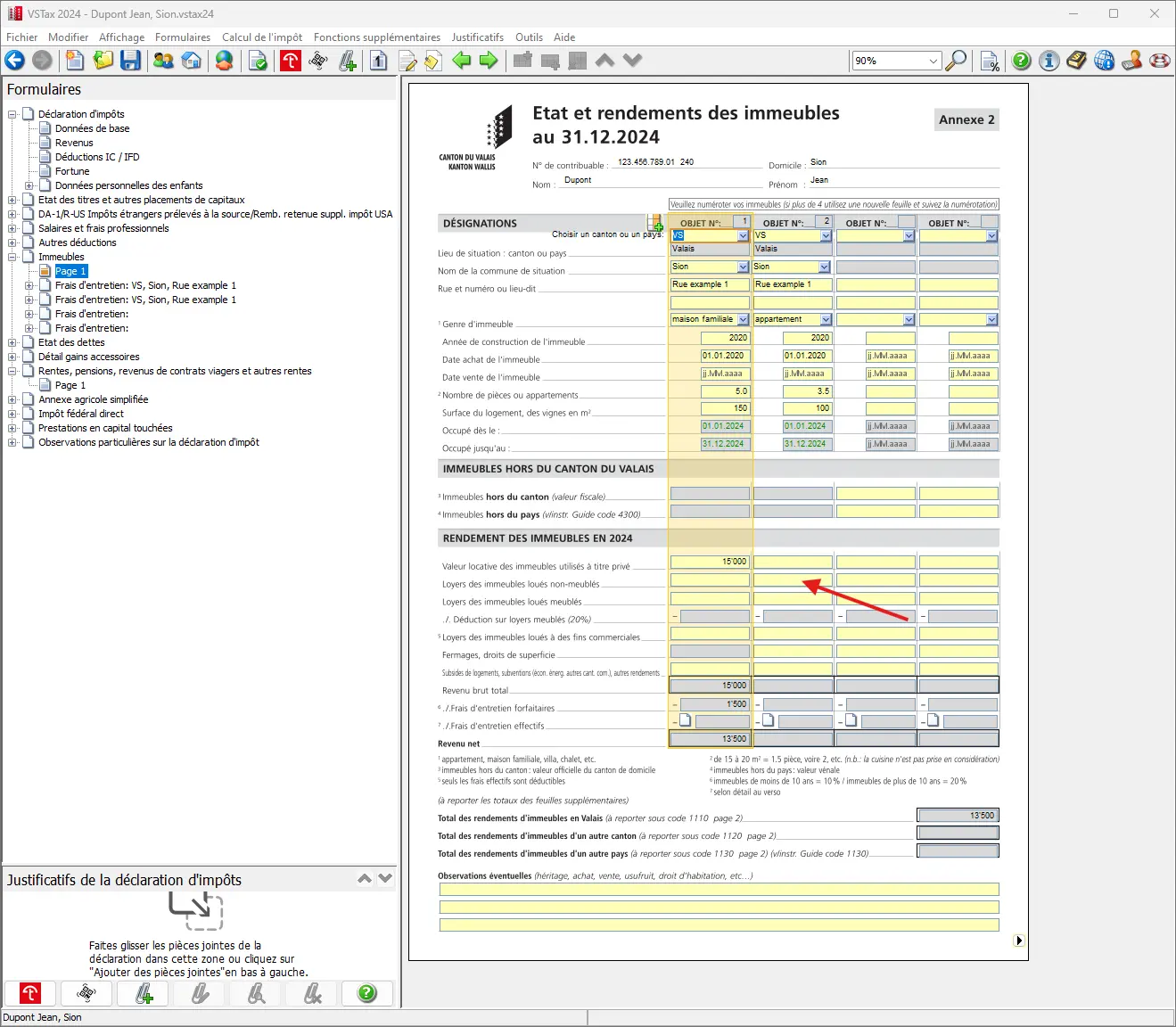
In the canton of Valais, a distinction is made between furnished and unfurnished real estate. In the case of furnished accommodation, other flat-rate deductions can be claimed, which is particularly common in tourist areas. The flat-rate deduction for furnished accommodation is 20% of income. The guide explains this practice and the higher flat-rate deduction.
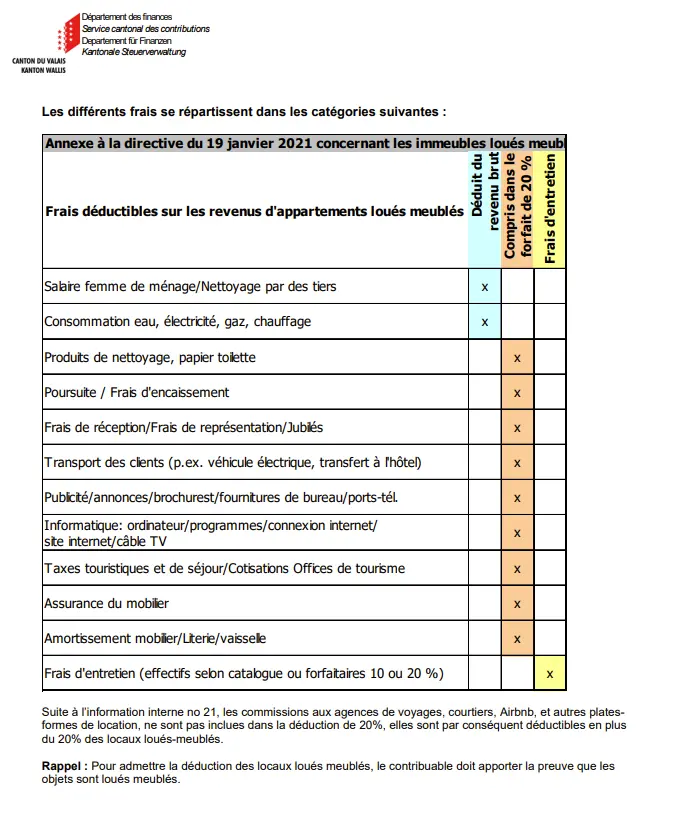
In this example, we’re using an unfurnished apartment. Income (12 x CHF 1'500 = CHF 18'000) is entered, while the fields for furnished property and business use remain empty.
If subsidies or other income such as housing subsidies have been received, these must be entered in the corresponding fields.
Next comes the interesting part, where you have to decide whether to deduct the rent or the actual deductions. For unfurnished accommodation and the house, this is the 10% that can still be deducted from the rental value or rent. For furnished accommodation, as already mentioned, the rate is even 20%.
It is advisable to keep receipts for renovations, maintenance, repairs, etc., and to add them up. If the actual costs exceed 10% or 20%, you can claim them and save additional taxes.
As a reminder, all value-preserving costs and energy renovations are tax-deductible. On the other hand, expenses that increase value are not deductible (e.g. the addition of a winter garden).
In our example, for single-family homes, the actual costs are entered and deducted. For rental property, a value of less than 10% is assumed, so a flat-rate deduction is used.
The form for maintenance costs is divided into three sections. For operating costs 1, a lump sum of CHF 1'000 can be claimed for household waste, sewage disposal charges, chimney sweeping, heating and basic electricity and water charges. If actual costs are assumed to be less than CHF 1'000, the flat rate is used. For operating costs 2, the actual values are entered. It is assumed that two repairs have been carried out, which can be additionally deducted further down in field 3.
The result is roughly as follows:

Clicking on the bottom right takes you back to the form for real estate. Here, income and expense deductions can be checked once more, before returning to page 2 by clicking again.
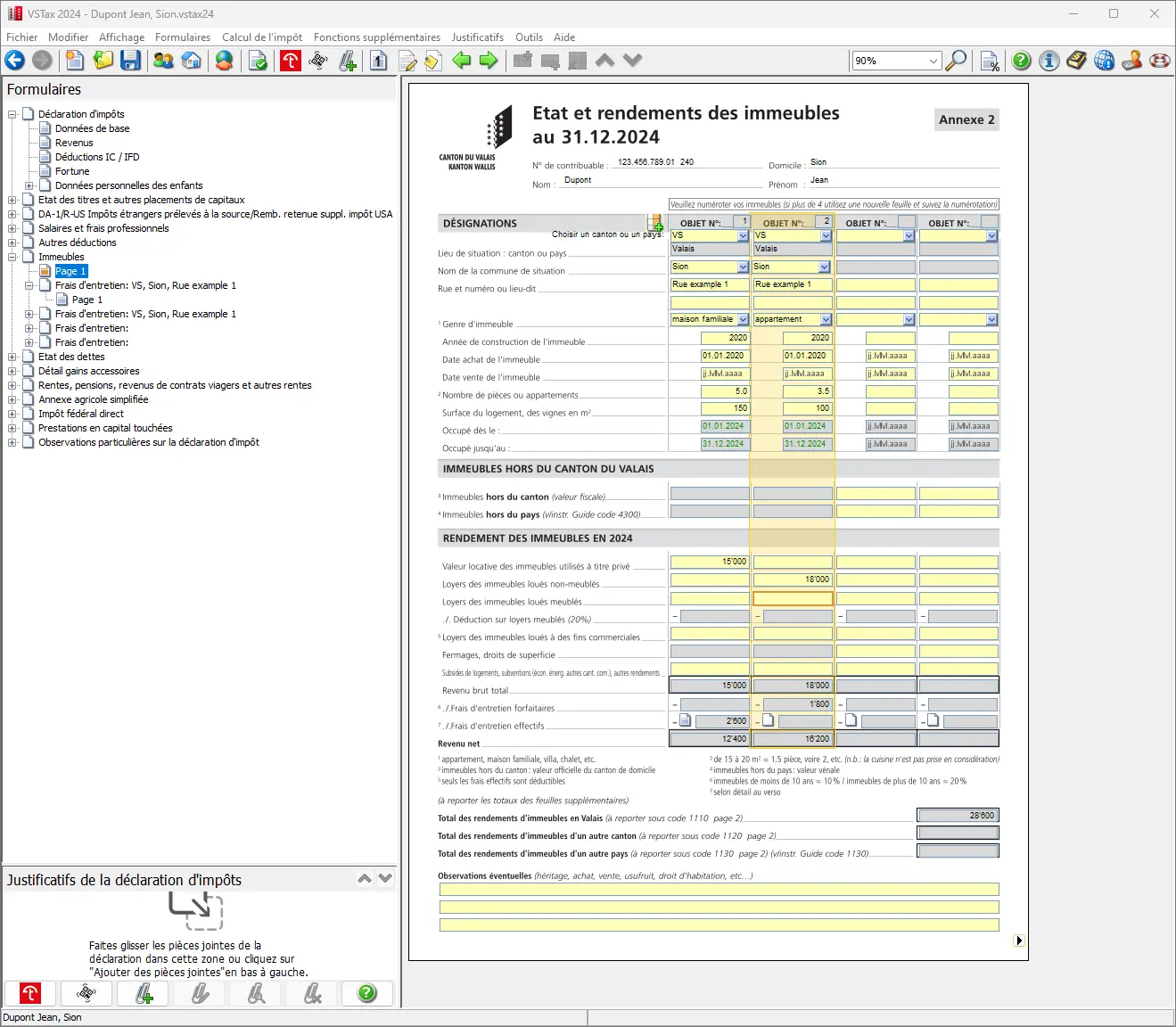
In this way, all property income and maintenance costs are shown, and the result should be visible on page 2.
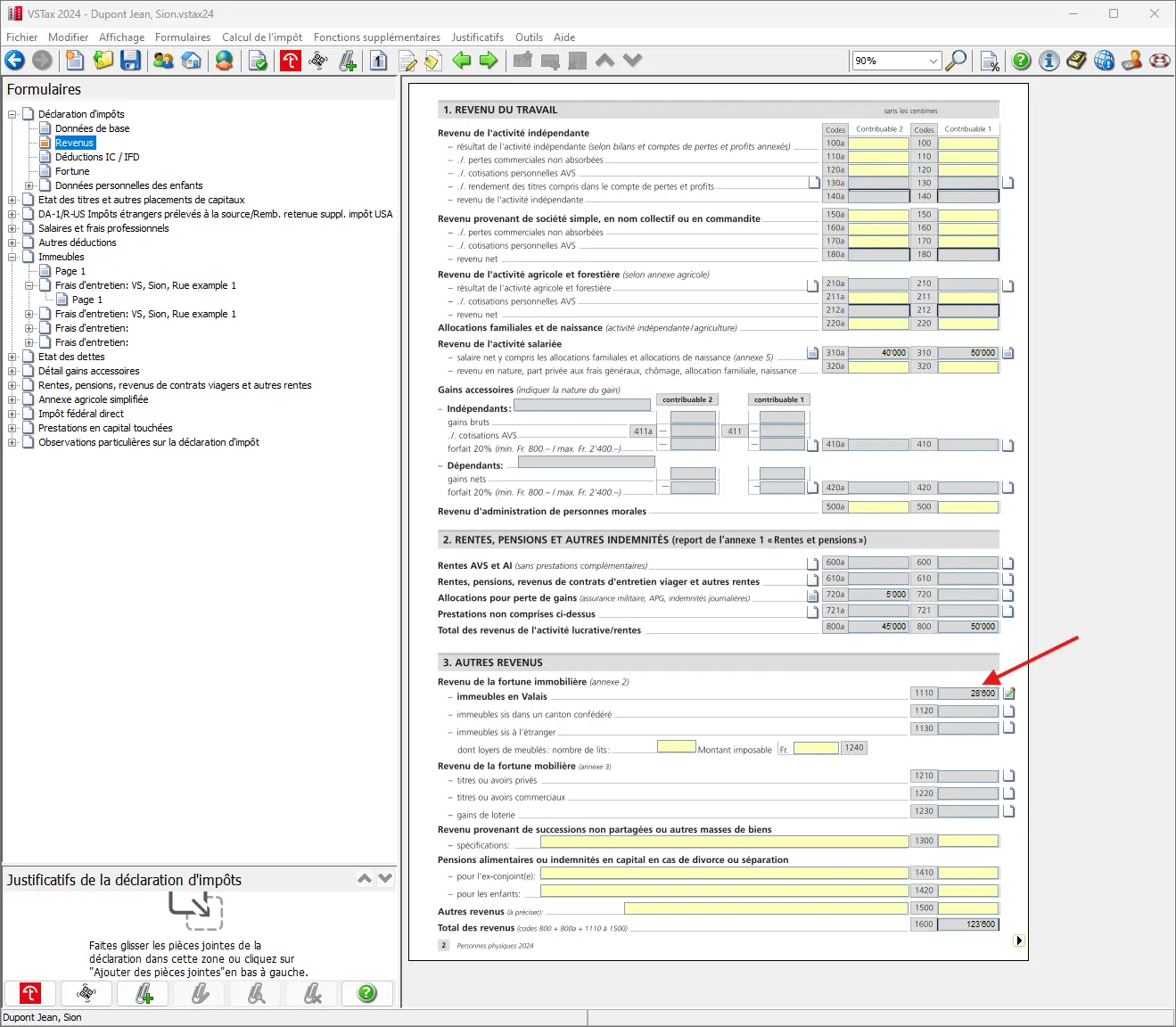
Real estate assets and their mortgages and also mortgage interest come at a later stage. For the time being, we’ll set them aside.
Step 9 - Page 2: Income from movable assets
Here’s another interesting source of income for Mustachians: income from movable property.
Here, we’re redirected via the form and already make a detour to the “Register of Securities and Investments”. This is where our ETFs count, as they provide us with income in the form of dividends.
The securities register has its own cover sheet and has to be filled in with general data, like the tax return. But that’s no big deal, as it’s more a question of changes (arrival, marriage, etc.) during the year.
If you’ve played the lottery or casino (even online), you should also mention this directly here. We assume that good Mustachians don’t play the lottery or casino and can leave the fields blank as shown here.
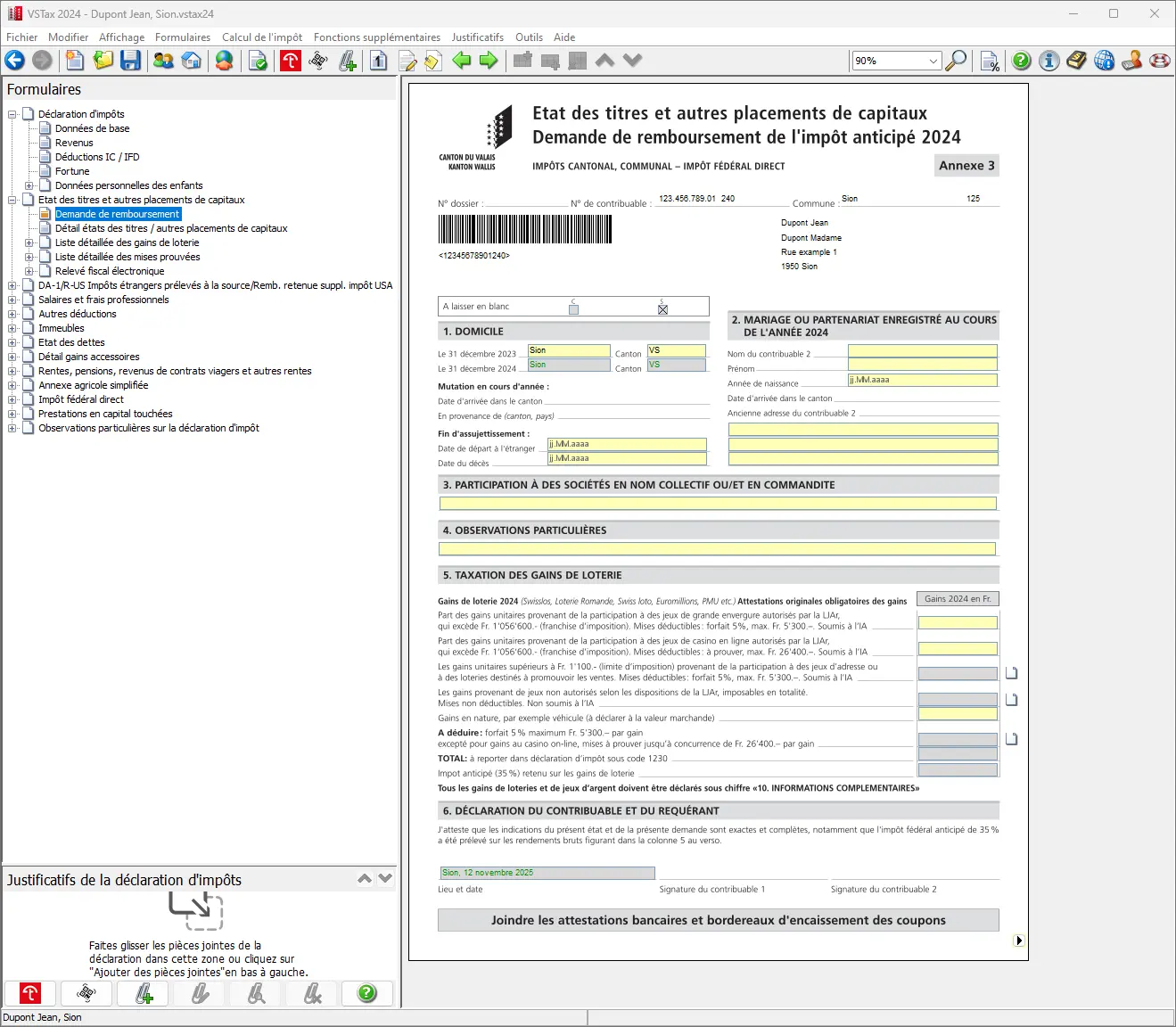
Application for withholding tax refund with information on domicile, securities and lottery winnings
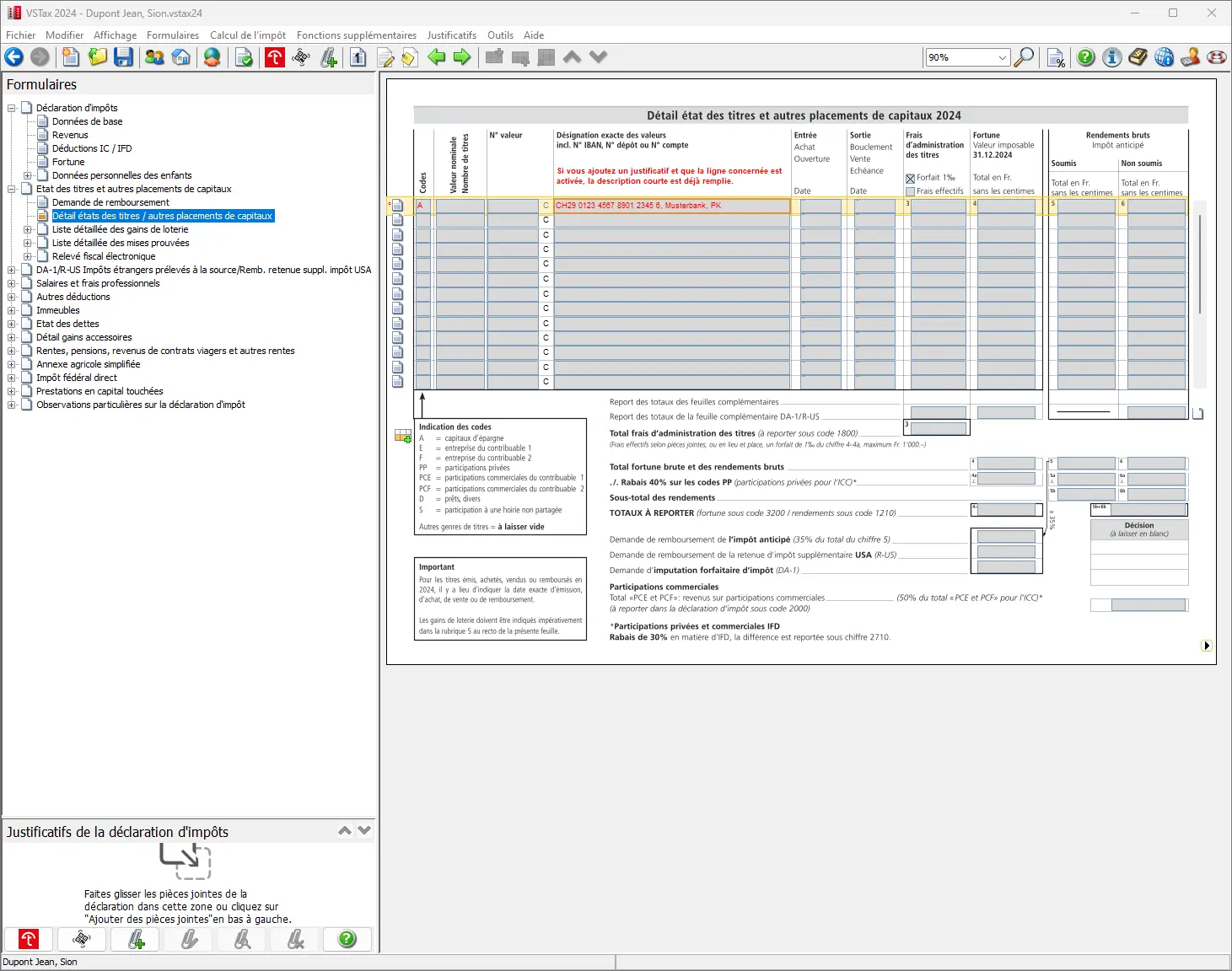
Step 10: Securities/assets list form (for bank accounts)
One click and you’re done, and if all went well with the import, at least the same accounts as last year should now appear on the form. The line is highlighted in red, because you now have to enter something here. See the example of last year’s savings account:
In principle, you only declare your share (often 50%). Details are explained in the general FAQ here: FAQ Swiss tax return (2026).
Every January, you receive a statement from your bank concerning your accounts. This certificate is often marked “for tax purposes” or similar. This information is used to provide the relevant values for the tax return.
In the tax return, you must now indicate the tax value as well as the interest generated. To do this, click in the corresponding online form in the “Assets” field. A context-sensitive menu opens, allowing structured input.
The tool clearly expects the total balance to be greater than zero and enters it accordingly. This procedure must be carried out separately for each individual account.
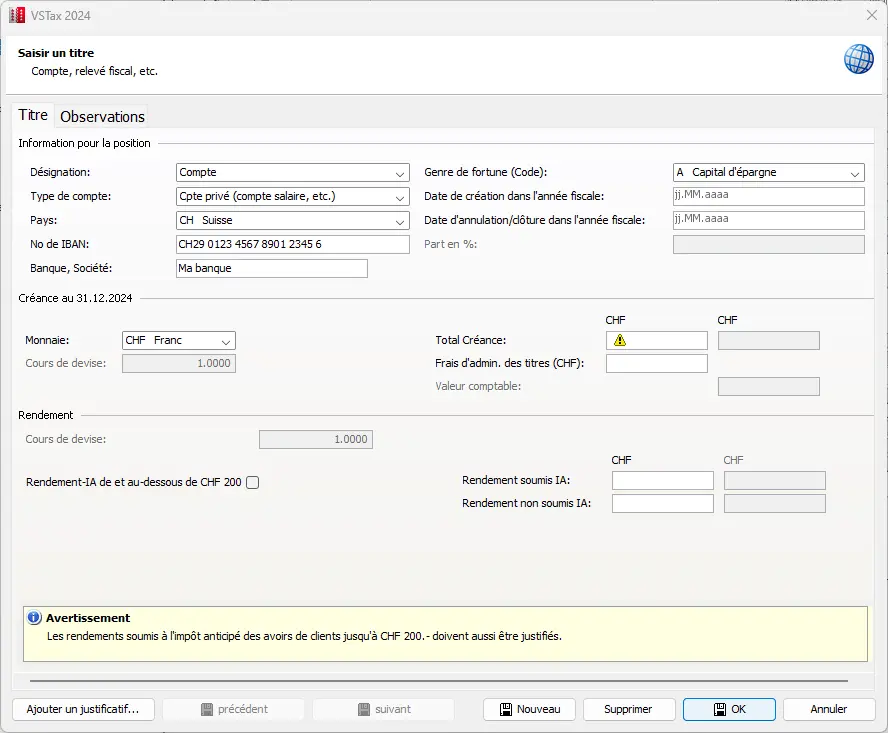
Once all the necessary values have been entered in the form and confirmed with “OK”, they are taken into account. To illustrate this point, this example assumes a savings account with a balance of CHF 100'000.
Very important: here, the form differentiates between income with and without withholding tax. Typically, this tax (33%) is only paid on income of CHF 200 or more. As soon as the account is declared, the withholding tax will be credited to you. This should be clearly indicated on the bank’s tax statements.
If no higher effective fee is indicated, the form automatically applies an administrative fee of 0.1%.
After entering the accounts, the form should look something like this:

Step 11: Supplementary form DA-1/R-US (stocks and securities)
If you invest in ETFs or stocks (US, Europe, Ireland), the tax side quickly gets confusing: dividends, withholding tax, DA-1, R-US 164, etc. I’ve put everything together in a clear, jargon-free guide, with concrete examples from my own tax returns:
Swiss Investor Tax Guide 2026: US, Europe, Ireland ETFs
Some may wonder why no ETFs have been transferred since last year’s import. This is due to the tax treatment of foreign funds with tax refunds using Form DA-1/R-US, where U.S. withholding tax can be taken into account.
This is why the famous global ETF is listed on a separate form and only appears hidden on the main form. This procedure is a little complicated and can be confusing, but with a little practice, you’ll soon get the hang of it.
Clicking as shown below takes you to the corresponding form, where you can enter the relevant values:
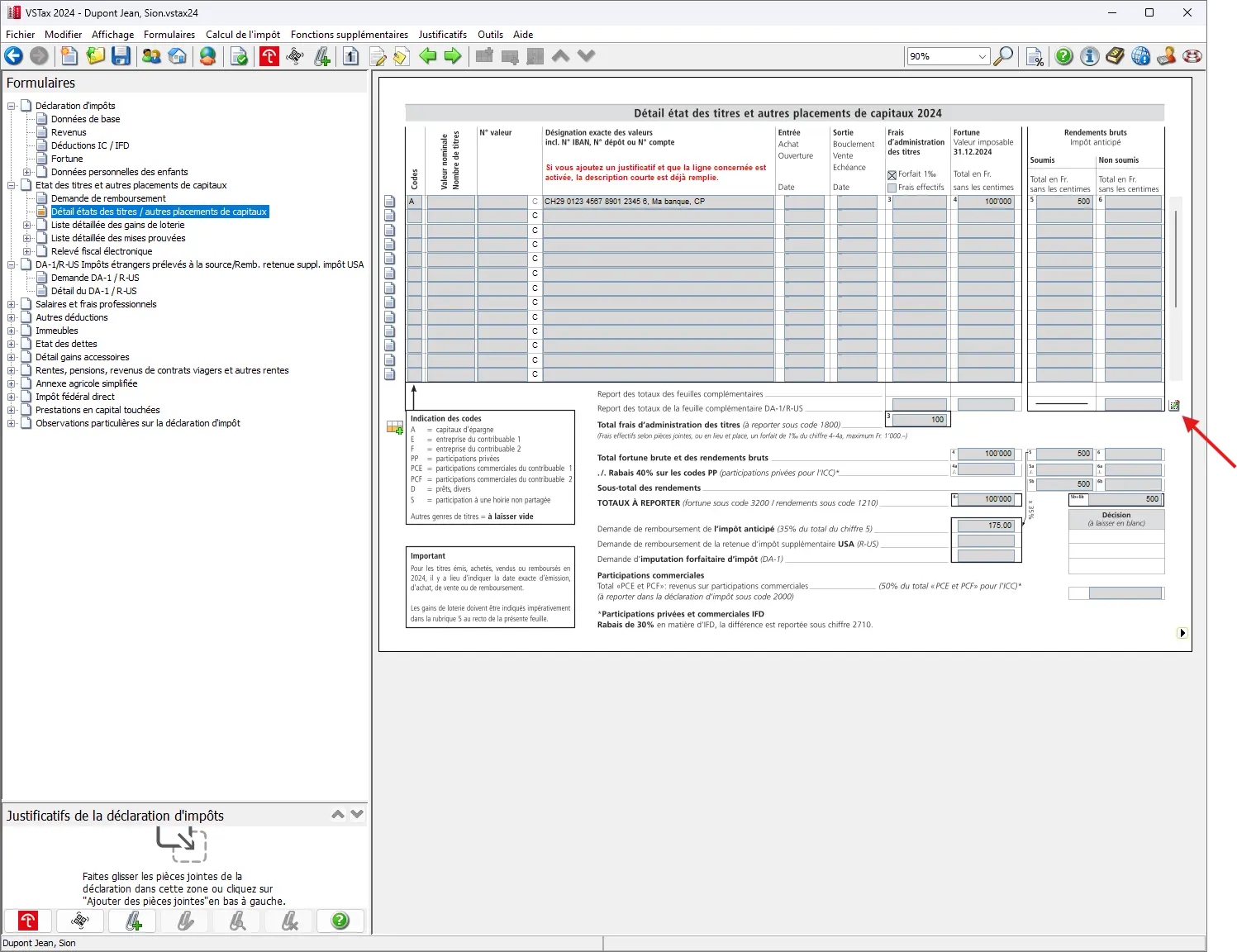
Small aside: even if you enter a new asset value (for example, if you click on a new line) and then select a foreign investment fund, it will be opened or managed again in form DA-1/R-US.

Double-clicking on last year’s ETF field opens a menu. In this menu, you can view or add the corresponding securities. In addition, it is possible to enter entries and exits. If required, additional notes can be added.
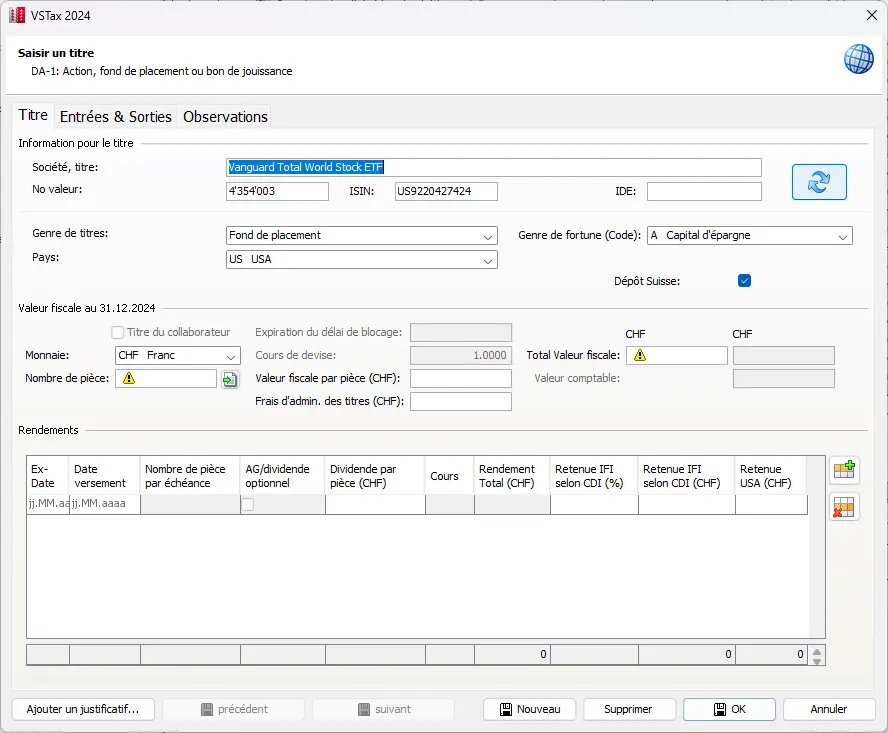
As an example, we would also like to list two titles here:
- 5'100 VT ETFs, of which 100 purchased during the fiscal year
- 100 CH SPI ETFs (new position also purchased during the year)
We will now show the 5'100 VT ETFs in 3 steps, including the 100 entries, and then, in step 4, the position with the 100 Swiss SPI ETFs.
In the following, the ETF positions will be indicated in a structured process. The process is divided into four short intermediate steps:
- First, the 5'100 VT ETFs are entered.
- In the next step, the 100 entries added to the VT ETFs during the year are taken into account.
- Foreign withholding taxes are taken into account.
- Finally, the fourth step is to indicate the position with the 100 Swiss SPI ETFs.
Intermediate step 1: VT ETF entries (i.e. purchases)
When entering ETF shares, VSTax checks the quantities already purchased from the previous year. In our example, we already had 5'000 shares in the VT ETF at the change of year. If we suddenly entered 5'100 shares without documenting the entries, we’d get an error message. To avoid such inconsistencies, it is advisable to enter the entries first. In our example, 25 additional shares were acquired each quarter during the year. We enter these entries in the table below.
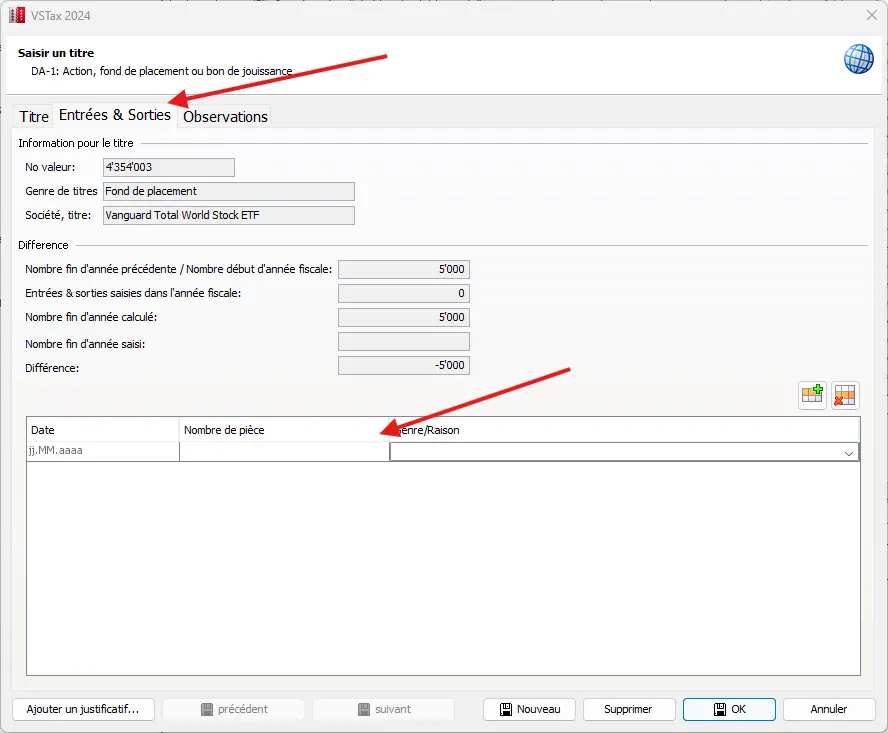
At the bottom of the table, it is possible to indicate the reason (purchase/issue) in addition to the purchase date. In the case of a sale, a different entry must be selected. Use the Excel icon to open other entries.
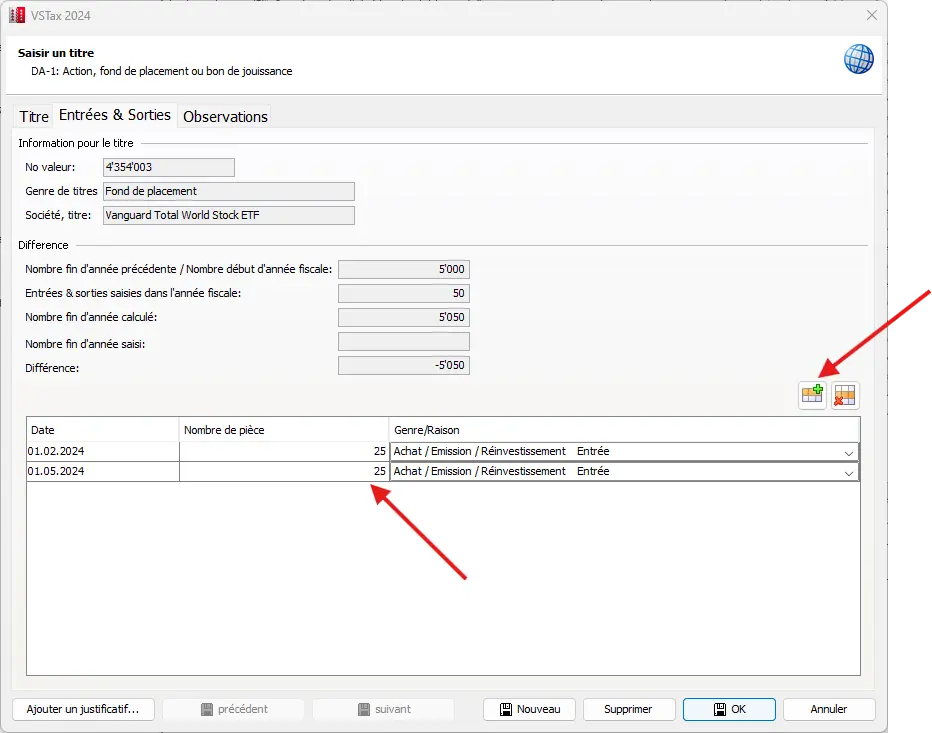
Once we’ve entered everything, the table should look like this and we can return to our Securities tab:
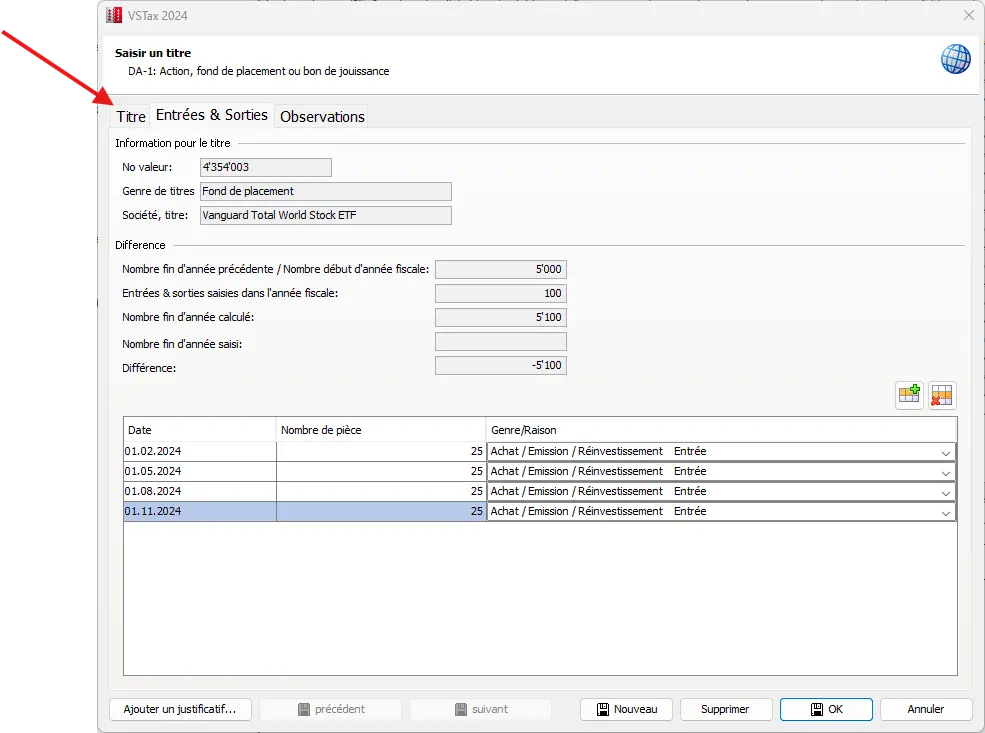
We now enter the number of shares in our possession at the end of the fiscal year (i.e. 5'100). The tool now seems equally happy.
Step 2: Check the number of shares at the end of the year and verify income
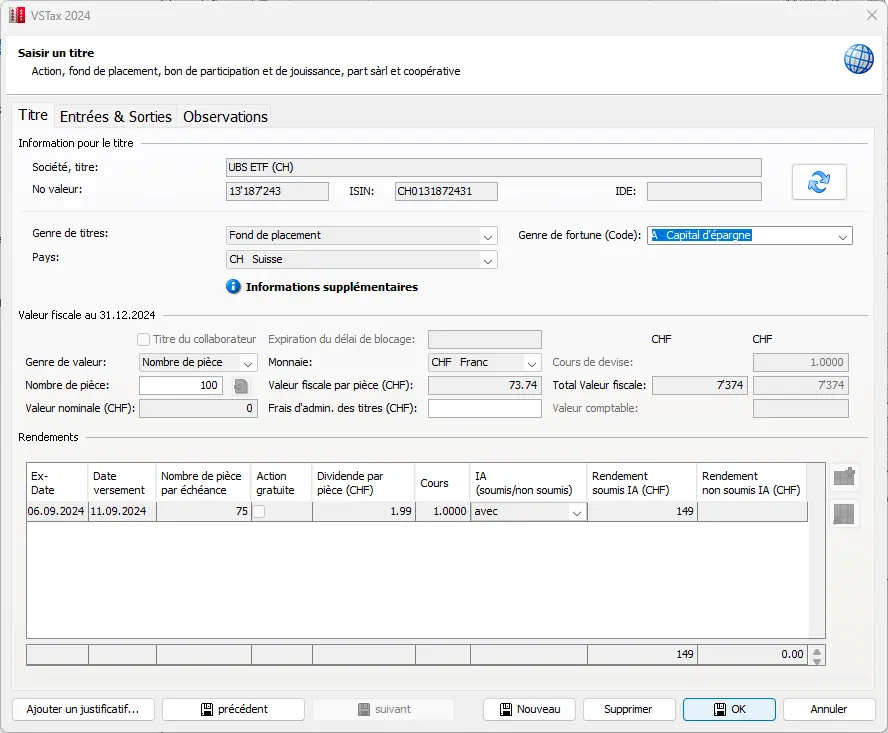
A simple click next to the corresponding box automatically calculates both income and tax value, based on the price table stored in the software and the purchases indicated. This function makes your work much easier, as it eliminates the need for numerous manual entries and considerably reduces the amount of typing required.
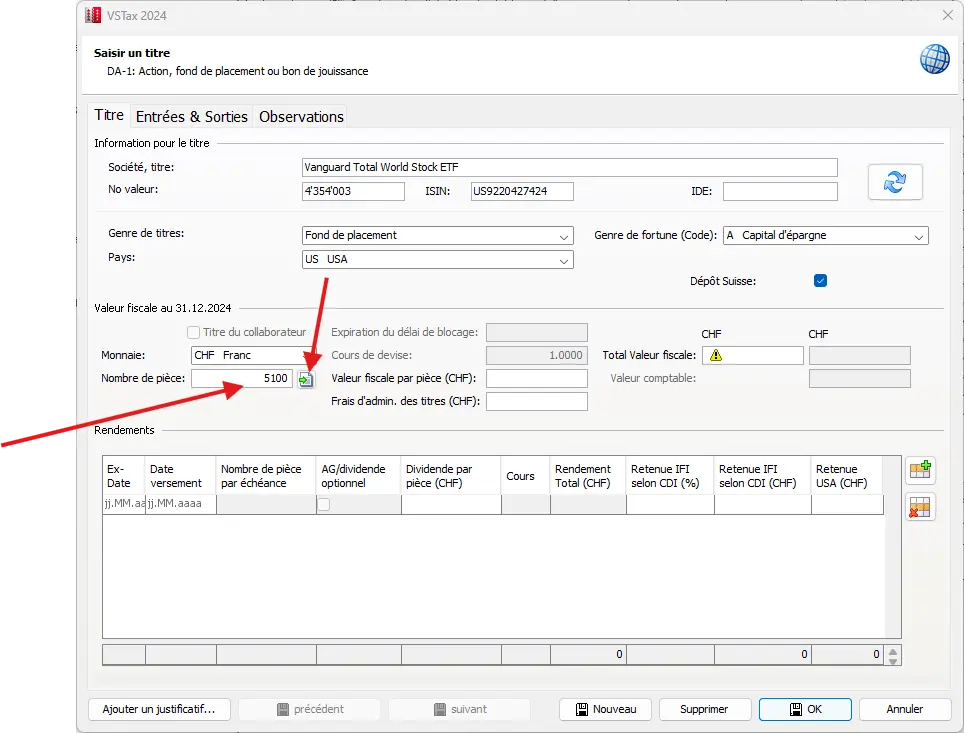
It then looks something like this:
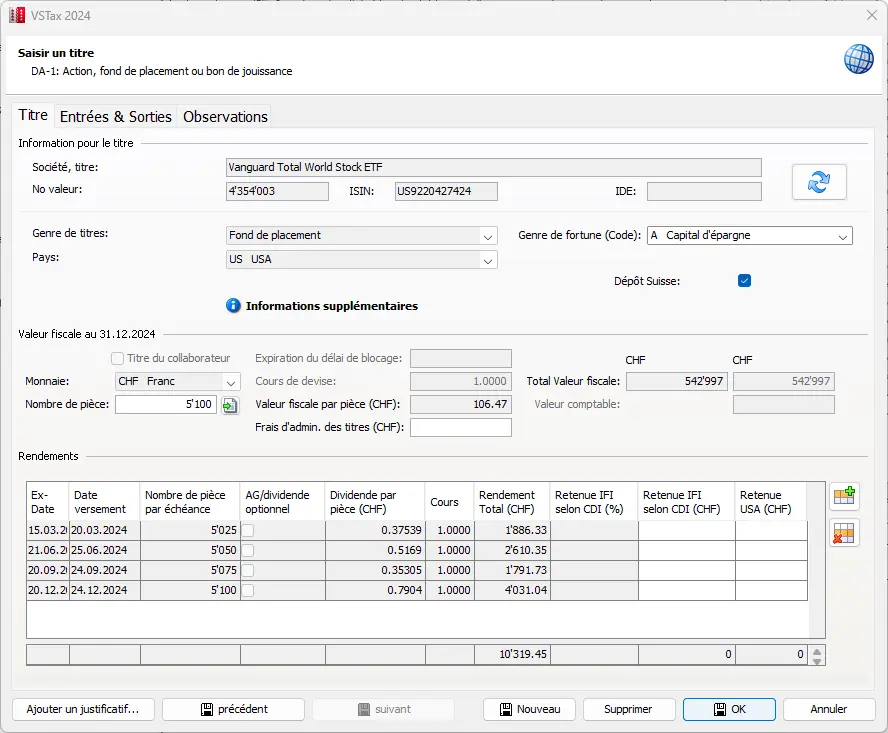
Detailed mask for entering an ETF with tax value, number of shares and dividend income as at December 31
If you own an ETF or a foreign stock whose price table is not filed, you’ll have to enter the values manually. You’ll need to enter the number of shares and the official price at the time of dividend payment. For most of the ETFs proposed or recommended on the blog, this step shouldn’t be necessary, and a click as shown above is all it takes for the software to calculate all this automatically.
Intermediate step 3: DA-1 / R-US (imputation of withholding tax)
I admit it. A rather tedious and technically complicated chapter, but important in this example for recovering (or having recovered) a few hundred Swiss francs in taxes.
If the income withheld (generally 30% of gross income, sometimes only 15%) is less than CHF 100, there’s no need to use a DA-1 form for imputation and, fortunately, the software flags this and adapts the form accordingly.
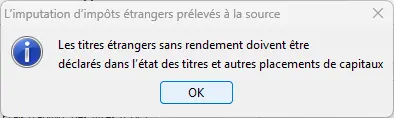

It then switches the securities to a standard form (and no longer to the DA-1/R-US form).
However, in our example, the income is over CHF 100, so we’ll continue with form DA-1/R-US here, as we’ve left some taxes there and want to offset them.
We now need to obtain from our broker the amount of tax imputation in Switzerland (only for a Swiss broker). We also need information on the amount of tax withheld in the USA (withholding tax). This will enable you to offset taxes already paid both abroad and at home. To explain the subject of withholding tax and forms DA-1/R-US in detail here would go completely beyond the scope and I refer you to a specific blog post: “Withholding taxes on dividends received, concrete examples”.
The reduction of the US withholding tax from 30 percent to 15 percent is only possible for custodian banks that have Qualified Intermediary status. This status is granted by the IRS. Qualified intermediaries must be able to guarantee that dividends and interest are paid to foreigners (e.g. to individuals or legal entities domiciled in Switzerland).
In addition to the above-mentioned tax deducted at source in the USA, there is a tax deducted in Switzerland. This is known as additional withholding tax. This generally amounts to an additional 15% for foreign ETF funds.
In short, we left 15% in the USA and another 15% with our Swiss broker.
A little calculation and you get the following amounts. Of course, the Swiss broker will provide you with proof when you file your tax return. It all looks like this, and clicking on “OK” transfers the values to the form.
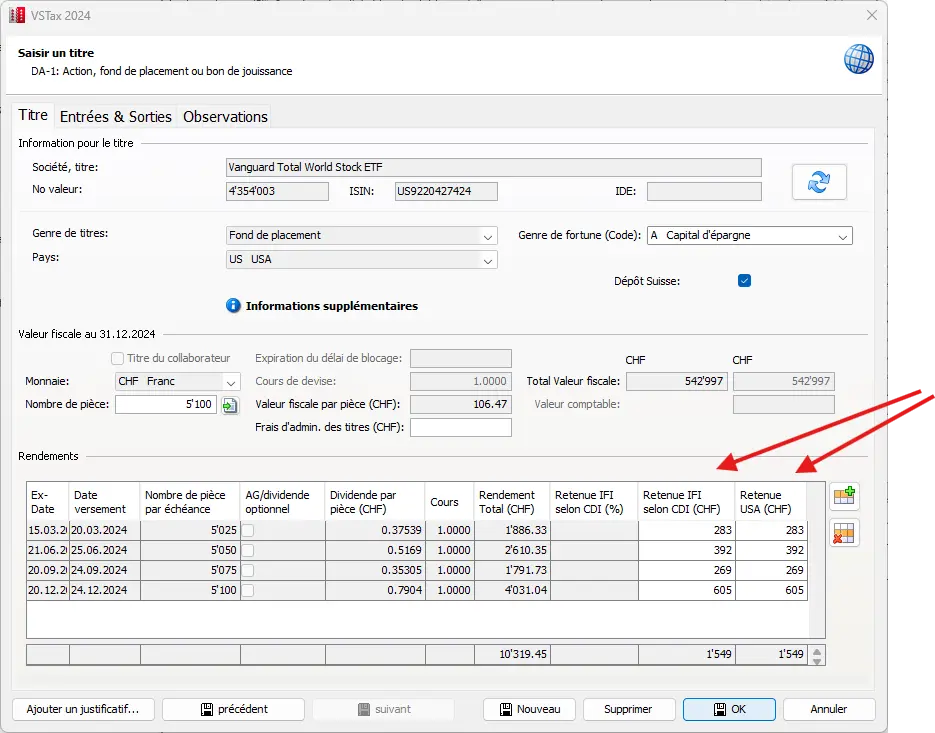
Note: with a foreign broker, the Swiss withholding tax is completely eliminated, but the USA withholding tax (15%) remains.
If we move the mouse over the DA-1 / R-US form to our ETF, the details are displayed again. This allows us to compare the data with the broker’s tax statement.
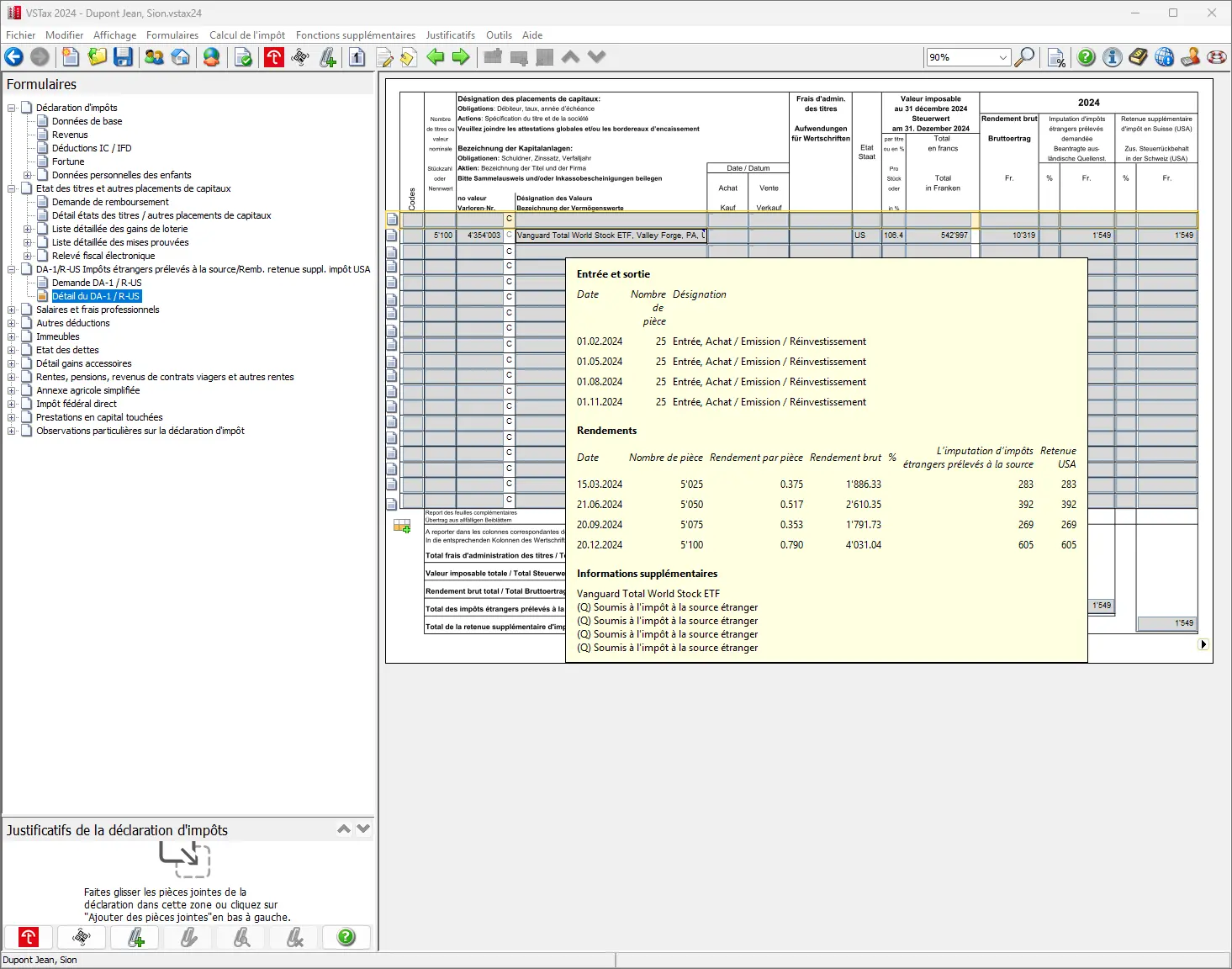
If everything is correct, the values are now transferred. Another click in the bottom right-hand corner takes you back to the securities register with the transferred data.

So we’ve completed these three intermediate steps and have probably finished the most complicated part of the tax return. Now, saving is certainly a good idea.
Intermediate step 4: Our Swiss ETF entries
This step is much simpler and doesn’t require a DA-1 / R-US form, so it can be added directly to the securities register, like shares. To do this, we click on a new line just below the savings account to open a new position.
A new window opens, in which you can enter both entries and assets as at the December 31st key date. In this step, the investment fund category is selected to provide the corresponding information.
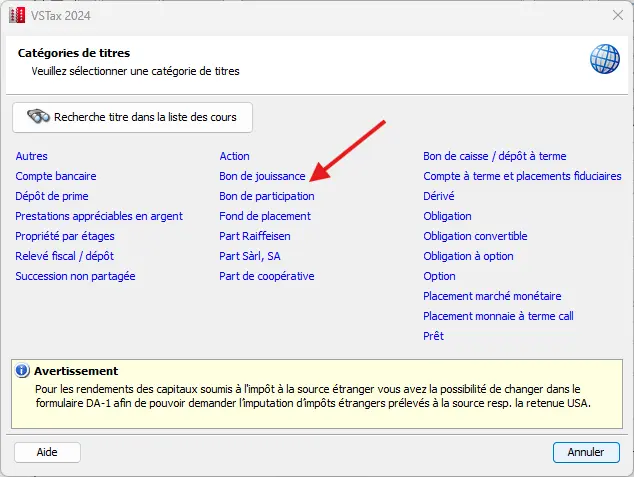
With our ETF’s ISIN number (CH0131872431) or security number, you can quickly find the ETF you’re interested in:
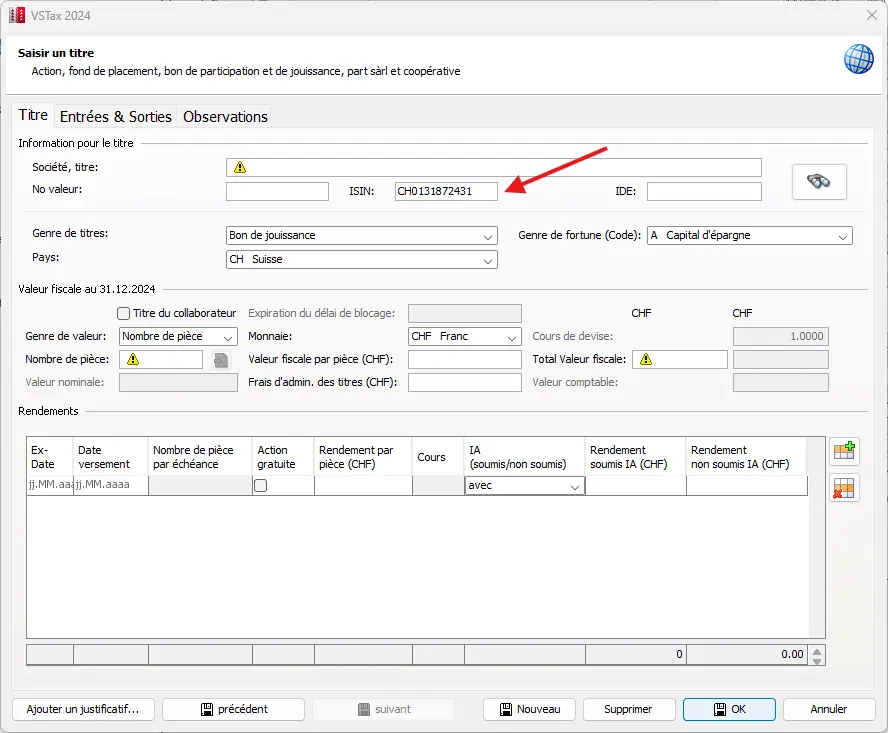
Press “Enter” once and all fields will be automatically filled in from the existing price data. This is how it looks:
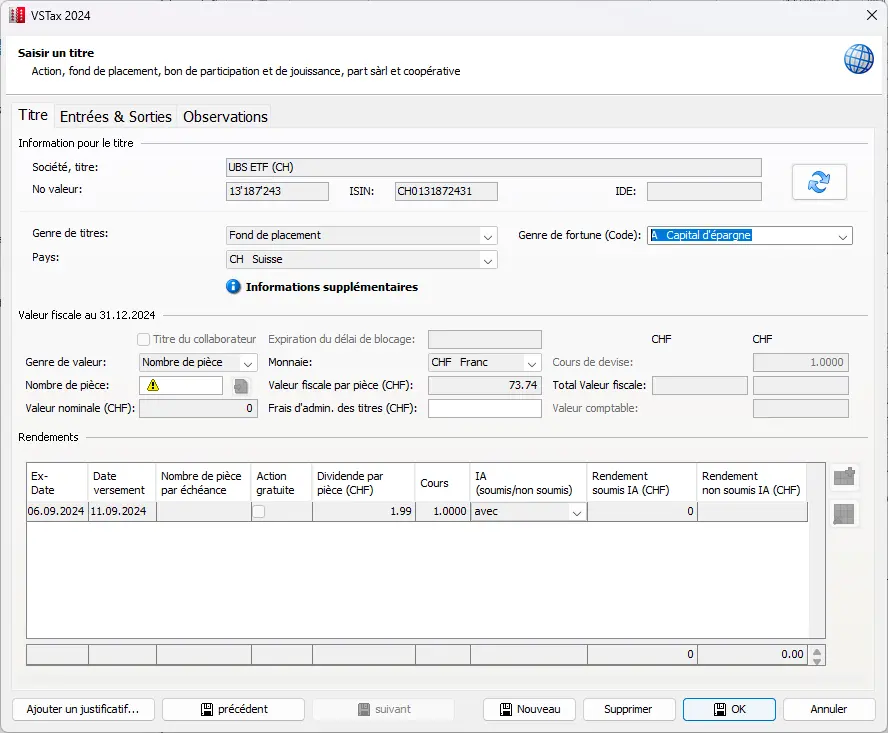
After entering all the entries and the December 31st value, everything should then look like this:
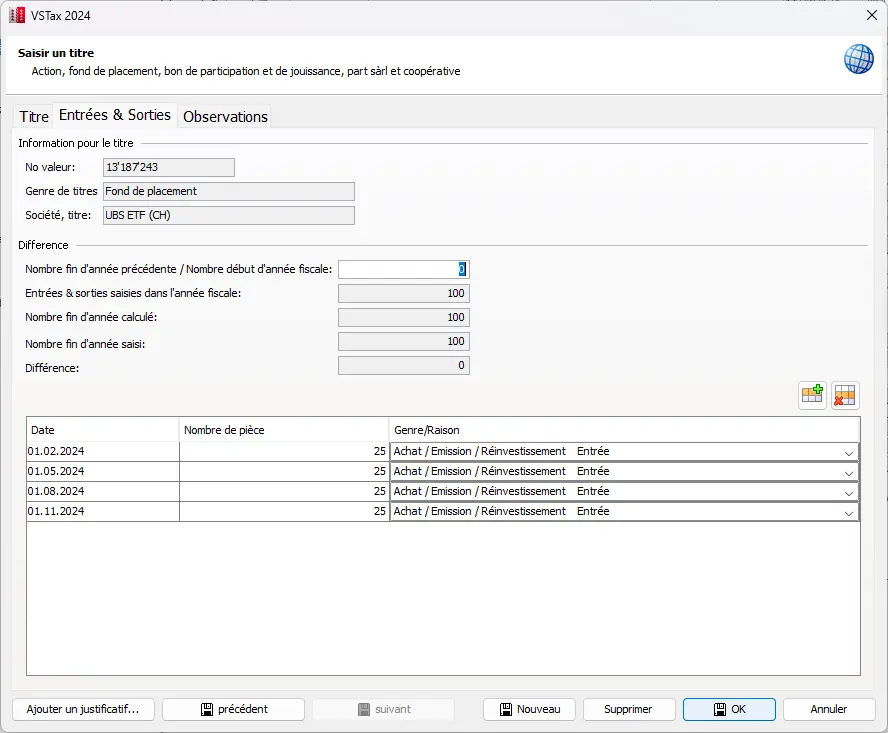
As you can now see, there are no columns for withholding tax or Swiss withholding tax in the table, since this is now a Swiss ETF.
Instead, withholding tax is calculated in the same way as for a bank account. A quick check with the broker’s tax statement and everything should be in order.
We now return one last time to our securities form and can now navigate by clicking on the bottom right to return to page 2 of the tax return. Here, all income from securities is now correctly entered.
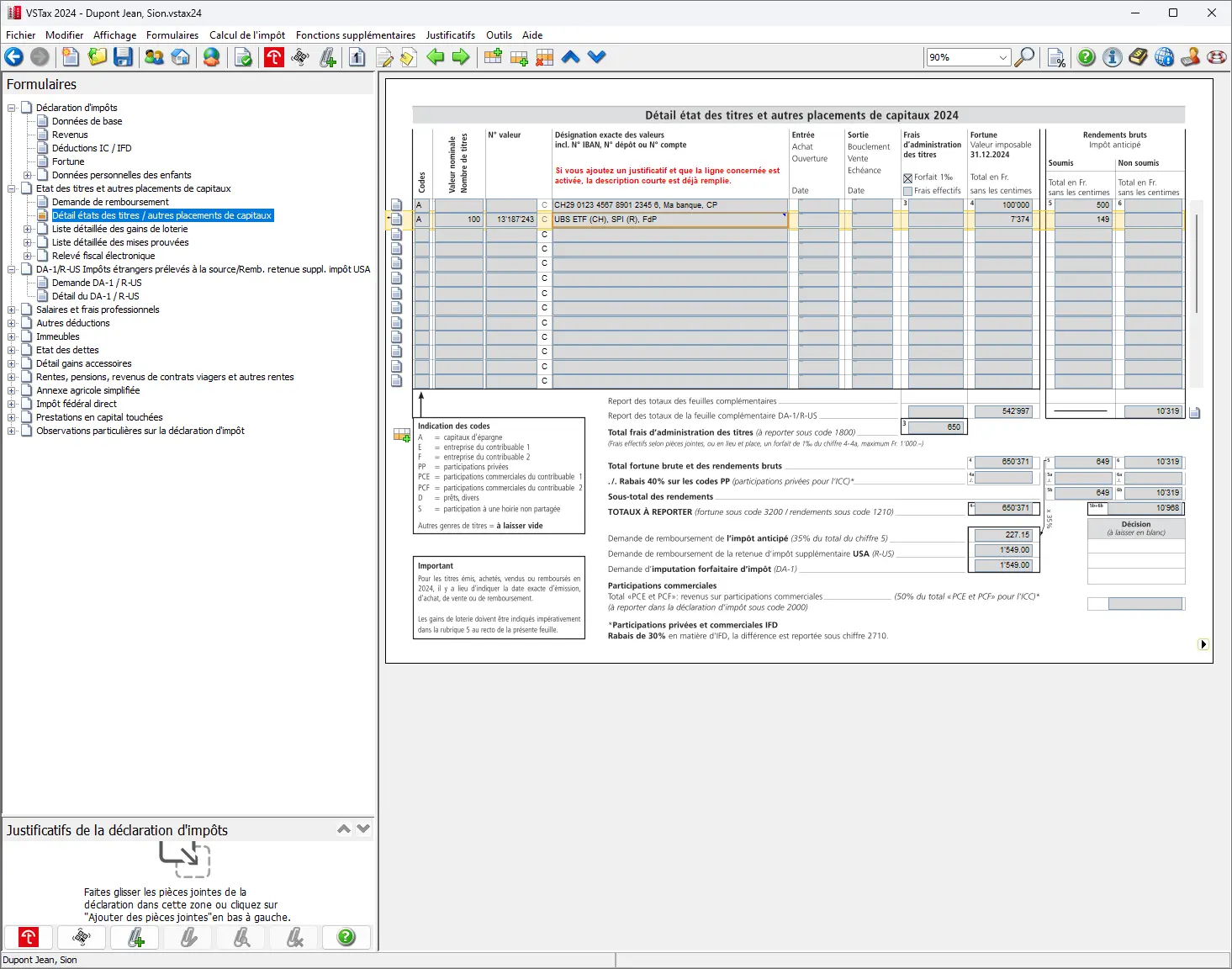
If further income is to be added now, it will still have to be entered at the end of page 2. Alimony payments are also included.
This completes the first two pages of the four-page tax return.
Next step
In part 3 of our VSTax tutorial, we’ll discuss the following sections:
- Interest expenses (and mortgages)
- Business and securities management expenses
- Contributions to occupational pension plans (pillar 2) or personal pension plans (pillar 3a)
- Personal deductions
- Assets
If you find other tax optimization possibilities in the screenshots above (or if you have a question), don’t hesitate to send it to me in the comments!