
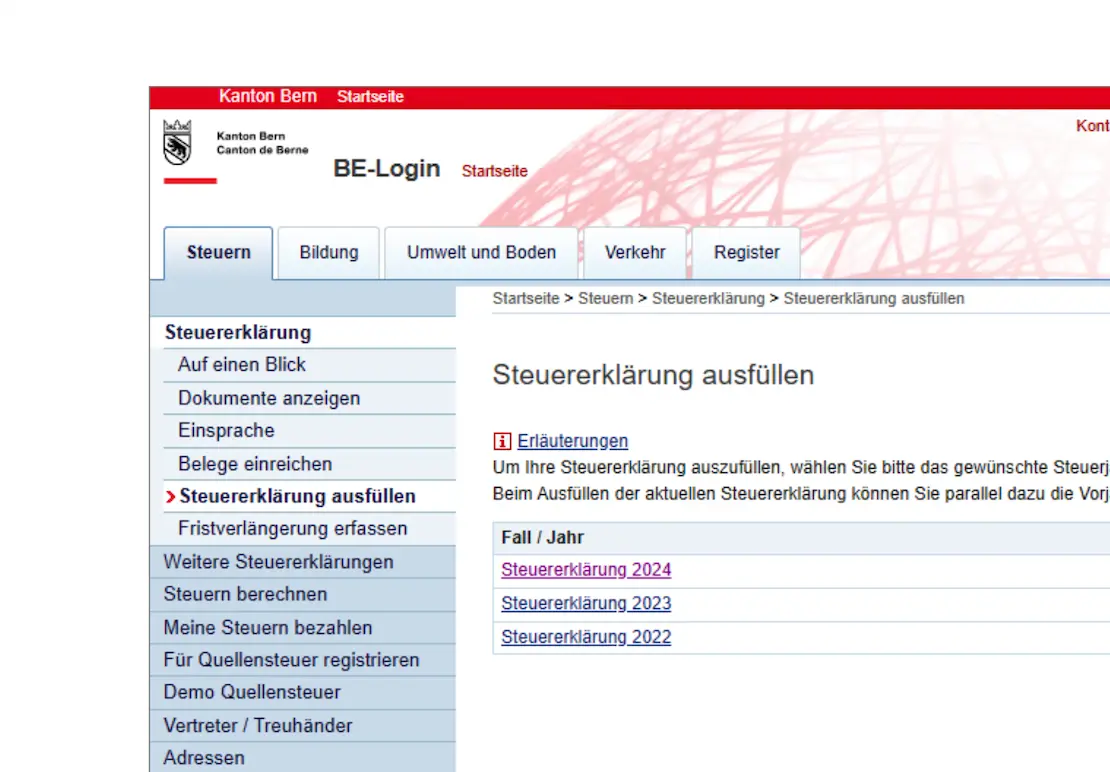
In the first part of the Bern TaxMe-Online guide, we’ve filled in the first three parts of our Swiss tax return (for the canton of Bern): personal data, earned income and miscellaneous income.
The next step concerns your assets. Here, you enter everything you own and have to declare to the tax authorities, from classic bank accounts to more exciting items such as shares or funds (with our famous VT ETF). You can see the different categories available to you.
Step 6: Assets and securities
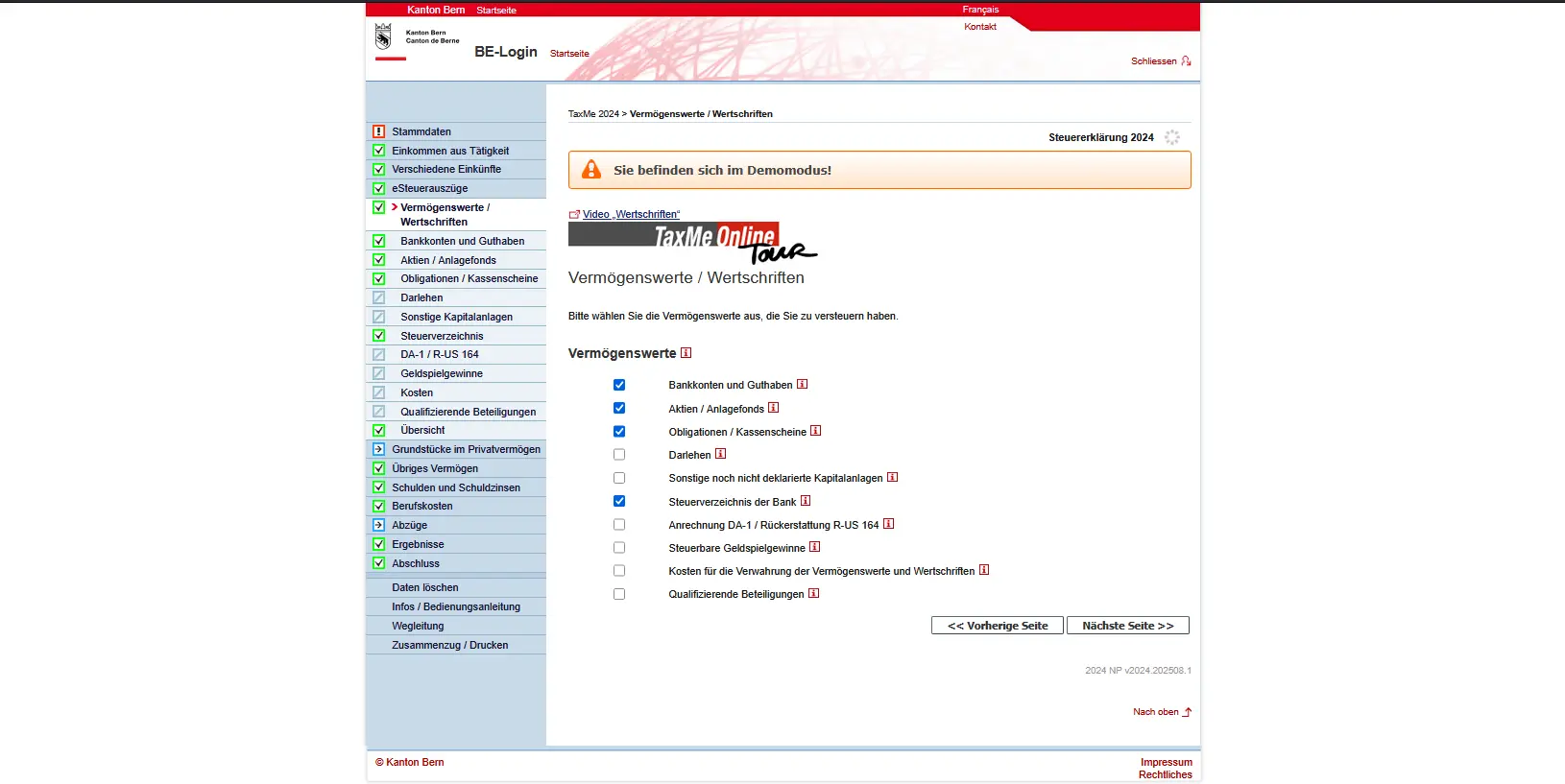
The bank’s tax statement is also handy. Many banks provide you with an overview of all assets and income. If you’ve already downloaded it as a PDF or electronic tax statement, you can save yourself the tedious task of entering individual data.
The following paragraphs cover all asset/security categories.
Bank accounts and credit balances
Under this heading, you enter all your bank and post office accounts, as well as your savings books. Important: every January, your bank will send you a statement of your accounts. You’ll often find a special note “for tax purposes” or something similar. You should indicate this here. If you have already downloaded an electronic tax statement, these accounts are automatically included. In this case, you don’t need to enter them again here.

Overview of bank accounts and assets entered in TaxMe-Online, including interest and account balance as at December 31
In principle, you only declare your share (often 50%). Details are explained in the general FAQ here: FAQ Swiss tax return (2026).
For a new entry, for each account you enter the name of the bank, the IBAN number and the account balance as at December 31st of the fiscal year. Interest credited during the year and any fees or expenses are also included.
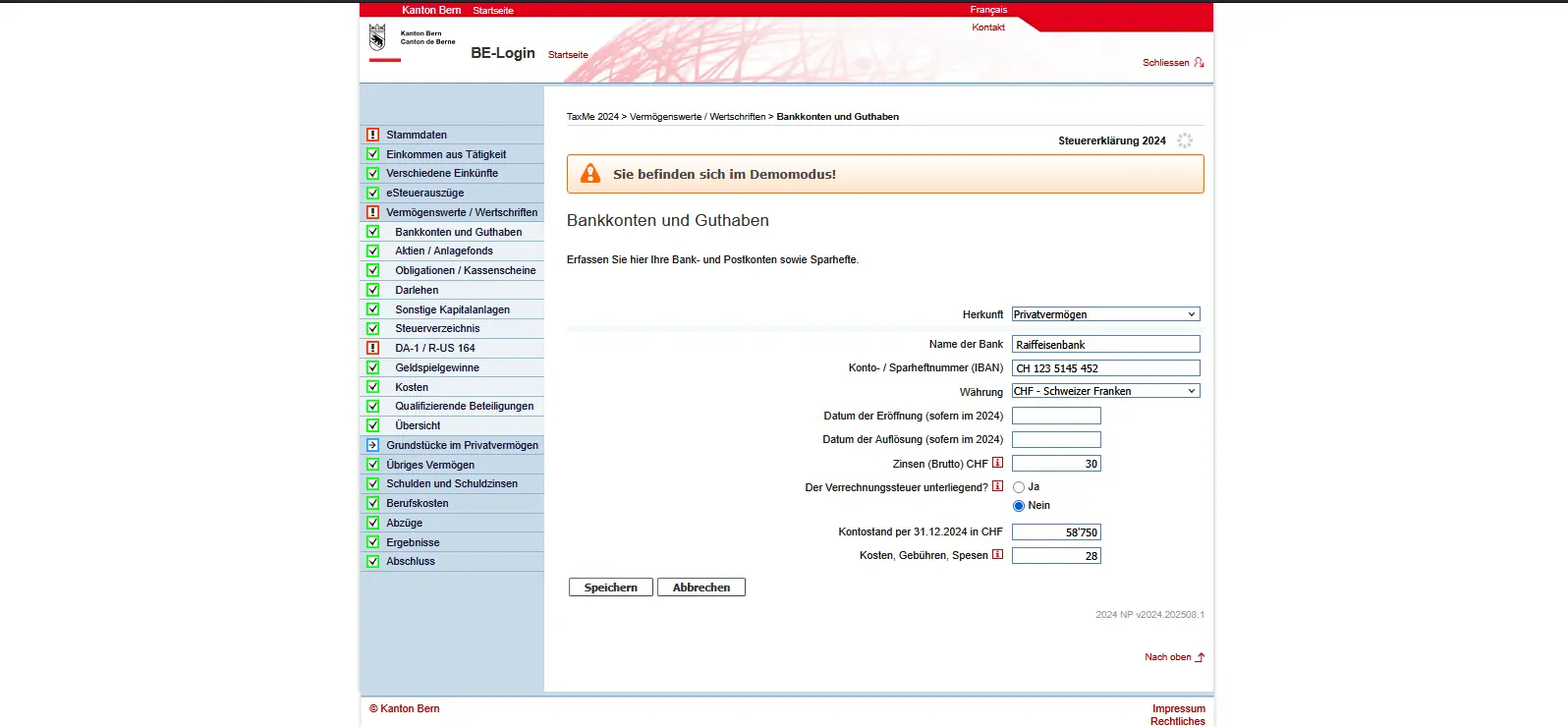
Entering a bank account in TaxMe-Online with IBAN, interest earned and account balance in private assets
In our example, we see two accounts: a Raiffeisen bank account with a balance of CHF 58,750 and a UBS account with CHF 62,830. In addition, annual interest and fees have been entered for each. If you have several accounts, you can easily add additional entries.
Make sure that you assign the accounts to private assets correctly. If you have taken over an account as part of an inheritance or donation, you should adjust the status accordingly.
If you invest in ETFs or stocks (US, Europe, Ireland), the tax side quickly gets confusing: dividends, withholding tax, DA-1, R-US 164, etc. I’ve put everything together in a clear, jargon-free guide, with concrete examples from my own tax returns:
Swiss Investor Tax Guide 2026: US, Europe, Ireland ETFs
Stocks, fund shares and other shares, profit-sharing certificates and participation certificates, options
In this section, you declare your securities holdings. This includes conventional shares, ETFs or participation certificates. Important: if you have already downloaded an electronic tax statement from your bank, the values are automatically taken over, so you don’t have to enter them manually again.
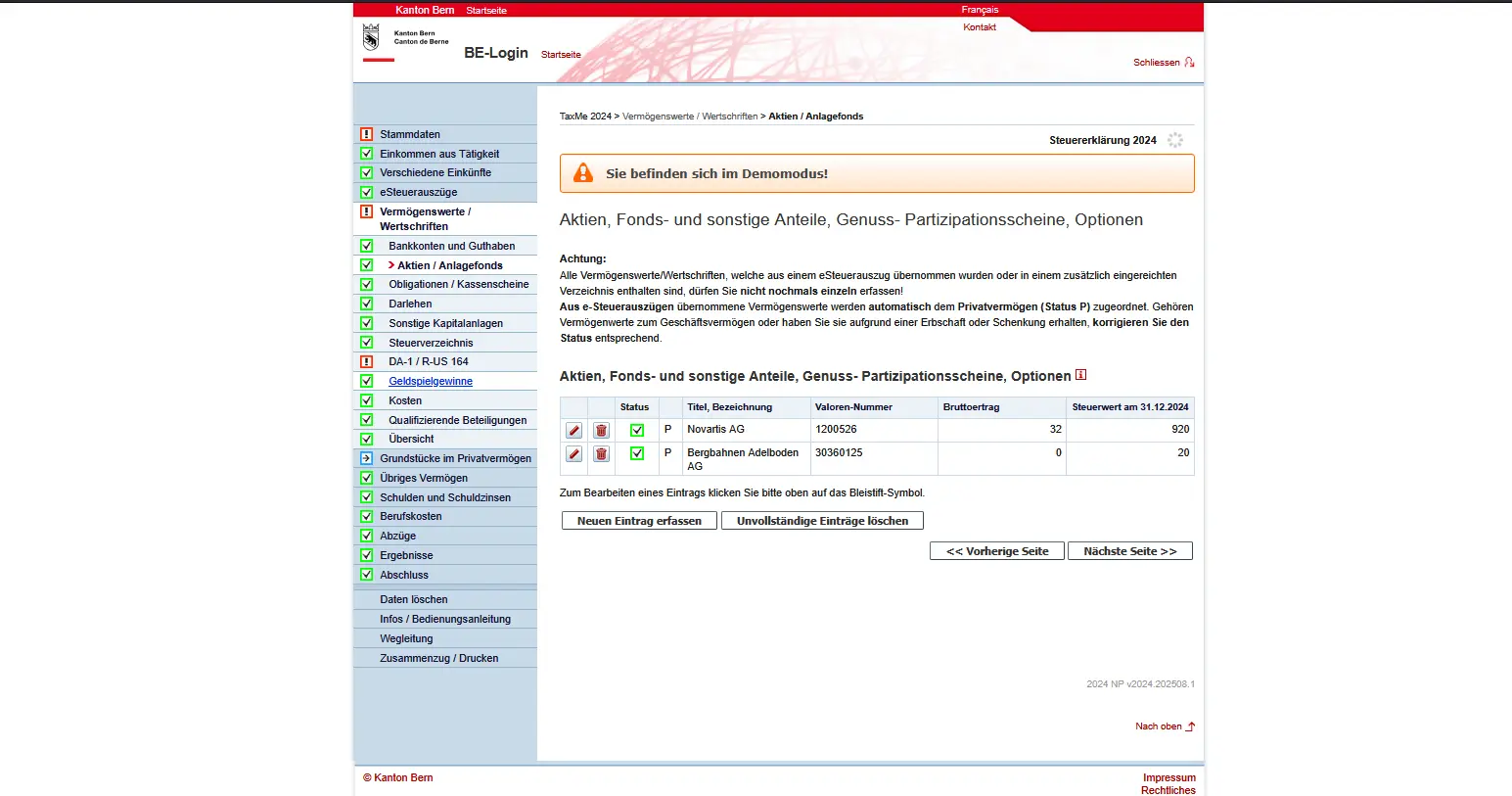
In our example, we see two current entries: a Novartis share and a share in Bergbahnen Adelboden AG. The security designation, value number, gross dividend amount and tax value as at December 31 of the fiscal year are shown.
If you have other stocks or funds, you can add additional securities by clicking on “Enter new entry”. Many securities can be identified directly via the security number, which automatically completes the information. You can also use the search mask under “Search for names to determine values” to find your security.
This is particularly important for securities such as the American VT ETF. This is also entered here, and via form DA-1 / R-US 164, to claim foreign withholding taxes later. Swiss securities such as Novartis shares, on the other hand, are entered as normal, without the need for an additional form.
The tax authorities already know a great deal about the VT ETF, so this data is taken over and you don’t need to type it in. I.e. currency conversions, start and end of period values, dividends, etc. It’s all there. What you still need to enter:
- Initial number of shares: how many shares did you have at the beginning of the year? Normally, this figure is taken from the last tax return.
- Final number of shares: how many shares do you have at the end of the year?
- All purchases and sales must be listed. As VT distributes dividends (taxable income!), the tax authorities need precise information on the number of shares you own at any given time.

Once you’ve filled in all the data, click on “Save”. You will now see the entry for Vanguard Total World Stock ETF in the overview.
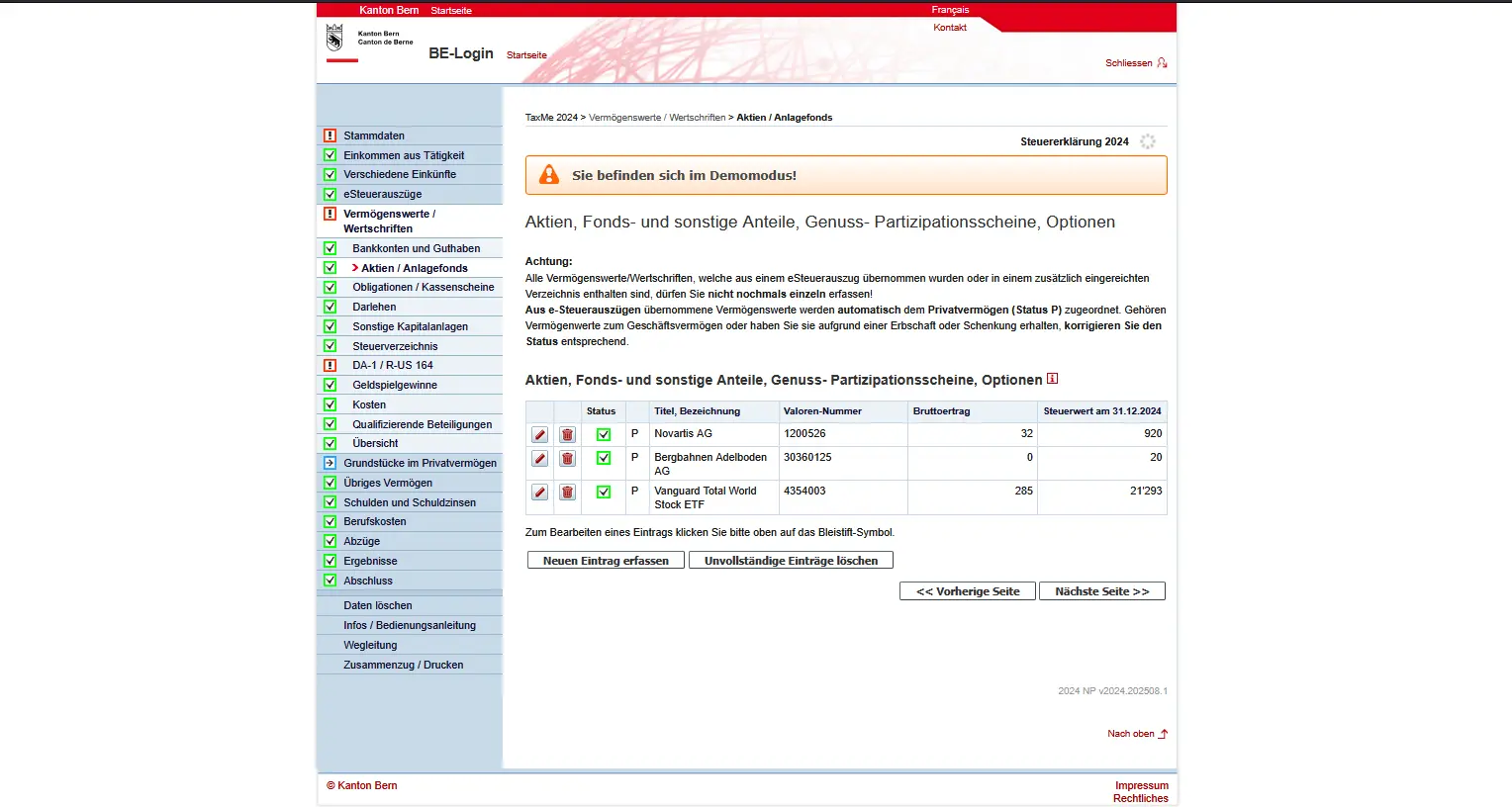
Total list of securities in TaxMe-Online, including stocks, funds and ETFs with their tax value at the end of the year
Bonds / savings bonds
In addition to shares and funds, you must also enter your bonds and savings bonds. These are fixed-income securities that pay you regular interest and are redeemed at the end of their term.
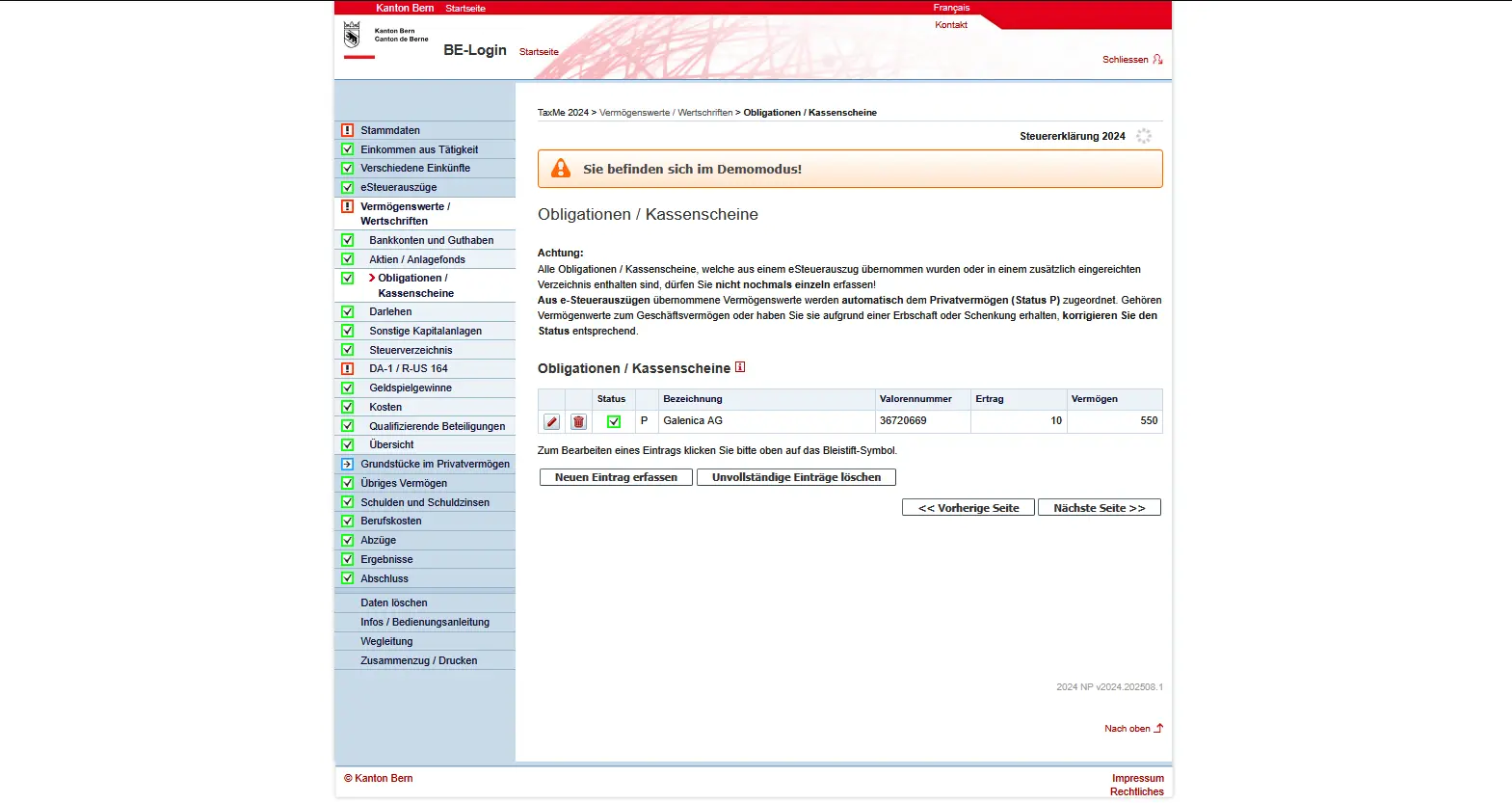
If you have downloaded an electronic tax statement from your bank, the bonds will be automatically included. Otherwise, enter them here manually. This includes the name of the bond, the value number and the interest received during the tax year. You must also enter the asset value as at December 31 of the fiscal year.
In our example, we see a Galenica SA bond with interest income of CHF 10 and an asset value of CHF 550. If you own several bonds, you can add them by clicking on “Enter a new entry”.
Again, use the security number if possible. This way, the data can be transferred quickly and correctly without you having to enter everything by hand.
Loans granted
If you have lent money to someone, with or without interest, you must enter this on your tax return. The same applies to advance payments or down-payments, e.g. for the purchase of land, or for other private assets. Claims secured by a mortgage also fall into this category.
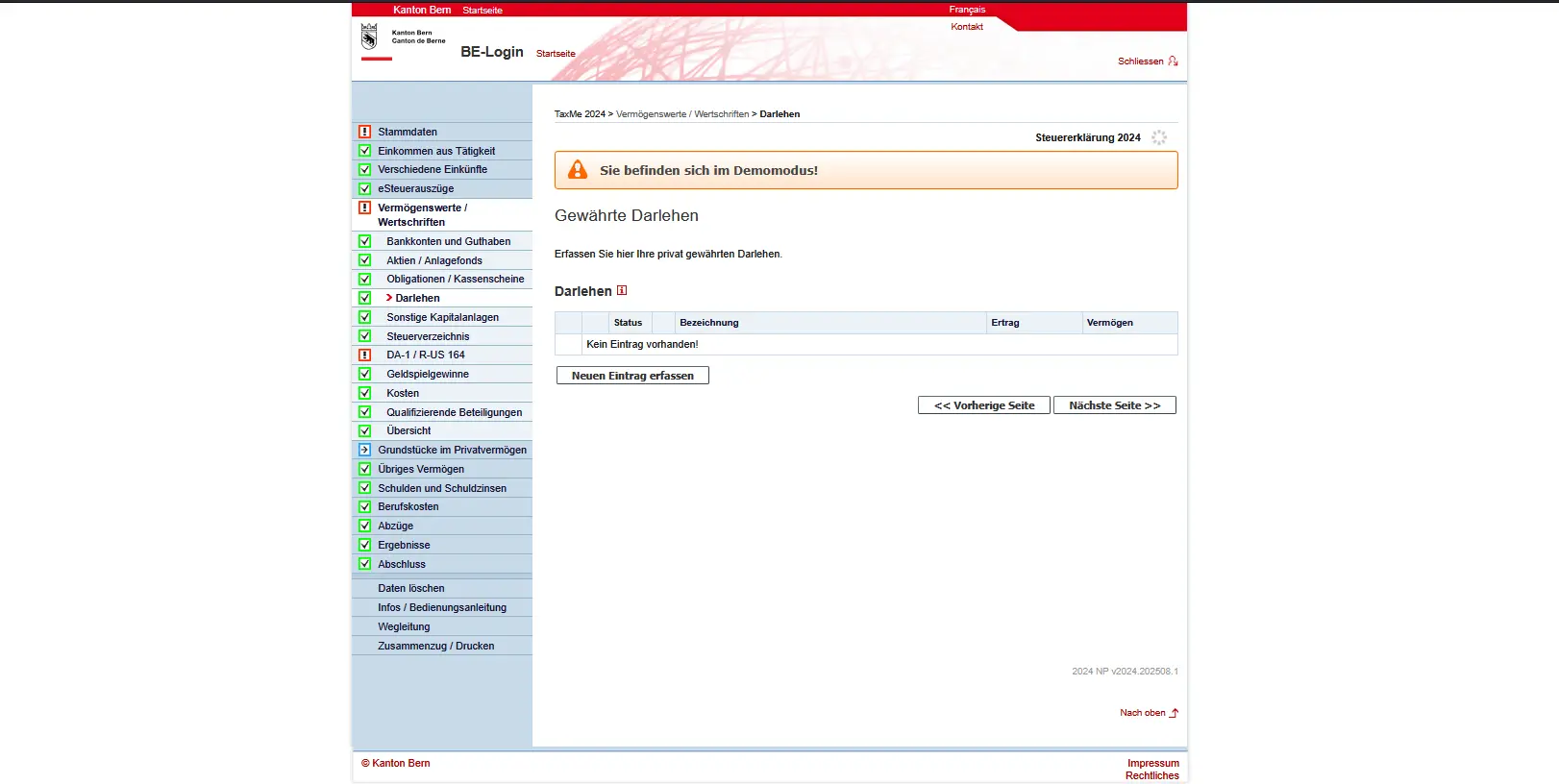
Click on “Enter new entry” to create a loan. Enter the name of the debtor, the currency and the date the loan was granted. If there is a fixed term, you also enter the expiry date. The amount of interest you received during the fiscal year and the amount receivable on December 31, i.e. the amount still due at the end of the year, are also important.
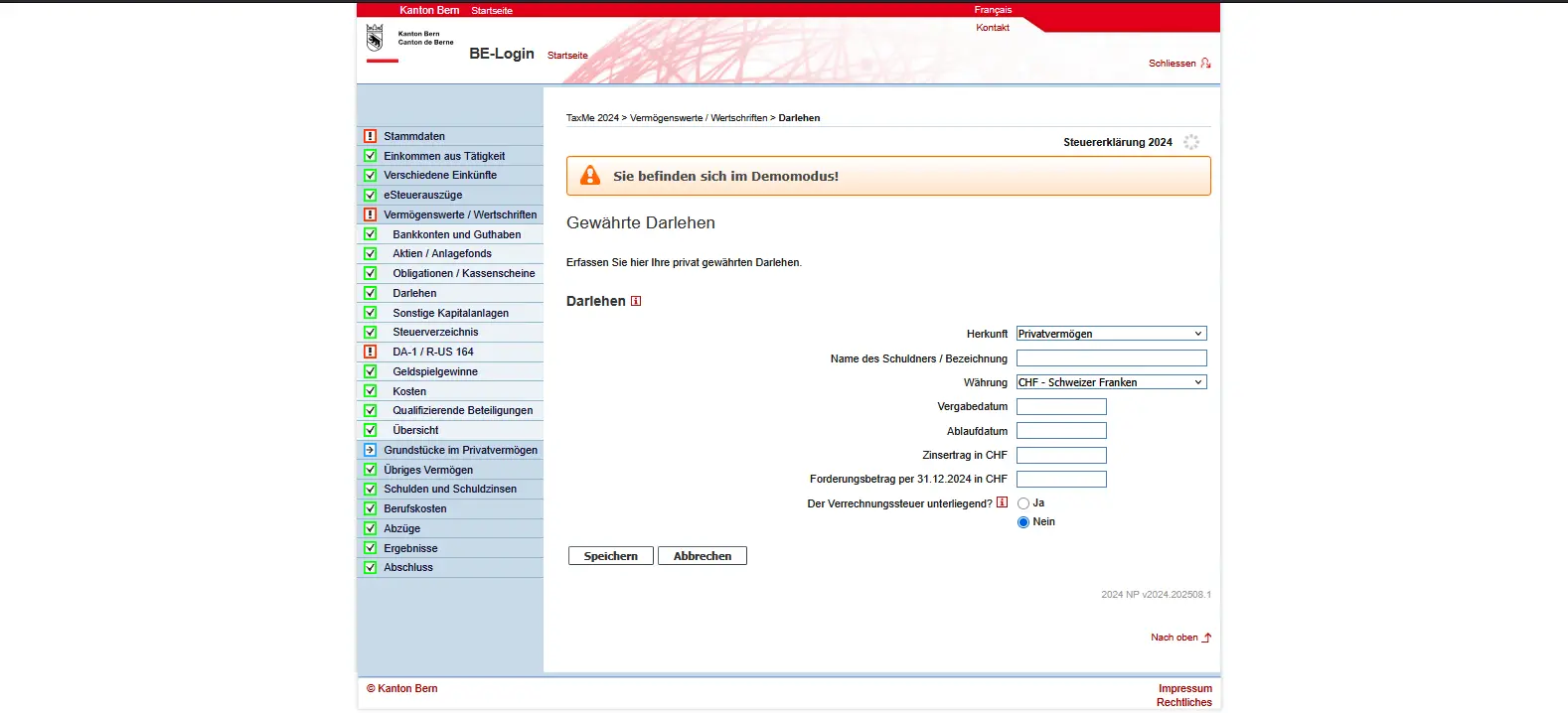
Entering private loans in TaxMe-Online with information on debtor, currency, interest and claim amount
Interest-free loans must also be entered. In this case, simply omit the interest received. For loans in foreign currencies, you need to convert the value into Swiss francs. You’ll find the official conversion rates in the tax authorities’ guide.
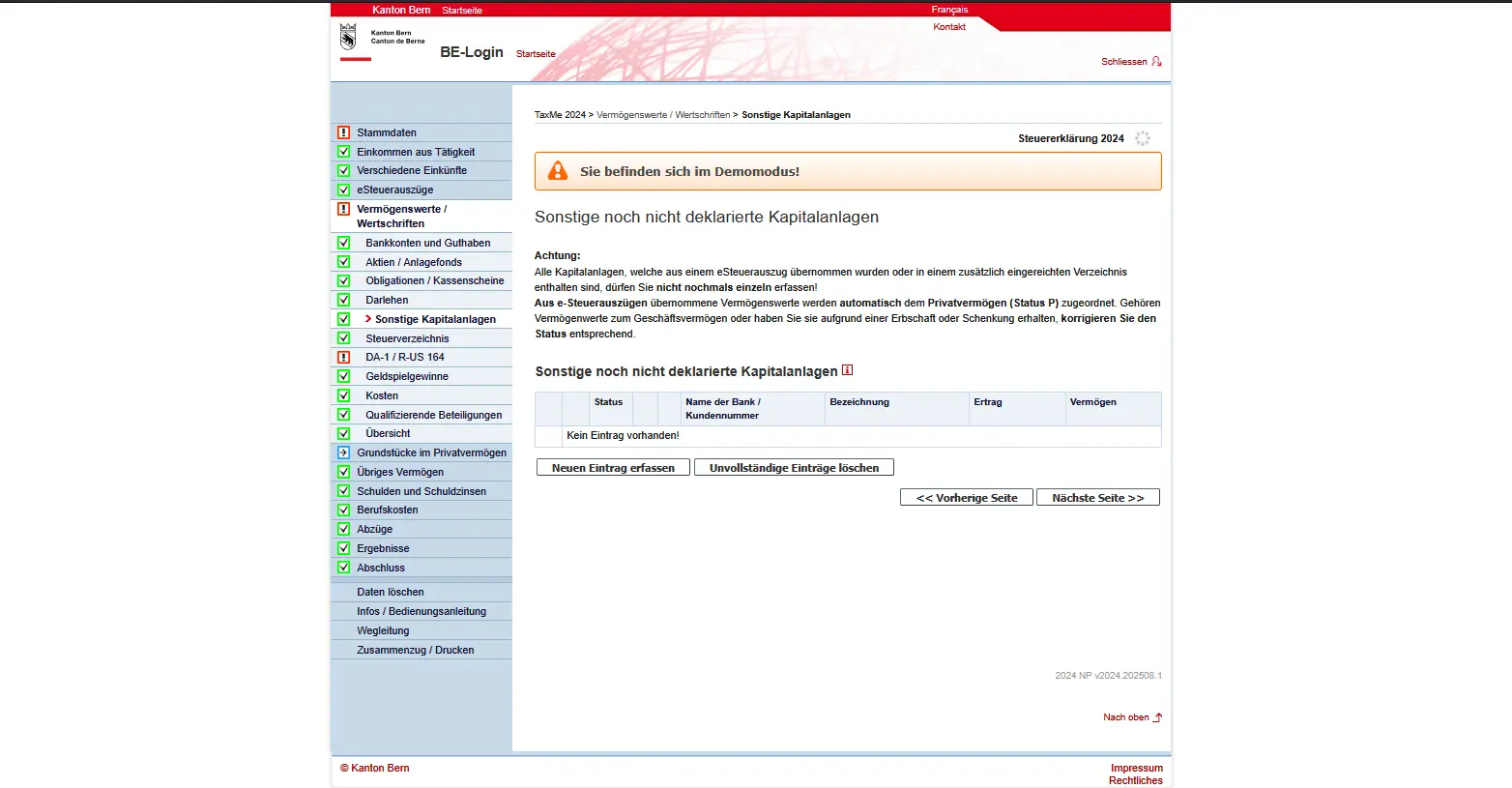
Other investments not yet declared
Not all investments fit into the standard categories, such as bank accounts, shares or bonds. For this, there’s the “Other investments not yet declared” field. Here you enter all investments that are also taxable, but have not yet been declared. These might include certain bonds, structured products or crypto investments.
Click on “Enter new entry” to open the input mask. Enter the security number or ISIN, the designation and the currency. In addition, you need to enter the claim amount or nominal value, the number of units, the purchase and sale dates, and the tax value as at December 31. Interest, dividends or income from crypto-currencies must also be entered here.
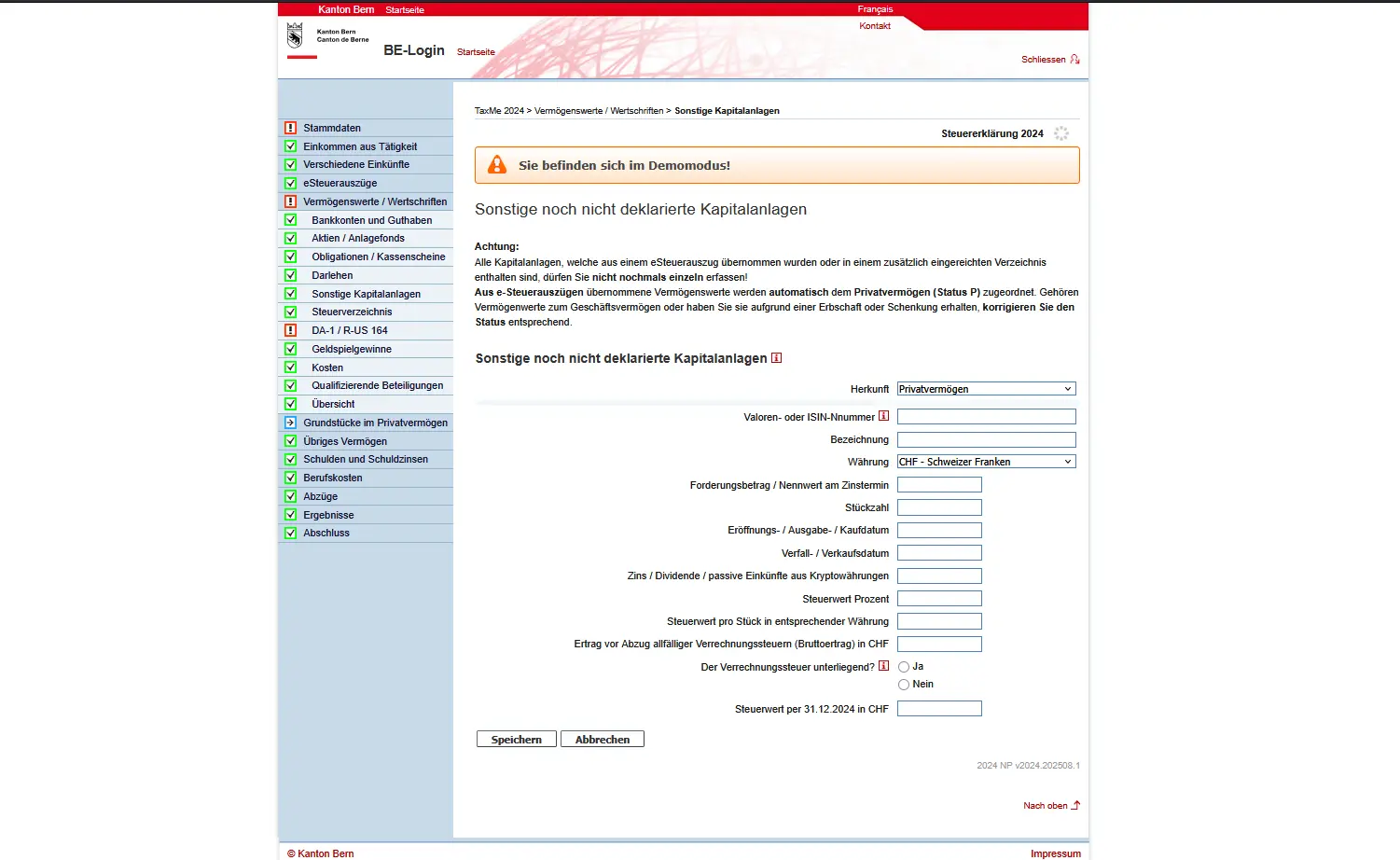
Form for entering other investments with ISIN, number of units, income and tax value in TaxMe-Online
Particularly important: check whether the investment is subject to withholding tax and indicate this correctly. Many fields are optional, but they help to represent your investment completely, such as interest rate or income per unit.
If you’re not sure whether a particular investment belongs here, it’s worth taking a look at the guide or making a quick call to the tax authorities. In principle, it’s better to declare once too often than to forget, as subsequent declarations are generally more painful than a clean declaration from the outset.
Tax statement for additional securities
In addition to accounts, shares or bonds, there’s your bank’s securities tax statement, which groups all securities together in a clear manner. It contains information such as designation, gross income, tax values and purchase and sale dates. A simple deposit statement is not enough; securities must be clearly broken down.
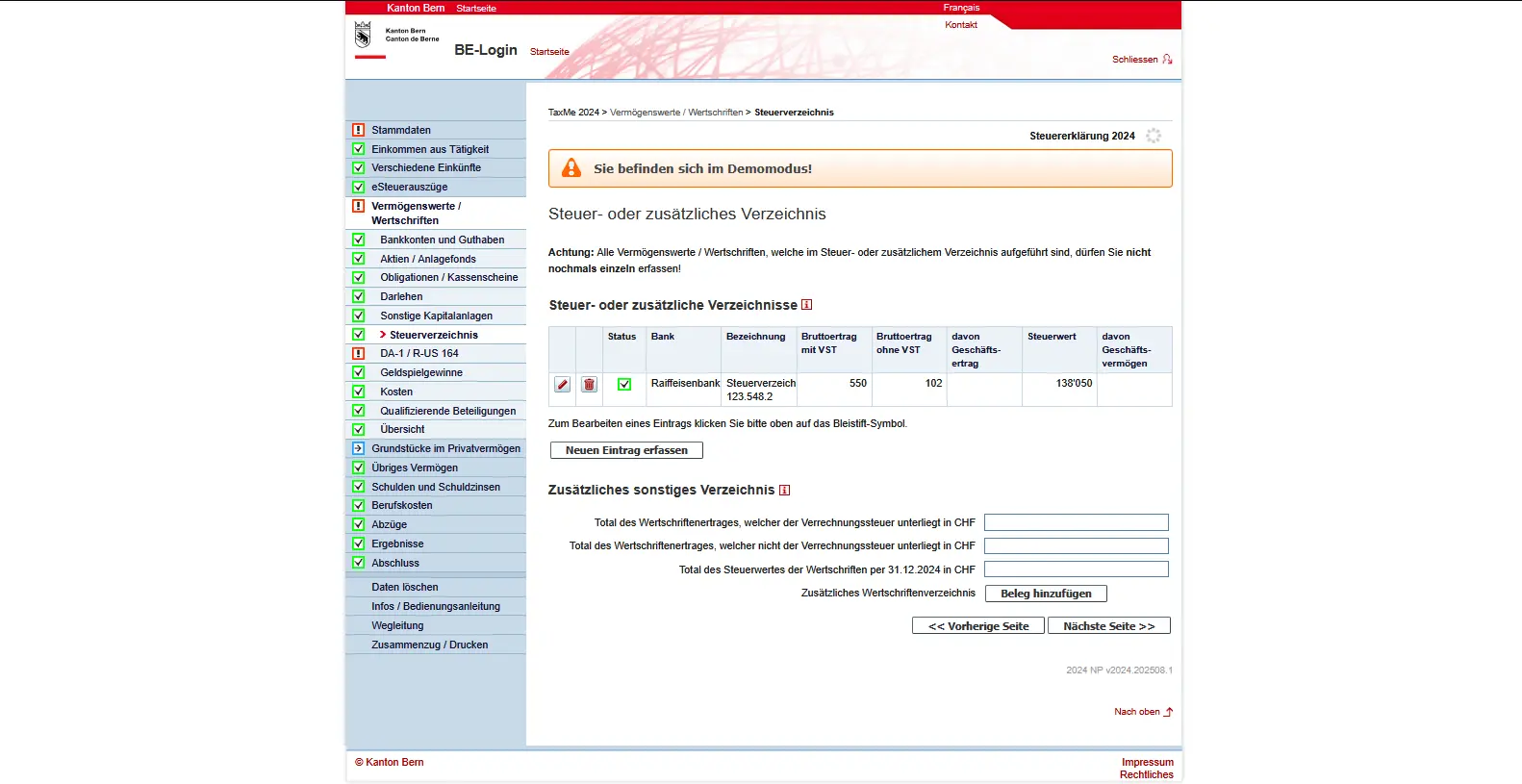
If your bank provides a complete tax statement, download it here. TaxMe-Online takes over the data so you don’t have to enter them manually. Check whether there are any parts in your business accounts (e.g. if you are self-employed). If so, mark them as business income or business assets.
There is also an additional statement. This is where you enter securities that do not appear in the bank register. It must contain the following information:
- Asset designation (if applicable, security number or ISIN)
- Gross income with withholding tax
- Gross income without withholding tax
- Tax values
- Date of purchase and sale or expiry
DA-1 and R-US 164 to reclaim withholding taxes
If you have foreign securities in your portfolio, such as US equities or ETFs like Vanguard Total World (VT), withholding tax is often levied abroad on dividends. To avoid double taxation, you can reclaim it using forms DA-1 and R-US 164. DA-1 is used to offset foreign withholding taxes on the Swiss tax return. It is important to enter the items correctly in the tax list and activate the request, as this is the only way to proceed with the imputation.
Form R-US 164 is specially designed for the USA. With this form, you claim the additional tax deduction withheld in the USA. This step is particularly relevant for popular U.S. ETFs, where a portion of dividends is automatically debited.
If you use Interactive Brokers, which is a foreign (i.e. non-Swiss) broker with Qualified Intermediary status (DEGIRO has the same status if ever), you don't need to fill out Form R-US 164. This means that IBKR or DEGIRO will fill in the W8-BEN form for you, so that you will only be taxed at source on your US stock dividends at 15% (instead of 30%). If this were not the case (if, for example, I were using Saxo Bank), then I would have to file this R-US 164 declaration.
In the input mask, you enter your bank details (IBAN, bank, account name) as well as your residence data. You will also be asked a number of control questions, such as whether the securities are used exclusively for your private assets, or whether you use them for business purposes. This information is also required to process your request correctly. Please tick the appropriate box (see above) and state your position.
Here’s an example with Vanguard Total World Stock ETF (VT):
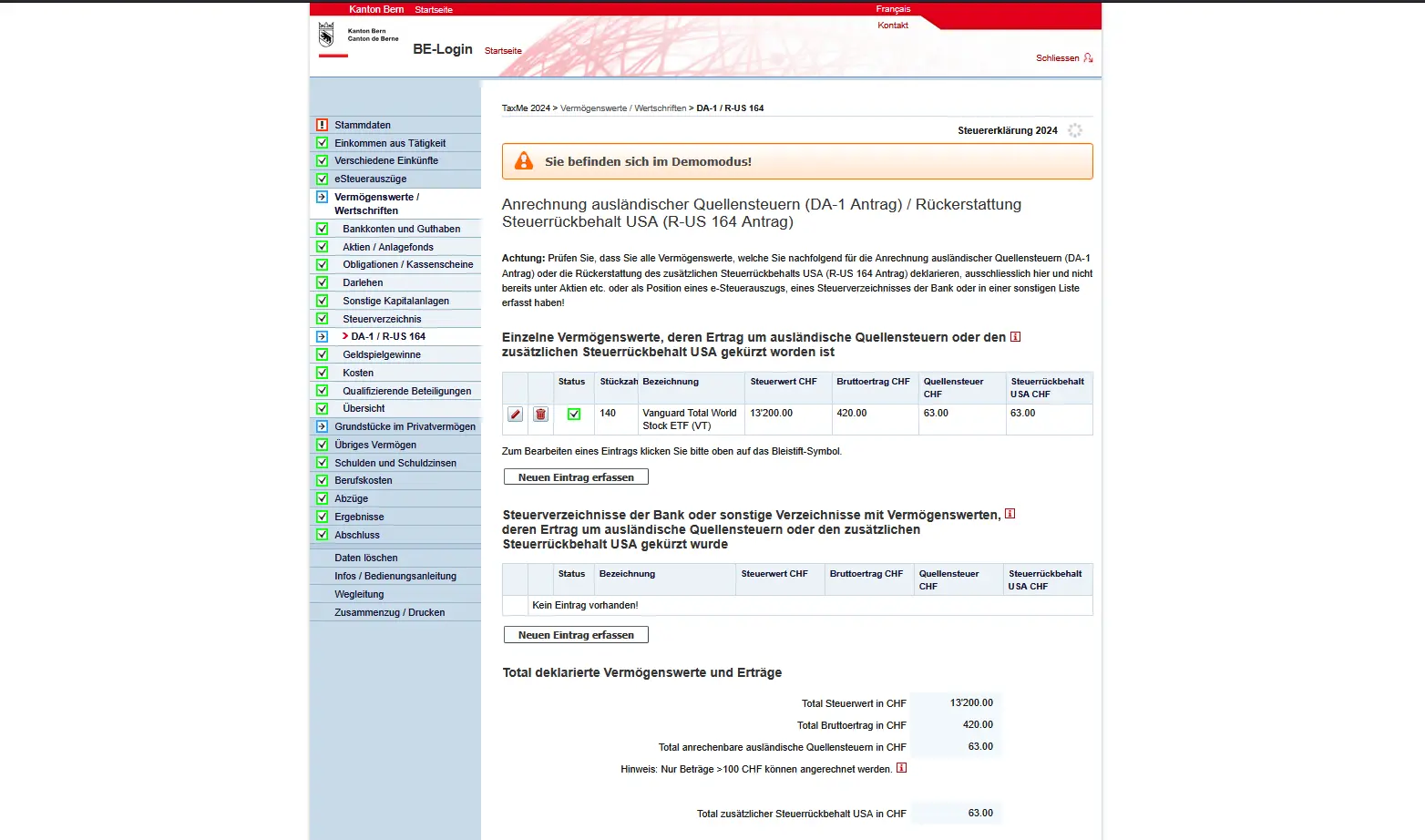
DA-1 / R-US 164: request for imputation of foreign withholding tax on US ETFs in the Swiss tax return
Taxable gambling winnings
If you have won a lottery or other game of chance during the tax year, be it Swisslotto, Euromillions, Sporttip or another game, you must declare the win here. The same applies to winnings in kind, such as travel, cars or precious metals. These are recorded at their market value at the time of winning.
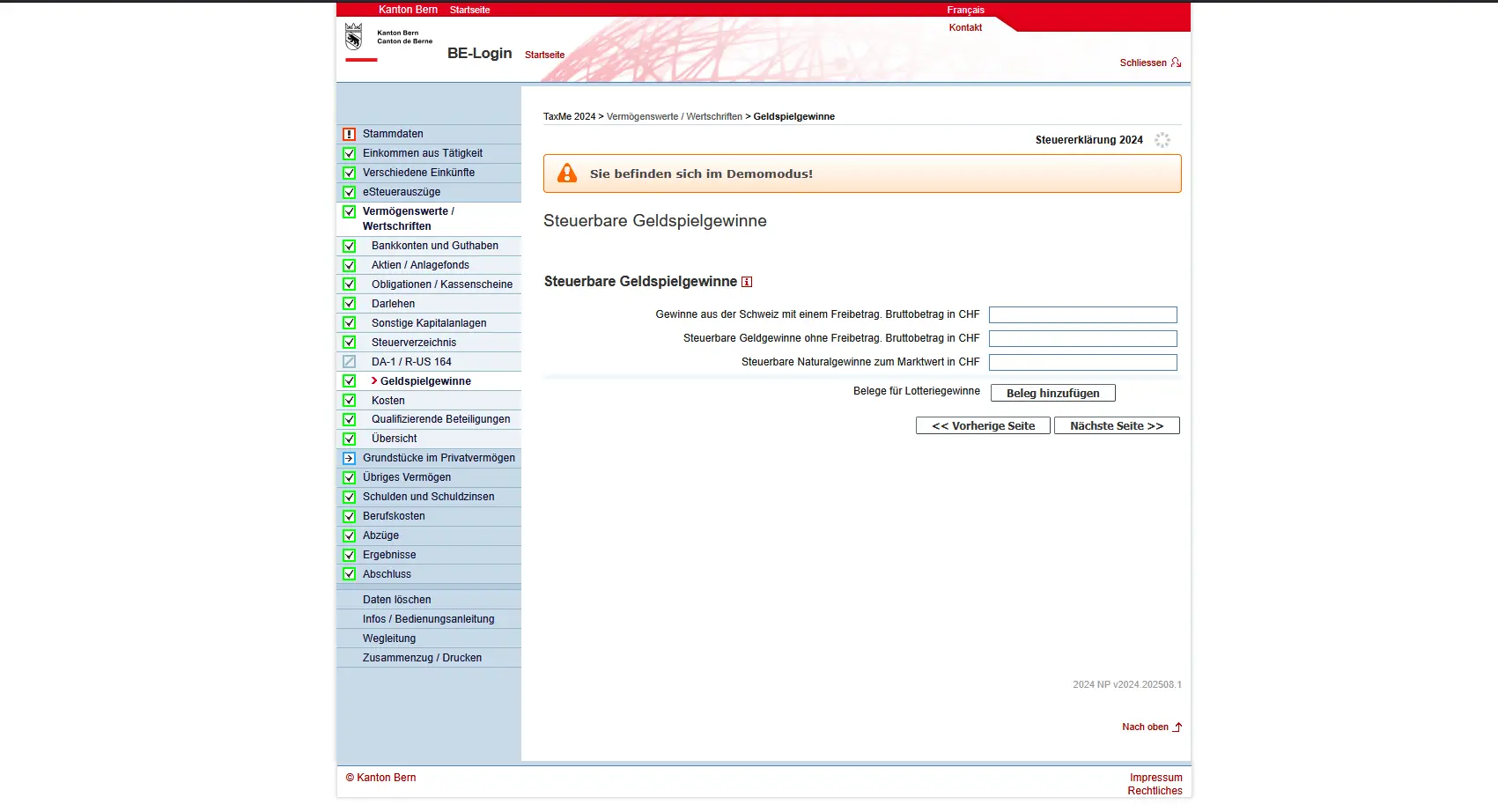
Entry of taxable gambling winnings in TaxMe-Online with gross amount and receipts for lottery winnings
Winnings from Switzerland benefit from a substantial tax-free allowance: up to CHF 1,037,000 for cantonal and municipal taxes, or CHF 1,056,600 for direct federal tax. Only the amount exceeding this limit is taxable, the rest is tax-free.
The situation is different for winnings with no excess. These include lotteries and games of chance abroad, winnings from foreign online games or sales promotion competitions (e.g. from retailers), if the individual winnings exceed the limit of CHF 1,000 (federal) / 1,100 (cantonal). You must declare them in full as income.
Fees
Securities and assets often entail costs, some of which can be deducted from your taxes. These are mainly the costs of looking after your assets, such as account maintenance fees, deposit or safe-deposit box fees, and fees for savings or investment accounts. You can also declare fees for tax statements (e.g. electronic tax statements) and even negative interest.
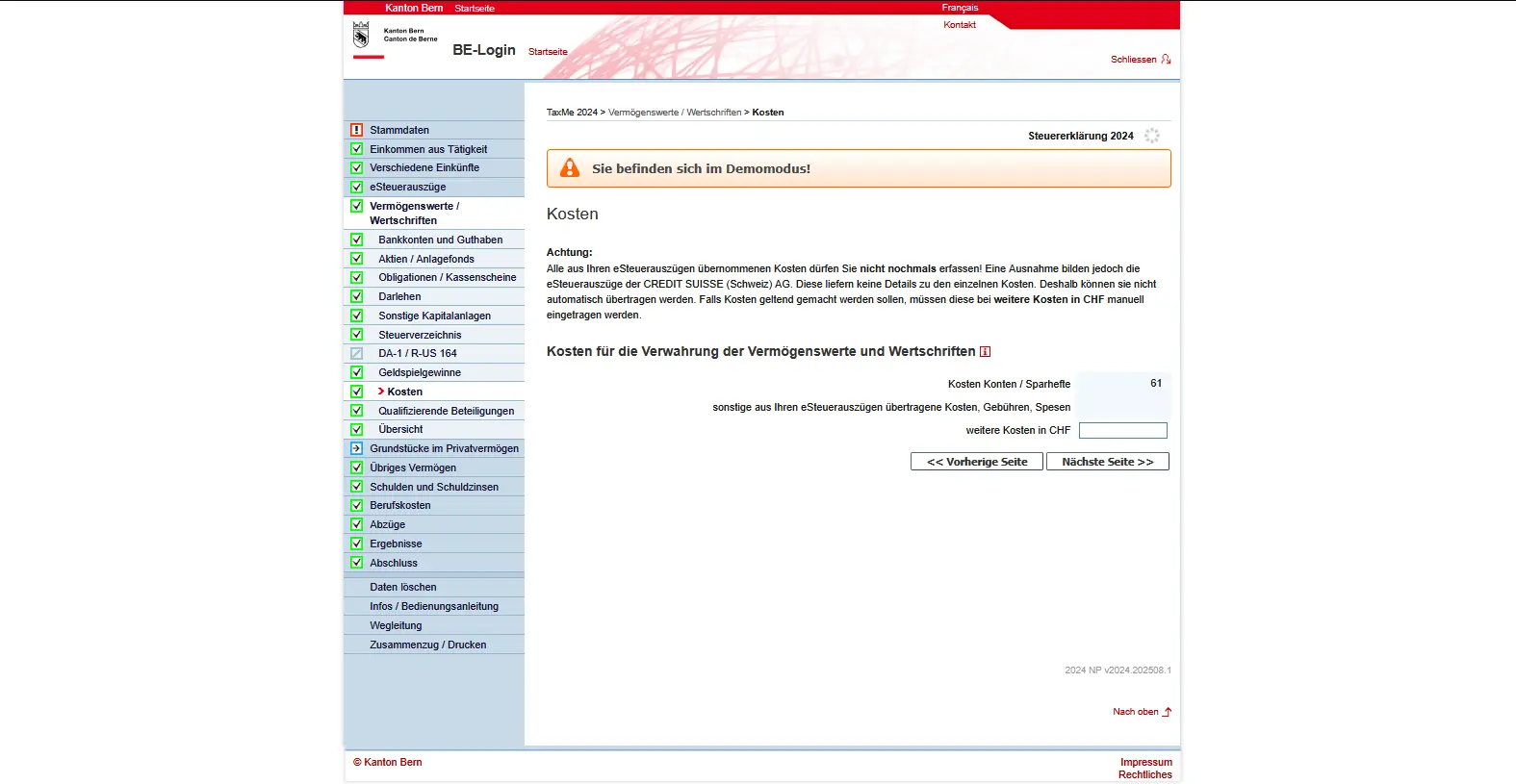
Not everything is deductible: active asset management fees, fees for buying or selling securities (e.g. brokerage fees, stamp duty), advisory fees or commissions are not included. The same applies to tax advice or the preparation of your tax return: you have to cover these expenses yourself.
You’ll find a full list of what’s deductible and what isn’t here: Fees for depositing assets and securities (Canton of Bern) (in German).
Qualifying holdings
If you hold a stake of at least 10% in the share capital of a joint-stock company or cooperative, these shares fall under the heading of qualifying holdings. This applies irrespective of whether you hold the shareholding in your private or business assets.
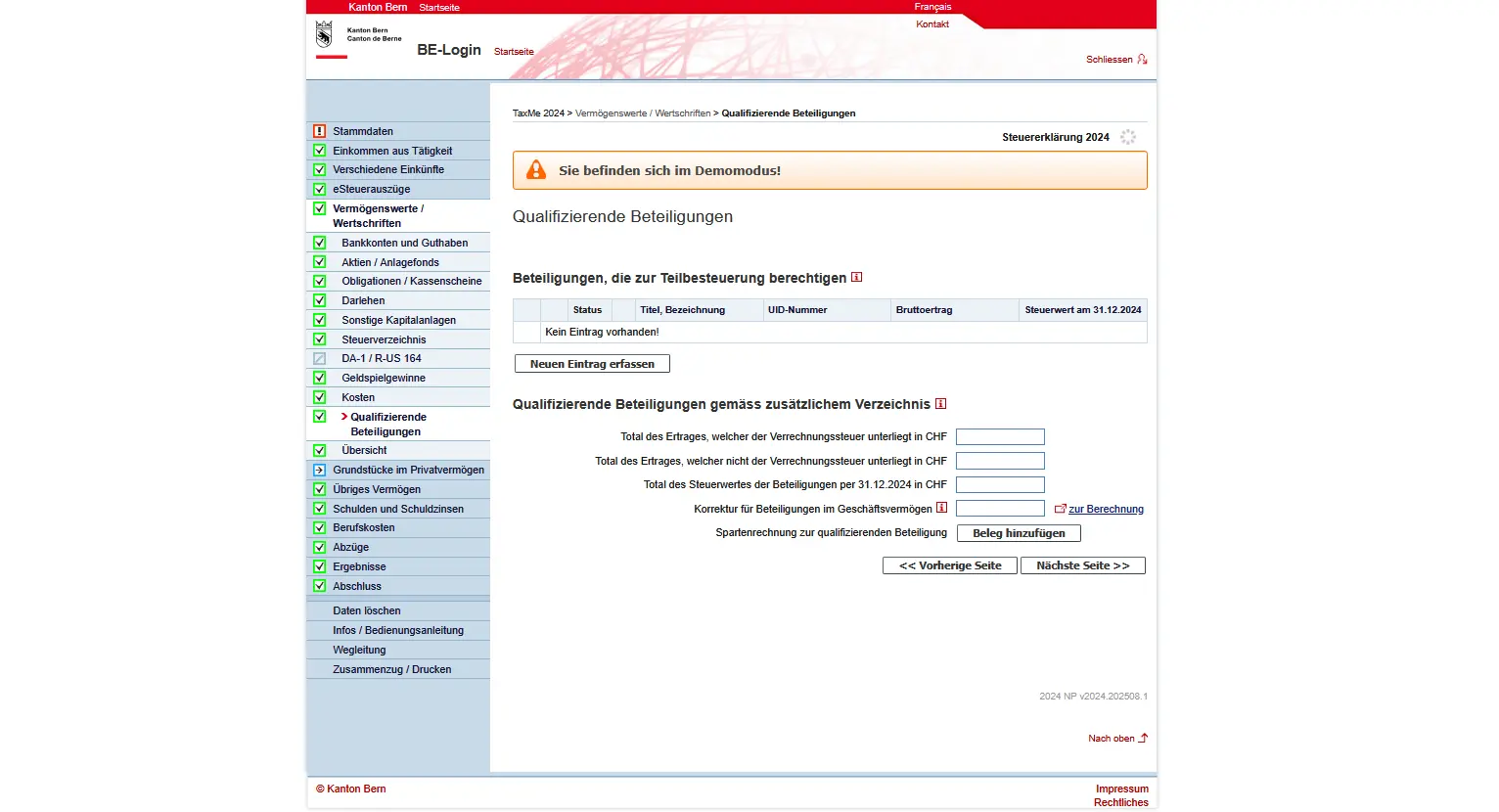
Here you enter the most important information: company name and registered office, UID number, number of shares, purchase and sale dates, dividend dates and tax value as at December 31 of the tax year. For unlisted Swiss companies, the tax value is set by the tax authorities.
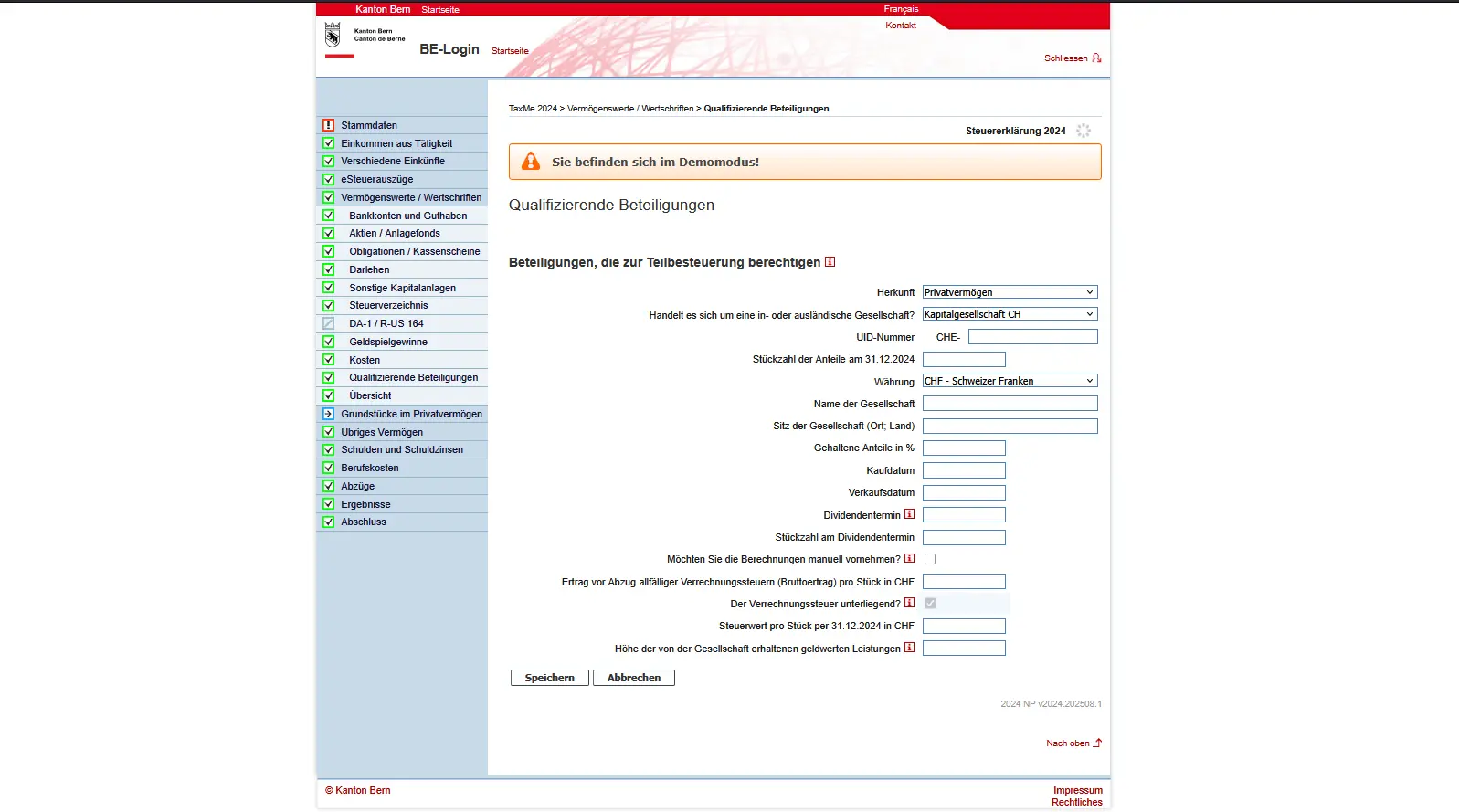
Please note: the shareholdings you discover here must not be entered additionally under shares/securities. For holdings in business assets, you must also set up an account by sector, so that income and assets are correctly separated.
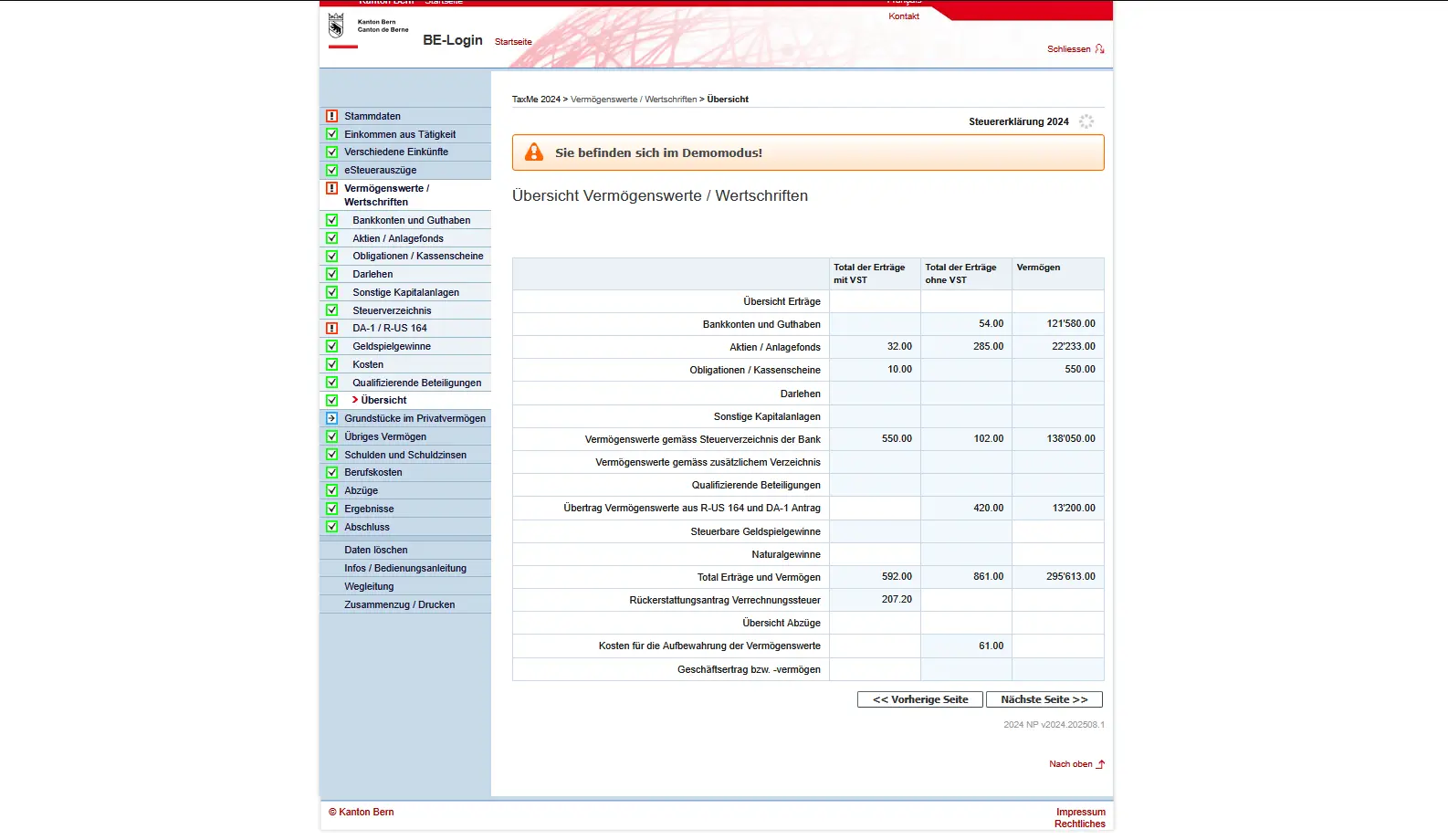
Overview of assets / securities
You’ve done it! You’ve finally declared all your assets and securities to the tax authorities.
In the overview, you can see at a glance all your seized assets and securities, including income with and without withholding tax, as well as the tax value.
Next step
Once your assets and investments have been fully declared, the last article deals with deductions: part 3 of our Bern TaxMe-Online tutorial. You can reduce your taxable income, for example, by deducting business expenses, health insurance premiums or donations.