
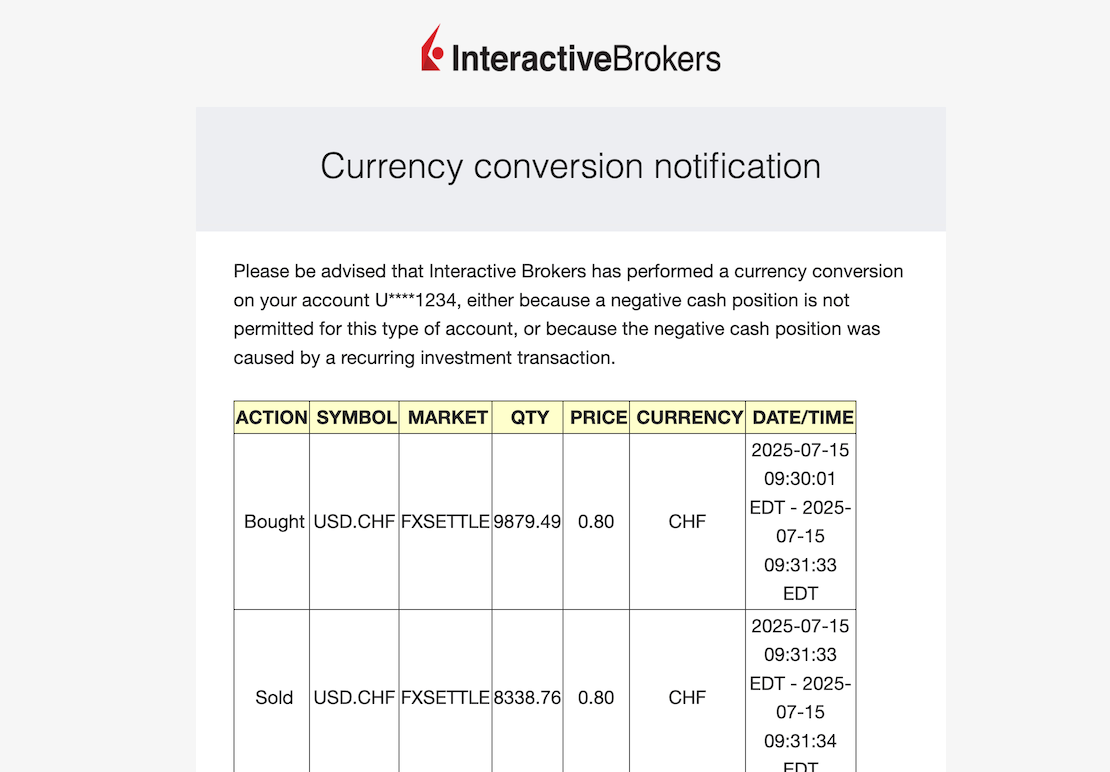
I recently received an email from a reader who was a little stressed after making his first ETF purchase on Interactive Brokers (IBKR):
I’m new to your blog and newsletter, so I followed your recommendations for IBKR. But I had a little surprise this afternoon…
I well received my CHF 10'000 in my account, I converted the 10k into USD, and once that was done, I bought my shares in the VT ETF and everything was perfect.
Except that in the afternoon, I received this e-mail, and saw that there had been several transactions made without my approval. I got a bit freaked out, because now, all my remaining cash is in USD, and I’ve got nothing left in CHF even though I wanted to keep some to invest in a Swiss ETF….
If you can shed some light on the problem, that would be great.
Interactive Brokers automatically converts your currency: here’s why
IBKR automatically converts your currencies for one reason: to prevent your order from failing when you do not have enough settled cash in the purchase currency.
So, if you get a “Currency Conversion Notification” email from IBKR, you have not been hacked.
In practice, IBKR auto-converts for two possible reasons:
- You don’t yet have any “settled” cash (i.e. available to use) in the purchase currency (USD, for example, if you want to buy the VT ETF)
- You’ve forgotten that purchase fees are charged in the currency of the security, so IBKR will dip into another currency where you have cash
A concrete mini-example:
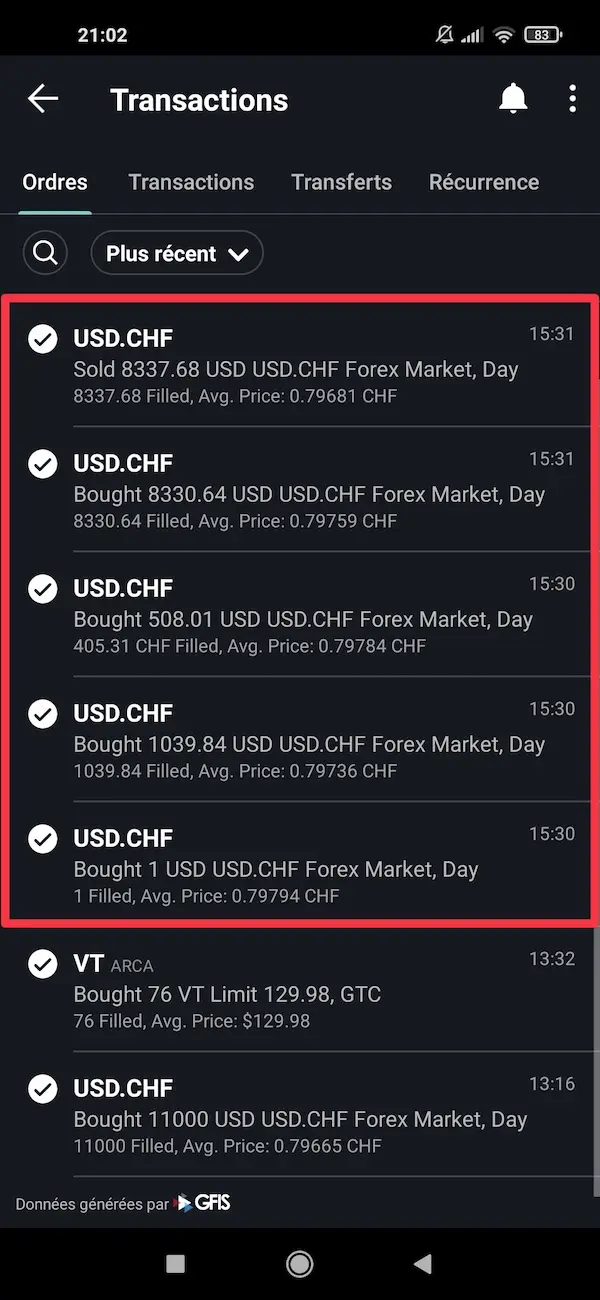
You want to buy the VT ETF in USD, but you’ve just converted CHF -> USD. If your USD are not yet settled (you have to wait 1-2 days), then IBKR will try to convert the entire amount of your transaction from your CHF. And if you’ve forgotten the USD fee, IBKR will convert a small amount of your CHF automatically so that your purchase goes through.
And that’s all there is to it. So don’t panic :)
The rest of this article shows you when IBKR does it, how much their currency conversions costs, and how to avoid these automatic conversions when you want to stay in control.
3 conditions that trigger an IBKR auto-conversion
IBKR automatically converts part of your cash when three conditions are met. Once you know these three elements, your stress level regarding this “Currency conversion notification” will be reduced to zero :)
In fact, the reality is: it’s just the system that wants your ETF order to go through.
When does IBKR convert currencies for you?
IBKR triggers an automatic currency conversion if all three conditions are true at the same time:
- You are on a “Cash” account
- You have not enough cash settled in the currency of the transaction (USD for the VT ETF, for example)
- You have enough cash settled in another currency (CHF, EUR, etc)
If these three points are met, IBKR converts what’s missing to execute your order. It’s automatic, and you can’t disable this behavior on a “Cash” account.
Why does IBKR trigger currency automatic conversion?
IBKR triggers automatic currency conversion for two very simple reasons, and very logical when you think about it:
1. Your cash is not yet settled
You converted CHF into USD today, but the money isn’t available yet (because T+2, see explanation later in the article).
IBKR therefore completes your transaction in another currency so as not to block your purchase.
2. You’ve forgotten the transaction currency charges
For example, when you buy an ETF in USD: the fees are also in USD. If you have 0 USD settled (because they were all used to buy the VT ETF if you’ve calculated the exact amount needed), IBKR will look for a small amount in another currency to cover these fees.
In both cases, IBKR prevents your order from failing or getting stuck.
Why this system surprises new users
This system surprises new users because they mistakenly believe that transactions have been made without their consent.
It’s scary!
This is what happens to you:
- You place an order to buy a VT ETF for the first time, not a little proud of yourself!
- Right afterwards, IBKR sends you a scary e-mail: “Currency conversion notification”…
- You’re under the impression that transactions have been made without your consent (like account hacking!)
- You thought you had enough USD cash, but you don’t know that settlement (the famous “cash settled”) is not instantaneous
- Whereas you just expected a message “Purchase order executed”, not “Multiple automatic conversions”
In short, it’s always surprising the first time, but it’s 100% normal. And once you understand how IBKR works, you feel in control again. Phew!
How much do IBKR automatic currency conversions really cost?
The question that often comes up once you’ve understood how it works is:
But then, as I understand it, you could buy VT directly with CHF, and IBKR would do the conversion themselves. Is this cost-effective or not, compared with manual conversion?
The answer: it depends on the amount of the transaction.
Automatic vs. manual conversion: the simple rule
At IBKR, you have two ways of converting currency:
1. Auto-conversion
Triggered automatically by IBKR if you don’t have enough of the right currency for your purchase.
2. Manual conversion
You do it yourself: “Convert CHF => USD “ before your ETF purchase.
The simple rule:
- Small amount (a few thousand) => automatic conversion is OK
- Larger amounts => manual conversion is cheaper
In practice, it’s mostly a question of costs, which I’ll explain just below.
When automatic currency conversion is more expensive
Automatic currency conversion is more expensive when the 3-pip spread costs more than the $2 fixed fee for a manual conversion.
Without jargon: automatic currency conversion costs 3 pips, i.e. 0.0003.
So for the currency pair USD/CHF, if the current rate is 0.8062, a variation of 3 pips represents 0.0003 / 0.8062 ≈ 0.000372, or around 0.0372%.
In other words, at the time of writing, a spread of 3 pips is equivalent to an implicit margin of around 0.0372% on the exchange rate at the time of conversion.
For its part, manual currency conversion on IBKR costs:
- Minimum USD 2 for all exchanges up to USD 100'000
- Then 0.002% above that amount
And so..:
- If you exchange a small amount, 0.03% costs less than 2 USD
- If you trade a large amount, 2 USD costs less than 0.03%.
It’s mathematical.
The “Mustachian” threshold: when to choose manual or automatic?
Good news: you don’t need to get out a calculator, I’ve done it for you.
X is the amount you want to obtain in USD.
With the following formula, we want to know the amount in USD at which the exchange charges exceed 2 USD:
X * 0.000372 = 2
2/0.000372 = 5376.34 USD
Here’s the simple threshold:
- Below approx. 5'376.34 USD -> automatic currency conversion is cheaper
- Above 5'376.34 USD -> manual currency conversion is cheaper
So the simplified Mustachian rule is:
- Are you investing between 1 and 6'000 USD? Let IBKR auto-convert.
- Investing 6'000 USD or more? Do your conversion manually.
Clear and precise!
N.B. if you see that the CHF-USD exchange rate has changed significantly (up or down), recalculate to update your range.
The IBKR double exchange rate trap (and how to avoid it 100%)
The only real “trap” with IBKR isn’t the self-conversion itself.
It’s when IBKR makes two successive conversions, in one direction and then in the other, just because an operation hasn’t been “settled” yet.
And that can cost you a lot of fees.
Here’s how it works, and how to avoid being duped.
The IBKR double exchange trap explained simply
This trap comes into play in a very specific situation:
- You manually convert CHF -> USD
- You use this money too soon to buy a stock that settles faster
- IBKR sees that your USD has not yet settled
- For your order to go through, it:
- automatically reconverts another currency to USD
- then sometimes reconverts in the other direction to cover costs
Result: you get two automatic conversions (round trip) at the IBKR spread.
That’s the famous “double change”.
Here’s a concrete example:
- You convert CHF -> USD on Monday
- You buy a US ETF on the same Monday (which settles at T+1)
- Your USD are not yet settled
- IBKR automatically converts CHF -> USD…
- and sometimes change once more some USD -> CHF to cover fees
You’ve just paid two automatic spreads for nothing…
Understanding the famous T+0 / T+1 / T+2 without jargon
T+0, T+1, and T+2 represent the number of days required for your cash to be actually settled and usable after a conversion or purchase.
This sign tells you when the converted cash is really "settled", i.e. usable.
Your purchase or conversion is made on the same day, but the money is only really available for use at the end of the T+1 or T+2 period.
For example: you convert CHF into USD on a Monday. Well, since it’s T+2 for this currency pair, the USD cash will really be available at the end of the day on Wednesday to buy your VT ETF in USD.
And the purchase of a security also has a T+X: imagine you have a security purchase that is T+1, while your currency conversion is T+2, so you buy a security with a shorter lead time than your exchange, and IBKR automatically converts it twice.
Summary of the jargon:
- T+0 = the day you make the transaction
- T+1 = one working day later
- T+2 = two working days later
How to avoid automatic currency conversions on Interactive Brokers
Yes, IBKR auto-converts to help you… but sometimes you’d rather keep your hand in.
Good news: just follow a few simple rules and no more conversions will go “behind your back”.
The simple way to stay in control
The cleanest way to avoid automatic conversions is..:
1. You first convert manually to the correct currency
Example: CHF -> USD if you want to buy VT.
2. Wait for the money to settle
In general:
- Currency conversion: T+2
- ETF UCITS: T+2
- US equities: T+1
You can see how much cash has been “settled” from the Interactive Brokers Client Portal > Portfolio:

3. You then place your buy order.
As long as you have enough cash settled in the right currency, IBKR won’t do anything automatically.
It really is that simple.
Why you should always leave a small amount in base currency
This is THE classic trap: you convert 100% of your CHF deposit into USD… but the costs of your conversion are in CHF.
Result: IBKR has to auto-convert USD -> CHF to pay these fees, even if you didn’t want to.
So the Mustachian rule: never convert all your cash. Always leave a small amount in the base currency (CHF, EUR or USD, depending on your account).
This avoids unnecessary auto-conversions and, even worse, double conversions.
- Exchange fees and brokerage commissions are calculated per market, and are in the same currency as the transaction
- “Other fees”, such as market data subscriptions, are invoiced in the base currency
- Commissions on foreign currency conversions are billed in the base currency too
How IBKR chooses which currency to sell automatically
IBKR does not publicly document the currency selection algorithm for automatic conversions…
But one thing is for sure: IBKR first converts to a currency where you have enough cash to fully cover the operation (logical!).
The other sure thing if you really want to go far: use the IBKR Trader Workstation (aka TWS) and on the currency of your choice, indicate “Liquidate last”. This means: “Dear IBKR, only touch this currency as a last resort.”
Cash vs Margin: how IBKR reacts to your account type
How your IBKR account react to currency conversions depends on the type of account you have.
A “cash” account and a “margin” account have nothing in common when you buy in a currency you don’t yet hold.
Here’s the difference, simply explained.
What IBKR does on a cash account
With a cash account, you need to have the money “settled” in the exact currency of the transaction for the order to go through.
If this is not the case, IBKR automatically converts to the correct currency, just enough to cover the purchase + costs.
And it’s impossible to disable.
What IBKR does on a margin account
With a margin account, it’s completely different: IBKR never converts automatically.
If you don’t have enough USD, EUR or CHF for a transaction:
- the order goes through anyway
- IBKR gives you a negative balance in the currency concerned
- and you automatically borrow that currency
- paying margin interest for as long as the balance remains negative
This behavior is deliberate: the margin account is designed precisely to have the right to go into the red (by paying interest to IBKR).
IBKR FAQ: Currency conversions
Does IBKR always convert currencies automatically?
No. IBKR only does this on a cash account when you don’t have enough cash settled in the purchase currency.
How can I avoid automatic conversions on Interactive Brokers?
Convert manually, wait for the money to be settled (T+2), and always keep a small amount in the base currency.
Is IBKR’s automatic conversion expensive?
Below approximately 6'000 USD, it costs less than manual conversion. Above that amount, manual conversion is more advantageous.
Is it normal to receive a currency conversion notification?
Yes. This is normal behavior for IBKR to prevent your order from failing if your cash is not yet settled.
I transferred €1 to my IBKR account, and it was automatically converted to CHF. Why?
This is normal, as amounts transferred below 10 USD are automatically converted to the base currency.
Conclusion: no, your IBKR account hasn’t been hacked
If you get a “Currency conversion notification” email, don’t worry: your IBKR account hasn’t been hacked. It’s just how Interactive Brokers works.
IBKR automatically converts your currency when:
- you have a “Cash” account
- you don’t have enough settled cash in the transaction currency
- but you have enough money in another currency
This system always surprises new users, but its purpose is simple: to prevent your order from failing.
With the few rules you’ve just read, you can:
- understand when IBKR will convert
- avoid double conversions
- choose between automatic and manual currency conversion
- keep full control over your currency
Now that you understand how IBKR converts your currencies, you can invest with confidence on Interactive Brokers.
PS: if you want to learn more, I’ve created a comprehensive IBKR guide that explains (almost) everything about Interactive Brokers: opening an account, fees, conversions, ETF purchases, etc.
And you, do you convert currencies manually or automatically on IBKR? And why?