
In the second part of the FriTax guide, we have completed the following sections of our Swiss tax return (for the canton of Fribourg): insurance premiums and contributions and statement of securities.
Let’s move on to the rest of the categories, including the interesting real estate section!
Step 1: Buildings, land and forests
Before submitting my tax return, I always go through the same checklist to avoid costly oversights. I detail all my Swiss tax deductions here, with concrete real-life examples:
My Swiss tax deductions: real-life example and checklist (2026)
Unlike the canton of Vaud, in Fribourg there is no deduction for rent if you are a tenant.
On the other hand, if you’re an owner, you’ll need to fill in various fields, such as rental value, tax value, debt and maintenance.
Following the vote of September 28, 2025, the rental value will disappear in 2028 at the earliest, so a lot will change in these fields in the future. In the meantime, here’s how to fill them in:
Rental value
To determine the rental value of your apartment or house, you need to fill in the “Questionnaire pour l’estimation des valeurs locatives et fiscales des immeubles non agricoles” of the canton of Fribourg.
Once you know your rental value, you can determine the tax value of your property.
Tax value
The tax value is determined from the rental value of your property.
To calculate it, perform the following steps:
((Rental value capitalized at 8%) x 2) the market value, divided by 3
Let’s take an example: if you buy a house for CHF 800,000 with a rental value of CHF 15,000, you get..:
- Capitalized rental value at 8%: (15'000x100)/8 = 187'500
- ((187,500 x 2) 800,000)/3 = CHF 391,666
- Your property will therefore have a rental value of CHF 15,000 and a tax value of CHF 391,666
- This means that CHF 15,000 will be added to your income and CHF 391,666 to your assets
The tax value will also determine your future property tax bill. Each commune in the canton of Fribourg has its own coefficient, which varies between 1 and 3‰; you can find this information in the document “Coefficients et taux des impôts communaux, état au 1er août 2018”.
If you bought your property in a commune with a coefficient of 1‰, your future real estate contribution will therefore amount to 1‰ of 391'666, i.e. CHF 391.60 per year.
If you bought your property in a commune with a coefficient of 2‰, your future property contribution will therefore amount to 2‰ of 391'666, i.e. CHF 783.30 per year.
If you bought your property in a commune with a coefficient of 3‰, your future property contribution will therefore amount to 2‰ of 391'666, i.e. CHF 1174.80 per year.
It’s best to choose your future commune carefully when buying a property, because you realize that you can easily make nice savings in the long term by opting for a commune with a low coefficient.
With these new figures, you can now complete page 2 of the “Property status” section:
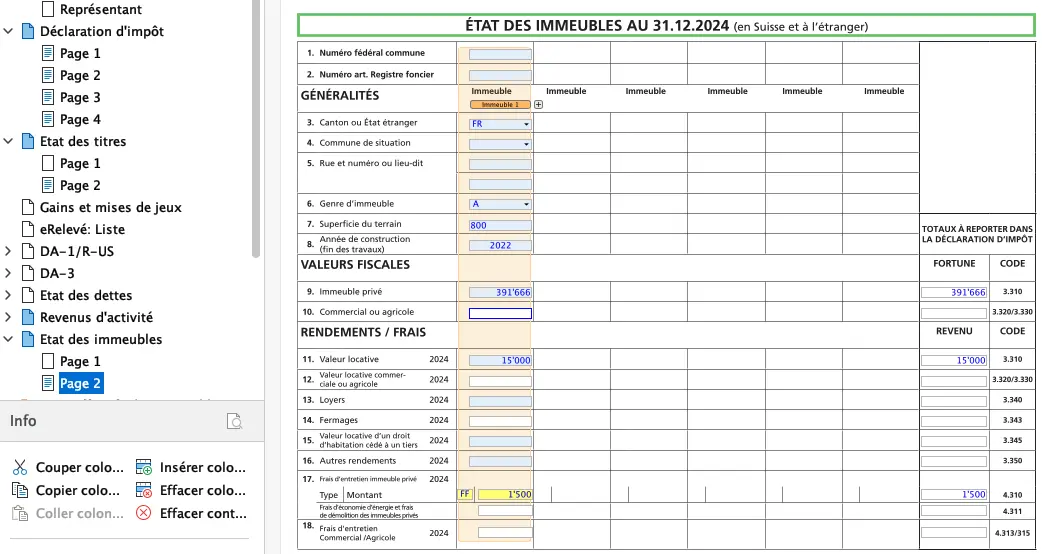
Of course, you’ll still need to fill in the various fields relating to the federal number of the municipality or the number of the item in the land register.
For maintenance costs (point 17 in the previous image) you have two possible options:
- 1/ FF: Frais Forfaitaires (lump-sum costs)
- Automatically filled in, 10% of rental value if your property is less than 10 years old, 20% if it is more than 10 years old
- 2/ FE: Frais Effectifs (actual expenses)
- Expenses incurred for repairs or renovations, provided they do not increase the value of the property
- Insurance premiums for the building
- Property contribution
- Water treatment and drainage / basic annual fee
- Household waste / basic annual tax
The complete list of possible deductions can be found in Fritax, “Instructions” tab, appendix 4.
When all this is completed, you’ll have this in your declaration:
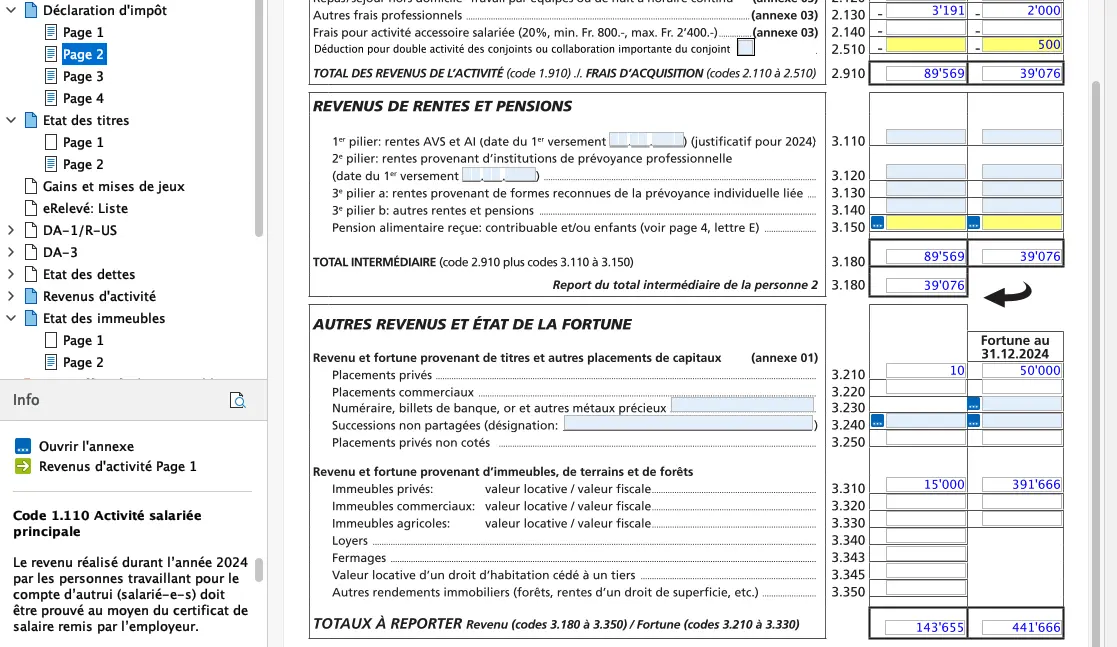
Item 3.310 has been filled in with rental value and tax value:
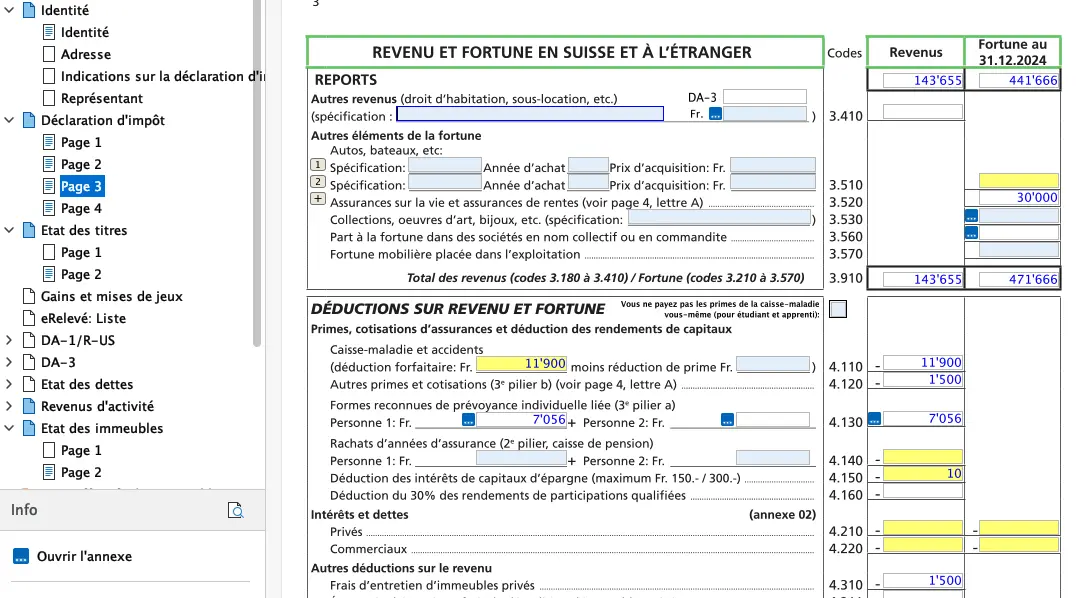
Item 4.310 has been filled in with the amount of the flat-rate expenses, i.e. 10% of the rental value of CHF 15,000.
Step 2: Interest and debts
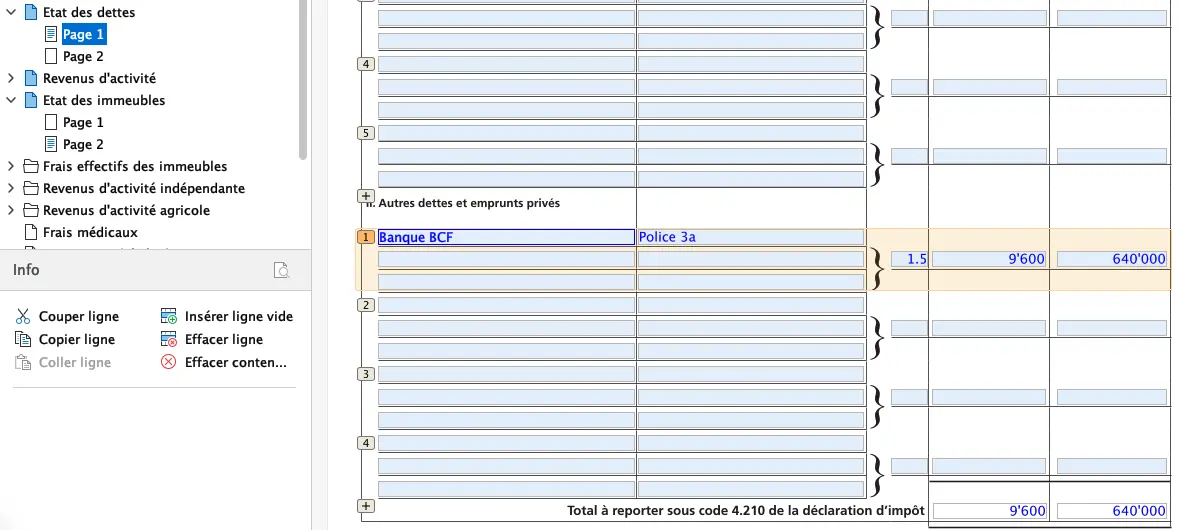
Using the previous example, buying a house for CHF 800,000, you will have invested CHF 160,000 in equity. Your loan will be CHF 640,000.
Let’s say you’ve negotiated a fixed rate of 1.5% with your bank, and the bank has accepted your 3a policy or 3a account as collateral.
With these figures, you can fill in Page 1 of the Statement of debts:
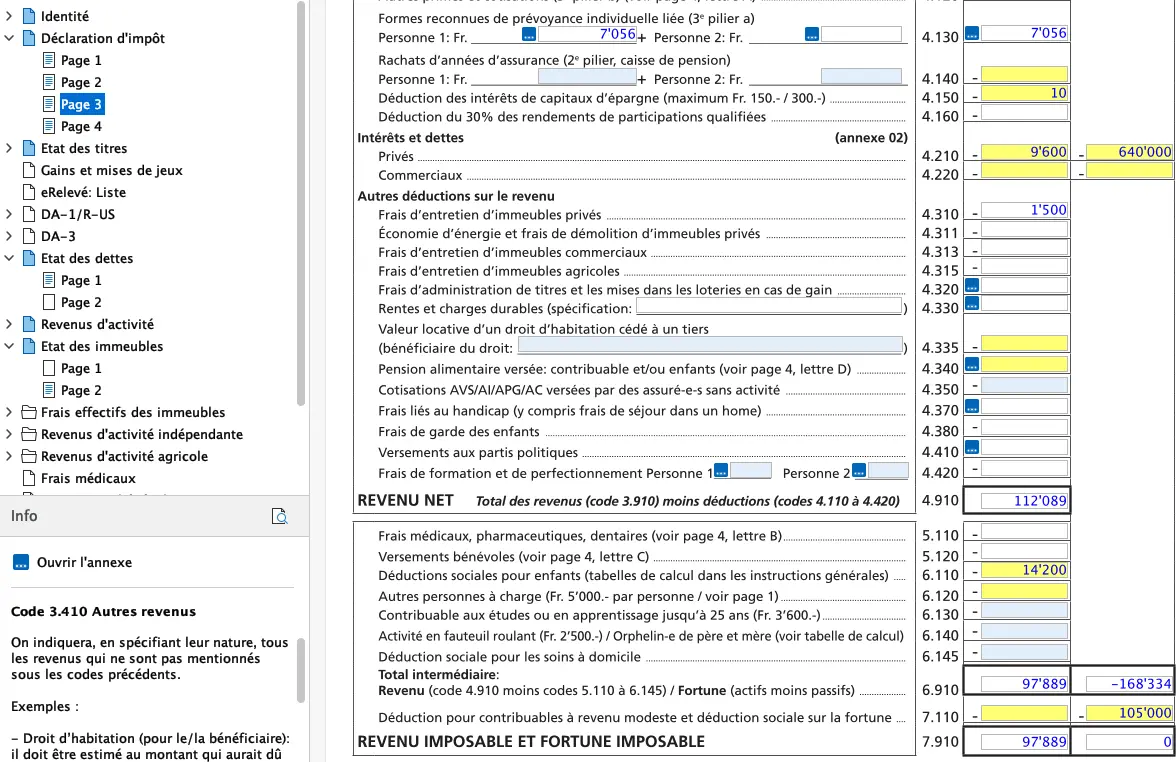
As a result, point 4.210 of the declaration has been updated:
If you own other assets, such as one or more investment properties, simply repeat steps 1 and 2 for each asset. The fields on the tax return will be updated automatically.
Other net worth assets
If you own a car, motorcycle, boat or collection of any kind, simply fill in fields 3.510, 3.520 and/or 3.530.
Medical expenses deduction
This takes place in section 5.110 of your declaration. All you have to do is add all the medical expenses you have incurred throughout the tax year. But not everything can be deducted.
The software adds a deduction corresponding to 5% of net income (code 4.910). Only the difference can be deducted. So if you have to enter all your expenses manually, I advise you to calculate the total amount of your expenses for the year and enter a single line with this amount first. If this entitles you to an additional deduction, go on to the next step, which is to create a line for each expense.
If you are not entitled to a deduction, delete the line previously created. This saves you a lot of time, as I’ve already experienced ;)
Volunteer payments
If you have made a voluntary contribution, you can deduct it (or them) under item 5.120. Please note that the minimum deductible amount is CHF 100 and the maximum is 20% of net income (code 4.910).
Proof of voluntary contributions need not be attached to the tax return. However, the tax authorities reserve the right to carry out a subsequent audit. You should therefore keep all receipts until the final tax assessment.
Tax calculation
To find out the total amount to be paid, just click on the last tab “Calcul de l’impôt” and you’ll get there:
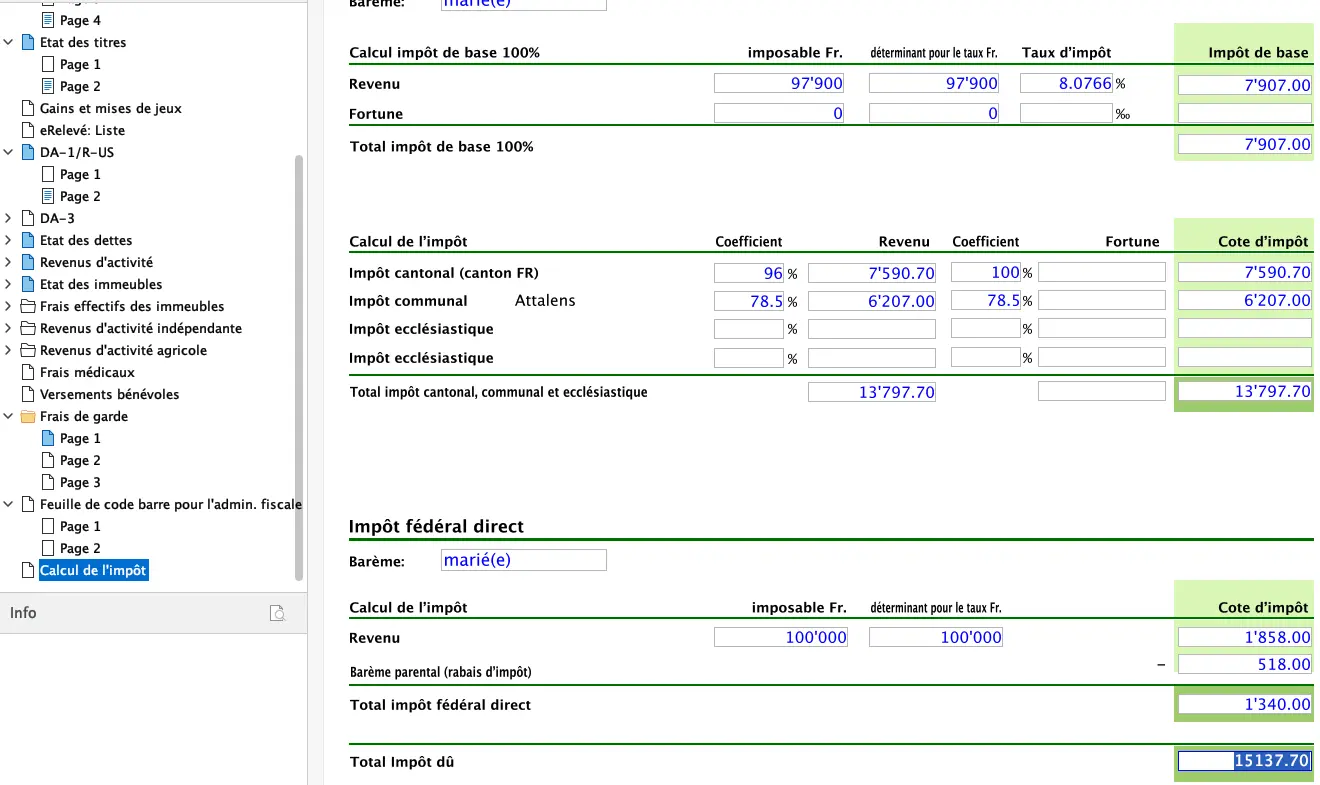
If the amount to be paid is equal to or less than the advance payments you made, you don’t need to do anything. Any overpayment will be automatically credited to your account once your tax return has been validated.
If the amount to be paid is higher than the advance payments you have made, then simply pay the balance using the payment slip you have received.
The final step is to send your declaration electronically. To do this, click on the button provided. You may be asked to attach supporting documents. Once you’ve done this, you’ll receive a receipt, which you should keep as proof that you’ve submitted your declaration. You can also print out your declaration in PDF format for your personal records.
Congratulations, you’ve completed your tax return.
And as usual, if you find any other (legal!) tax optimization ideas in the screenshots above, don’t hesitate to let me know.