
Spring is slowly approaching. The birds are singing, the days are getting longer and a letter from the tax authorities in the canton of Fribourg has arrived… it’s the access data for your tax return.
It used to stress you out. Now, thanks to my guide, we’ll sort it out in no time at all.
Ready to go?
Step 1: Access the FriTax service (tax declaration)
Despite what the name of the Fribourg software might suggest, Fribourg residents must pay their taxes, just like any other Swiss citizen!
To access the Fritax service, simply visit the State of Fribourg website.
Unlike VaudTax, Fritax is not yet available online. The canton of Fribourg plans to replace FriTax with an online service by 2027.
You’ll need to go to this page to install the FriTax software on your computer. Choose the version that corresponds to your operating system and follow the instructions.
Step 2: FriTax home page
When you launch FriTax, this is what you get:
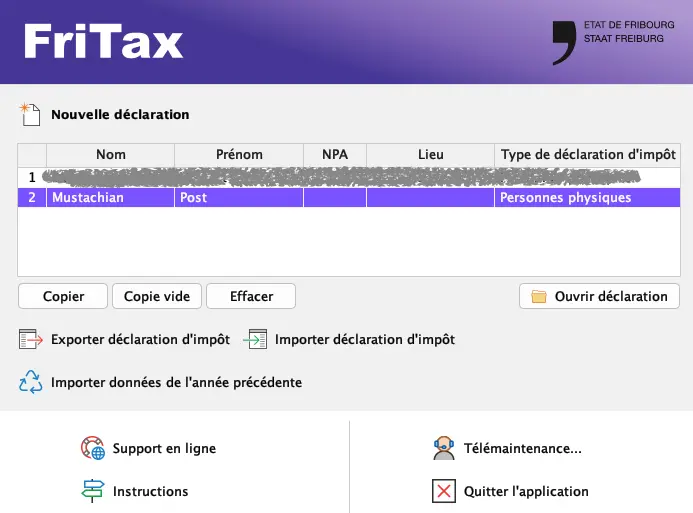
On the home page, you can easily import data from the previous year, which is handy if you’re doing this tax return on another/new computer.
The software allows you to have a maximum of 10 tax returns. You can therefore copy your official declaration to run several simulations.
When you’re ready, just click on “Ouvrir declaration”.
N.B. Remember to save regularly! It’s no fun doing it once, let alone twice!
Scenario for this tutorial:
- Married couple
- 2 children with childcare expenses
- He works at 100%, employer pays for lunches
- She works 70%, no employer contribution for lunches
- He commutes by car, she by public transport
- Pillar 3a for him, pillar 3b for her
Step 3: Personal data
If you have imported or retrieved your declaration from the previous year, all this data is pre-filled.
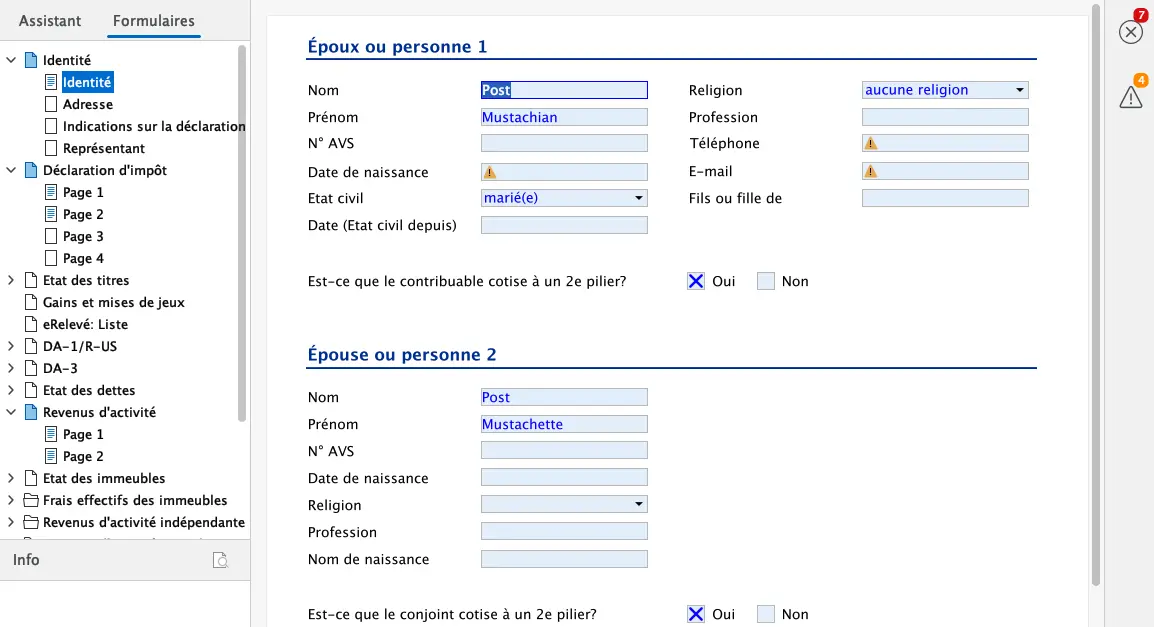
If you’re starting from scratch, simply fill in the four tabs:
- Identity
- Address
- Tax return details
- Representative
If there are any errors or missing information, you’ll see it in the top right-hand corner of the screen. To find out what’s wrong, click on the icons.
On the “Indication sur la déclaration d’impôt” tab. Don’t forget to select your commune of residence on 31.12. The automatic tax calculation will be based on this commune.

Step 4: Tax return
The basis for the tax return is in this chapter, from which you have all the links to the various appendices to complete the tax return.
- Page 1 concerns the personal, professional and family situation as at 31.12.
- Pages 2 and 3 summarize income and assets
- Page 4 is used to enter various points:
- All forms of insurance (other than 3a)
- Medical expenses
- Voluntary contributions
- Alimony payments
- Capital benefits
- Simplified procedures under the law on undeclared work or employment cheques
Page 1: Personal, professional and family situation
All you have to do here is enter your personal details and those of your dependants.
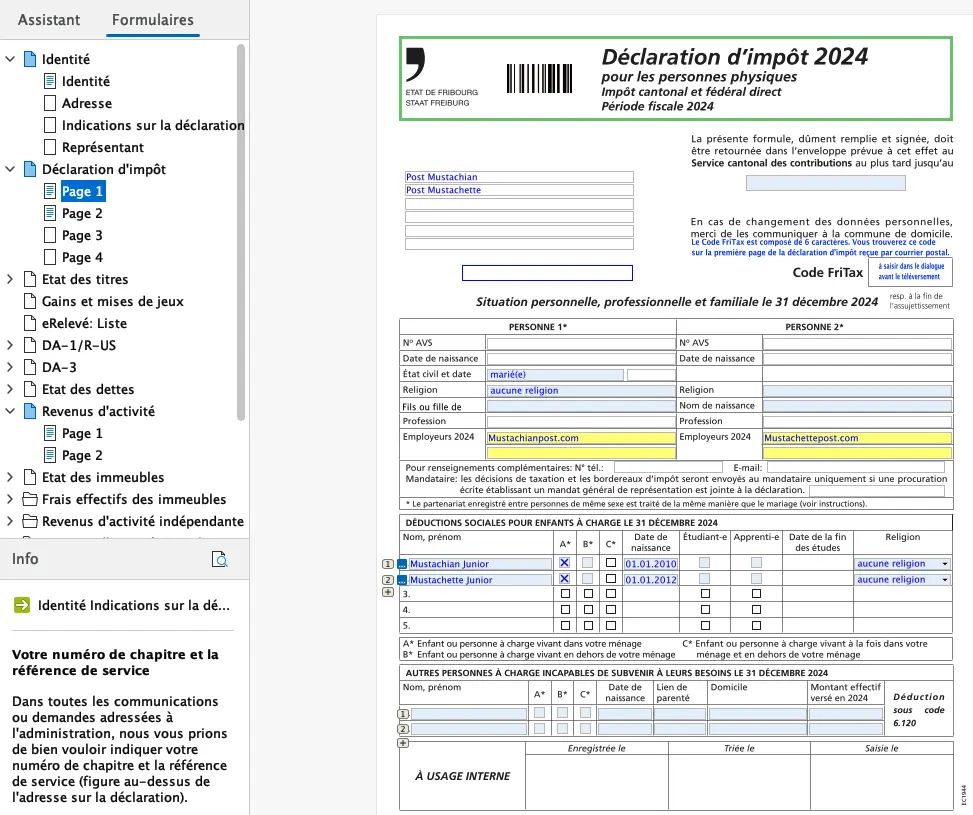
If you haven’t already noticed, a green arrow appears to the right of the boxes where you need to enter information. If you click on it, you’ll be taken directly to the page you need to fill in, so that the data you’ve entered will automatically appear in the tax return fields.
All this data is repeated from year to year, so that most of the work has to be done the first time around, and in subsequent years, all the information will already be there. All you have to do is change what needs to be changed to reflect your personal situation on 31.12.
Page 2: Summary of income and assets
From here, either click on the blue square (to the left of each box) or on the green arrow (to the right of each box) and you’ll automatically be directed to the corresponding form to fill in.
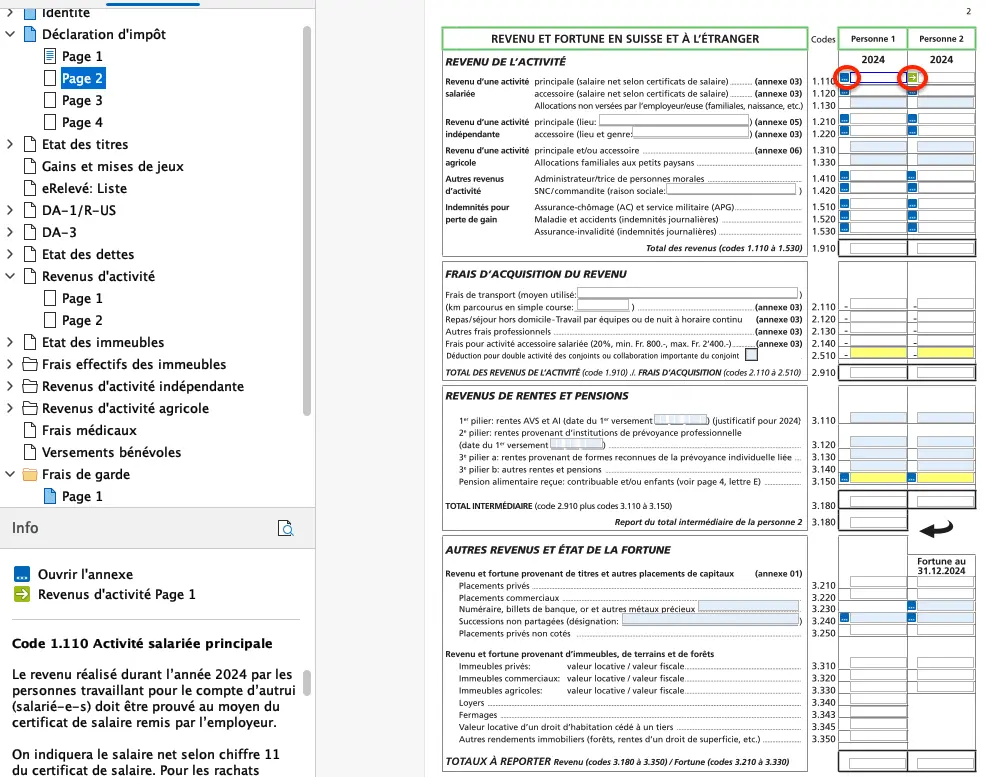
Once you have completed the form, click on “Fermer” or simply on “Page 2” to return to the declaration.
The information entered in the various appendices is automatically replicated in the fields on Page 2-4.
Income
On page 1 of the “Revenus d’activité” appendix, you enter your net salary, which appears on your salary certificate. This is also where you enter your transportation costs.
In our example:
- He earns CHF 100,000 net per year at 100%.
- She earns CHF 45,500 net per year at 70%.
- He goes to work by car, single journey of 40 km
- She goes to work by bus, TPF season ticket for 4 zones, 2nd class at CHF 1404.-/year.
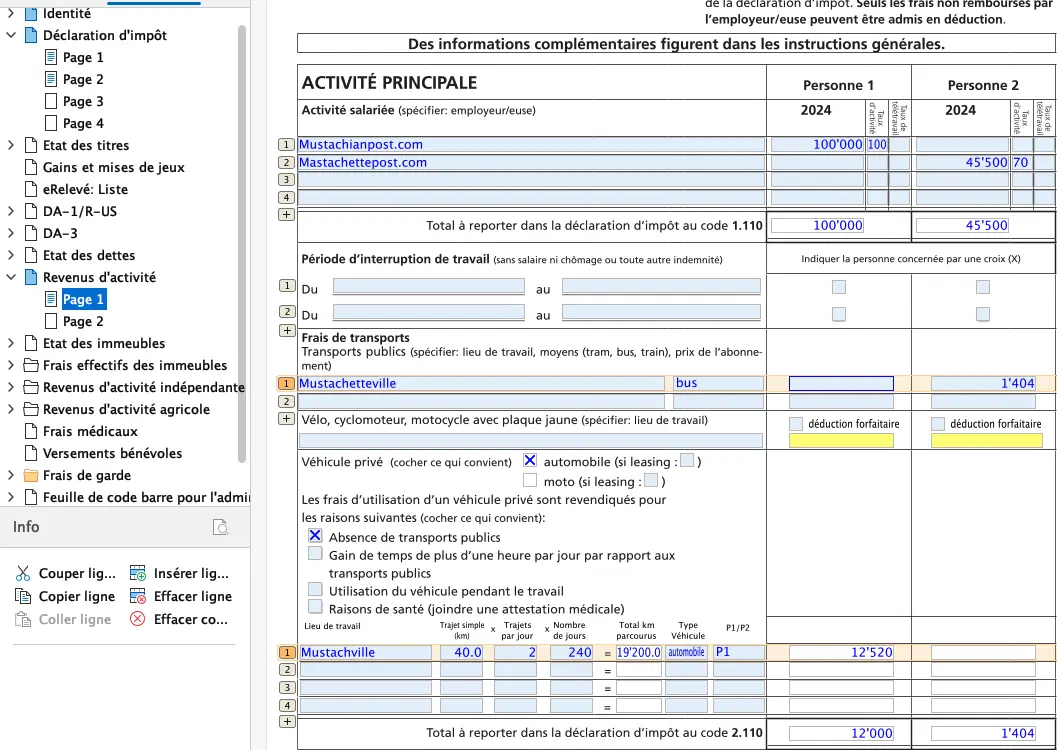
Once all the fields have been completed, simply click on “Page 2” of the tax return. The amounts previously entered are automatically transferred here.
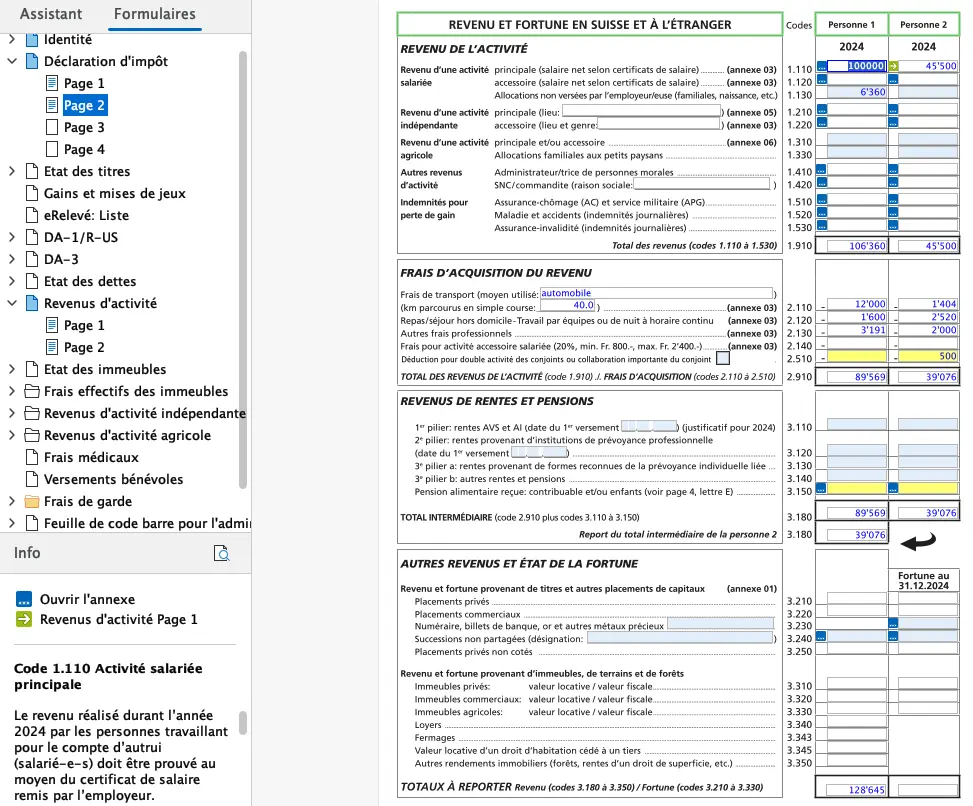
For income, you still need to add family allowances, unless your employer pays them directly to you and they are already shown on your salary certificate.
Our fictitious couple have 2 dependent children. The allowance in the canton of Fribourg is CHF 265 per child per month. This gives us a total of CHF 6'360.- to be entered in the corresponding box on the tax return.
You can still deduct:
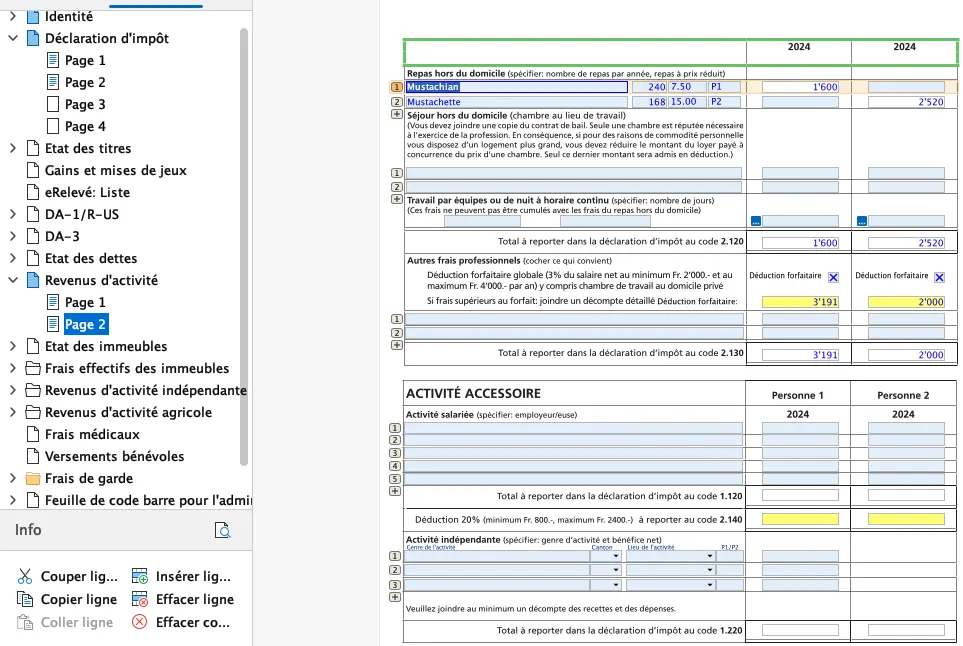
- meal expenses
- other business expenses
According to our scenario, he receives a contribution from his employer for meals (box ticked on the salary certificate), she does not.
Neither of them has had any training or other professional expenses this year, so we tick the “Déduction forfaitaire” box (automatic calculation).
The result on page 2 of the “Revenus d’activité” appendix is as follows:
Back on page 2, your declaration now looks like this:
Next step
If you’re salaried like me, these first steps were easy enough.
In part 2 of our FriTax tutorial, we’ll talk about the following sections:
- Insurance premiums and contributions
- Statements of securities
And if I’ve missed a tax-saving trick in the screenshots above (or if you have any questions), let me know in the comments section below.