
You’ve done your homework. You opened your Interactive Brokers account (aka IBKR), wired your first CHF, picked the ETF you want to buy by following my blog (or my program).
But the moment you open the IBKR app or website, the interface hits you hard: multiple result lines for the same search, with cryptic “codes”…
And that’s when you ask yourself THE question:
What if I click in the wrong spot? What if I buy the wrong ETF without realizing it?
That’s exactly the fear a reader recently shared with me:
Broker interfaces are cluttered and hard to grasp at first glance, and there’s a real risk of buying the ‘wrong’ security… how, with IBKR, can I be sure I’m buying the right ETF?
— Andrea (blog reader)
It’s a healthy fear.
Clicking on the wrong security potentially means wrong ETF, wrong currency, wrong tax setup, or unnecessary fees. Plus the time wasted to fix it (I’m speaking from experience here…).
Good news: there’s a simple method to make sure you buy the right ETF, and it boils down to three words: ISIN and IBKR SmartRouting.
We’ll use our famous VT ETF as our running example.
By the end of this article, it’ll take you 30 seconds to verify you’re buying the right security. And you’ll also know what all those lines mean (SMART, ARCA, AMEX, BATS…) that show up in your Interactive Brokers search results, so you never have to ask yourself that question again.
Find the ISIN of the right ETF before even opening IBKR
The ISIN is the globally unique identifier of every security listed on a stock exchange. The VT ETF has the ISIN US9220427424, and no one else has that one. So all you need to do is search by ISIN in IBKR, and you land right on the correct ETF (or stock, bond, or any other security that trades on an exchange).
In most cases, you’ll find the ISIN code on the “Factsheet” (the descriptive sheet of the ETF).
If not, the easiest way is to type “ETF VT ISIN” in Google (replacing “VT” with the name of the ETF you’re researching), and you’ll find several fund directories that show you the ISIN of the VT ETF.
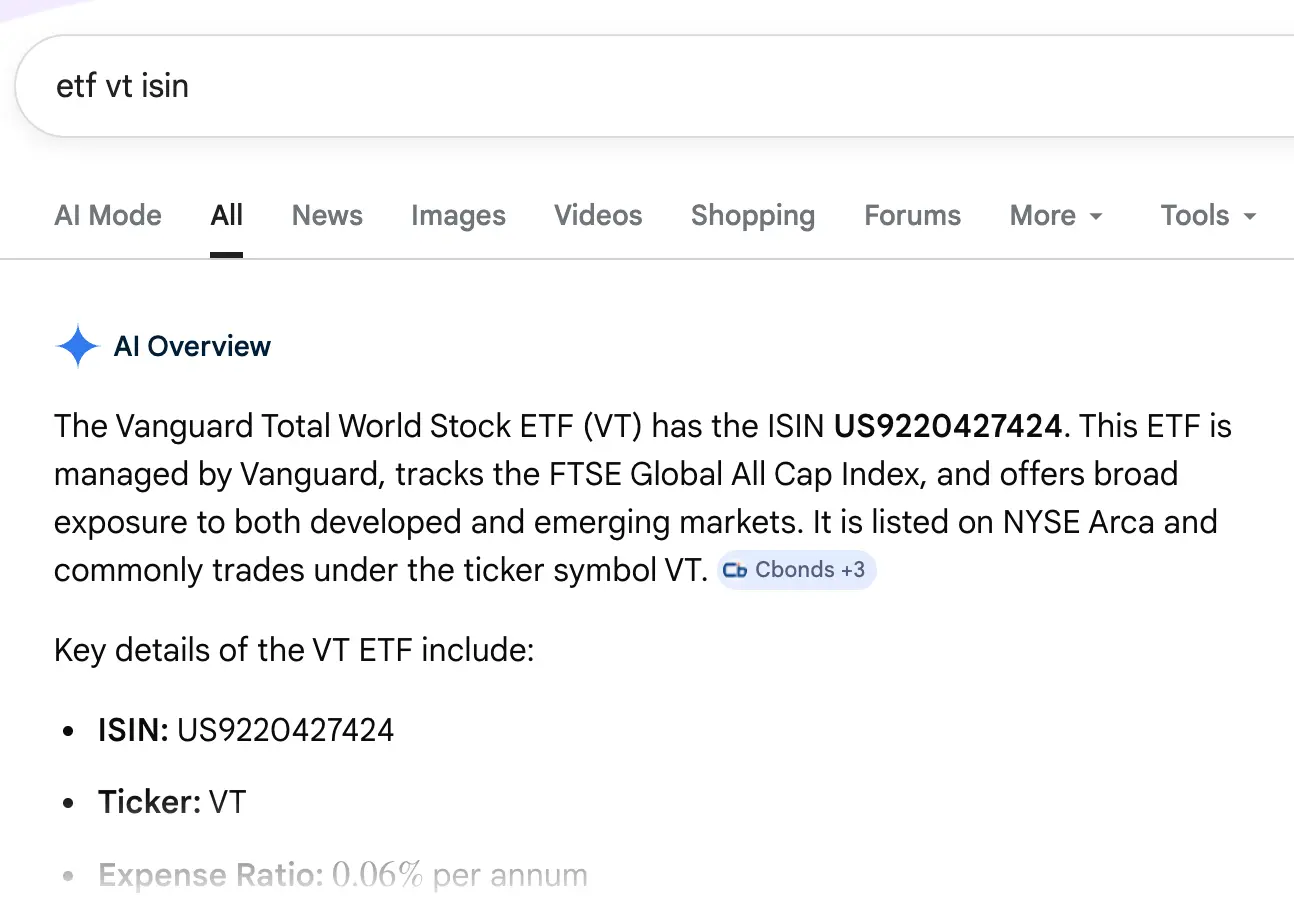
The VT ETF is a good example because you only find the CUSIP number on the official Vanguard website… Why make it simple when you can make it complicated… but no worries, I explain what this CUSIP number is later in the article.
Now that you’ve found the ISIN of our beloved VT ETF, let’s move on to Interactive Brokers.
Search for the VT ETF by its ISIN in IBKR (app or web)
You open Interactive Brokers, you type this number into the security search bar, and you see this appear:
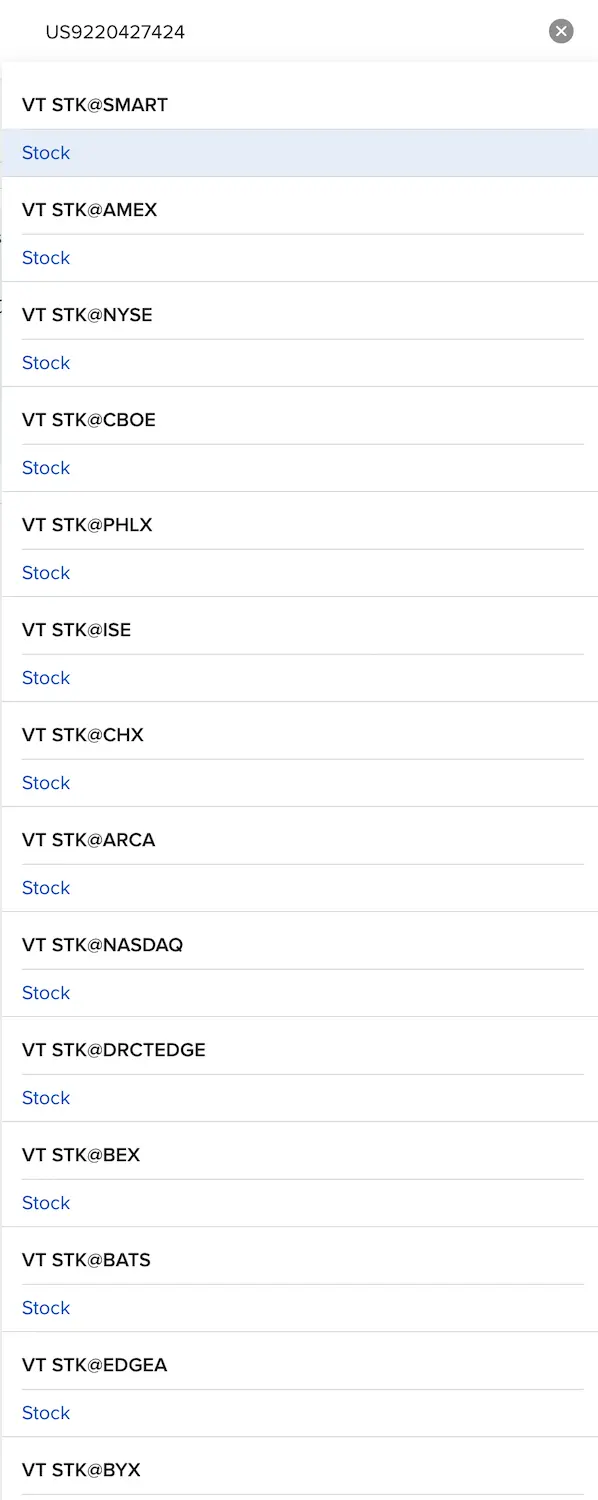
And right there, if you’re a new investor, you feel a small wave of panic and you’re tempted to close the IBKR mobile app right away for fear of doing something silly…
Why do I see multiple lines for the same ETF?! 🙈
But take a deep breath, everything’s going to be fine, you’ll see.
Let’s break down each thing on the screen one by one:
- VT: the ticker (full explanation below), in other words the short name of our “Vanguard Total World Stock ETF”
- STK: for “Stock”, in other words a share of an ETF
- @: indicates “at” which place you can buy it
- AMEX, NYSE or CHX: these are different stock exchanges and execution venues where you can buy the VT ETF
- SMART: the IBKR routing algorithm that automatically looks for the best price in real time (detailed below)
Let’s take a quick “Economics 101” detour to clarify something:
A stock exchange (NYSE, SIX Swiss Exchange, Tokyo Stock Exchange...) is the regulated institution where a stock is officially listed. It's the one that approves the company's listing, publishes reference prices, and manages opening and closing sessions. Historically, it was also the only physical place where the transaction happened (think of the NYSE floor with traders shouting their orders in The Wolf of Wall Street).
An execution venue is a broader term that designates any place where your transaction can actually be executed. This includes traditional stock exchanges, but also alternative electronic platforms born with market deregulation: ECNs (Electronic Communication Networks) in the US (including BATS, EDGX, IEX...), MTFs (Multilateral Trading Facilities) in Europe, or even "dark pools" for large institutional orders (also electronic, but not directly available to you and me, only to big players like Interactive Brokers). In the US, the "Reg NMS" rule forces your broker to route your order to the execution venue offering the best price at any given moment, regardless of the primary listing exchange.
In practical terms: an ETF like VT is listed on NYSE Arca (its exchange), but can trade on roughly fifteen different execution venues at the same time. That's exactly what IBKR's SMART routing does: it scans all those venues in real time and executes wherever it's best for you.
Same idea: the Vanguard FTSE All-World UCITS Distributing (which I recommend if you use DEGIRO) is available on multiple European exchanges, but with different tickers depending on the exchange (VWRL, VGWL, VWRD, see details below).
Remember: every stock exchange is an execution venue, but not every execution venue is a stock exchange.
That’s it for the econ class ;)
But I can hear you saying:
“So MP, which line do we click on?”
Buy via SMART: your default choice (and mine)
SmartRouting (also called SMART) is the IBKR algorithm that picks the execution venue offering the best price at the moment you buy. And using SmartRouting on Interactive Brokers is free.
What more could you ask for!
It’s what I use for 100% of my stock market purchases since day one.
So my recommendation is to buy the VT ETF via the “VT STK@SMART” line.
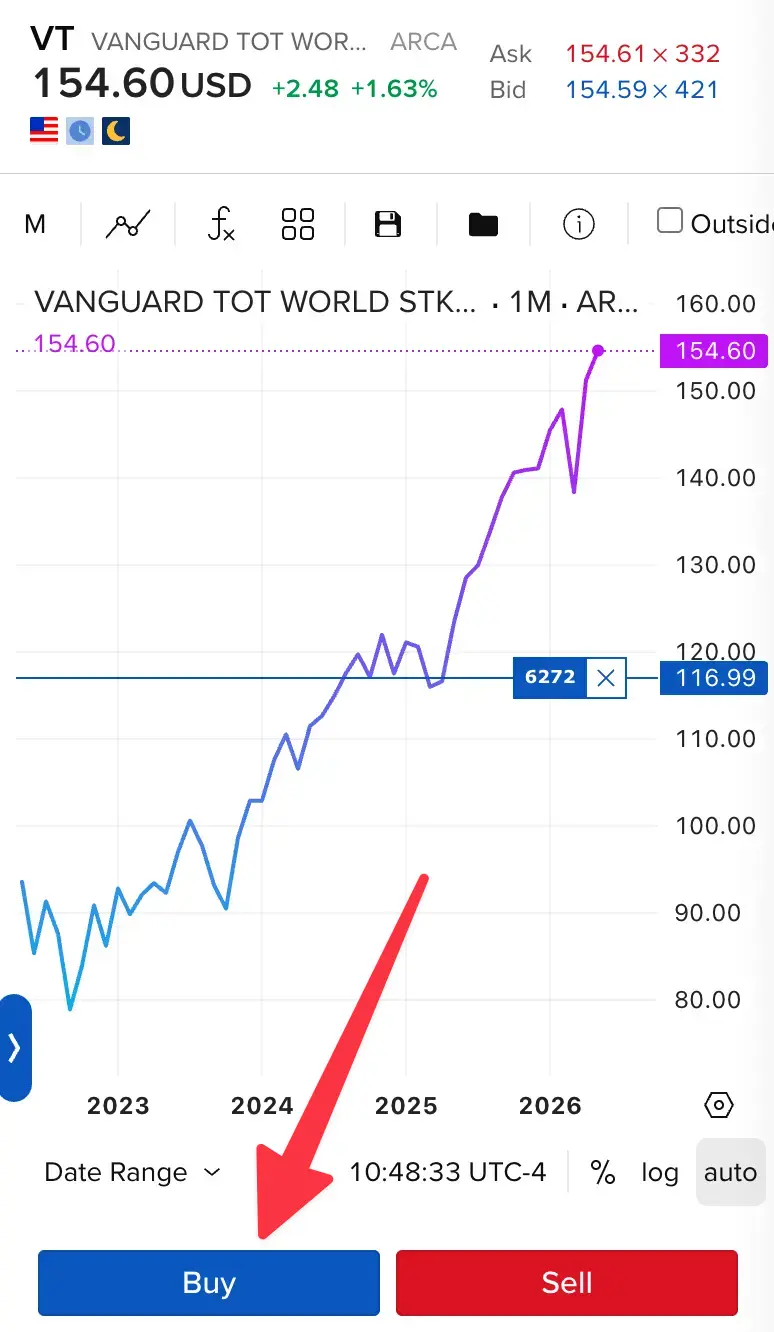
You click on VT STK@SMART, and then you follow this article from my Interactive Brokers guide: How to buy an ETF with Interactive Brokers in 2026.
Why does the same ETF have multiple codes (ticker, ISIN, CUSIP, Valor…)?
If you’ve followed along, you’ve understood that the same ETF can trade on multiple exchanges. But along the way, it sometimes changes its name, even though it’s the same product underneath…
Take the “Vanguard FTSE All-World UCITS ETF (USD) Distributing” (ISIN IE00B3RBWM25) for example, an ETF I recommend to readers using DEGIRO:
VWRLon the Swiss SIX exchange (in CHF), Euronext Amsterdam and Euronext Paris (in EUR), Borsa Italiana (in EUR), and the LSE (in GBP)VGWLon Xetra, gettex, and Stuttgart (all in EUR)VWRDon the LSE (in USD)
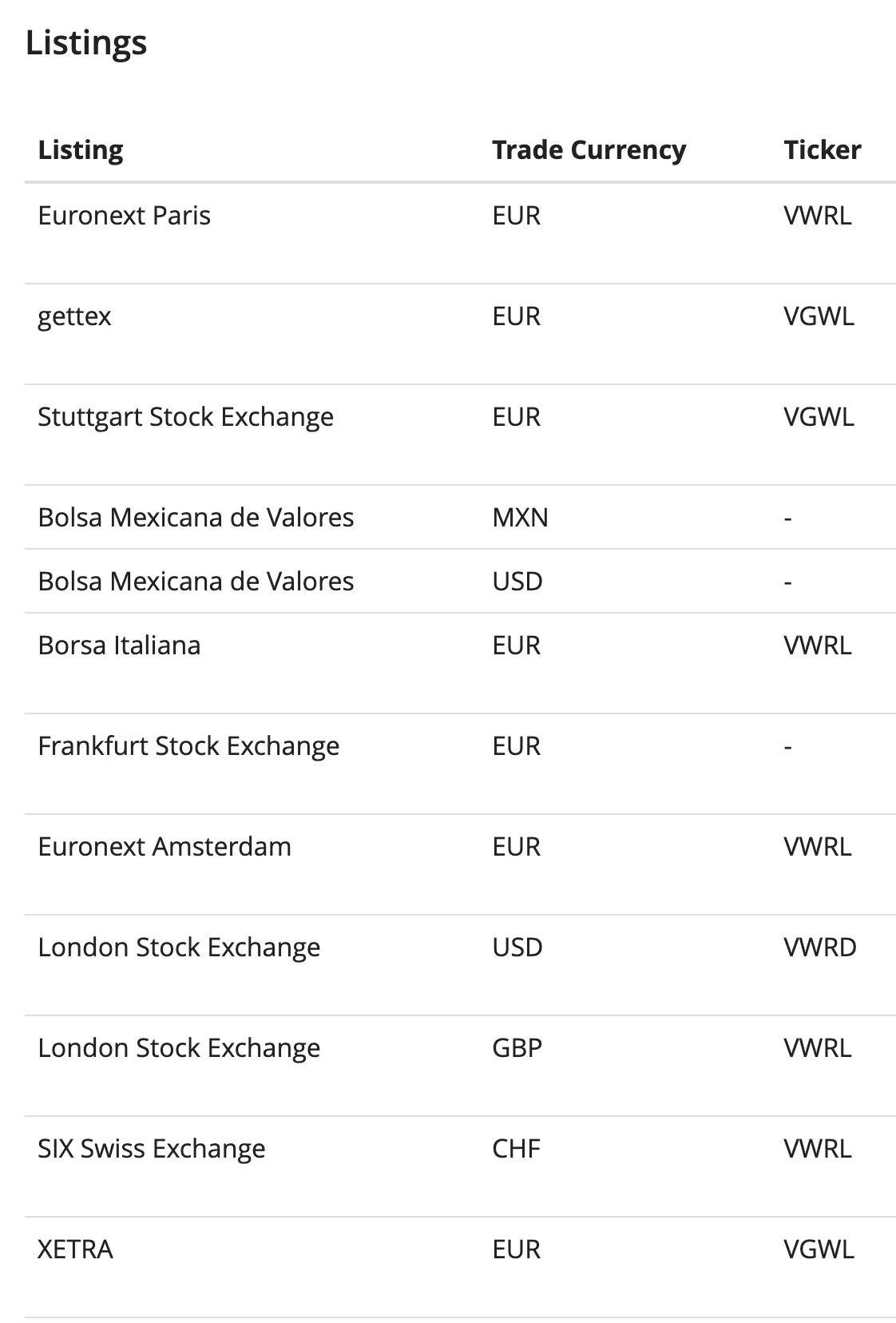
It’s exactly the same Vanguard ETF in the end, with the same shares, but… three tickers depending on the exchange and the currency.
And depending on the country, you can also come across codes that are entirely different from the ticker (called CUSIP, Valor, WKN, SEDOL…).
Why all this mess?
Quick zoom in:
- The ticker (1 to 5 characters) dates back to the days when stock prices came out on a continuous strip of paper (the “ticker tape”): you needed a short code to shout on the floor. But it’s only unique within one exchange. The same “Vanguard FTSE All-World UCITS ETF (USD) Distributing” shows up as
VWRLon the Swiss SIX,VGWLon the German Xetra, or evenVWRDon the London LSE, depending on the exchange and the currency. - National administrative codes: at another national level, you’ve got Valor (Switzerland), CUSIP (US/Canada), WKN (Germany), SEDOL (UK). These codes emerged in the 1950s-60s for bank back-office work (clearing, registries, taxes), not for trading. Unlike the ticker (one per exchange), there’s only one per security in the country.
- The ISIN (ISO 6166 standard, 12 characters) is globally unique, regardless of where the security is listed. For this “Vanguard FTSE All-World UCITS ETF (USD) Distributing”:
IE00B3RBWM25everywhere. TheIEprefix means Ireland (country of issuance, typical for tax-optimized European ETFs). And the ISIN generally embeds the country’s administrative code. It’s the international abstraction layer on top.
So in a summary table, here’s what we get:
| Code | Role | Granularity | Around since |
|---|---|---|---|
| Ticker | Buy/sell (trading) | Per exchange | 1870s |
| CUSIP/WKN/Valor/SEDOL | Administer (clearing, taxes, registries) | Per country | 1950s-60s |
| ISIN | Identify globally (so you can find the right security in any broker) | Per security (globally unique) | 1981 |
FAQ
How do I find an ETF’s ISIN quickly?
You’ll find it on the official “Factsheet” (descriptive sheet) of the ETF, or by typing "[ETF name] ISIN" in Google or in ChatGPT/Claude/etc. Several fund directories show it to you in seconds.
Why does my ETF have multiple tickers depending on the exchange?
The ticker is unique per exchange (a legacy of the 1870s stock telegraph), so the same fund changes its name based on where it’s listed. For example, the “Vanguard FTSE All-World UCITS ETF (USD) Distributing” shows as VWRL on the SIX and the LSE, but VGWL on Xetra. The ISIN, on the other hand, stays the same everywhere: IE00B3RBWM25.
Is an ETF’s price identical on all exchanges?
Not quite. The ETF itself is strictly the same, but the displayed price varies based on the listing currency and the spread of each exchange. That said, professional algorithms hunt these micro-gaps between exchanges all day long to pocket the difference, and their action forces prices to stay nearly identical in real time (within a fraction of a cent on a liquid ETF like VWRL).
What does SMART mean in Interactive Brokers?
SMART (aka SmartRouting) is the IBKR routing algorithm that scans all available execution venues in real time and sends your order to the one offering the best price. It’s free and turned on by default at IBKR.
What’s the difference between an execution venue and a listing exchange?
A listing exchange (or stock exchange) is the regulated institution where a security is officially listed (e.g., NYSE Arca for VT). An execution venue is any place where your transaction can be executed, which includes the exchanges plus all the alternative electronic platforms (ECNs, MTFs, dark pools). Every stock exchange is a venue, but not the other way around.
If I click on the wrong ETF, can I cancel?
Yes, as long as your order hasn’t been executed yet: you go to your open orders and click on “Cancel order”. But if the order is already filled at market, it’s too late, and you’ll have to sell and then buy back the right security (with fees and possibly a small price slippage).
Conclusion: how to buy the right ETF (the ISIN method)
Recap in one sentence: you find the ISIN of the right ETF, you paste it in the IBKR search bar, you click on the SMART line, and you place your order. Thirty seconds, and never any doubt again about what you’re buying.
This method works for any security listed on an exchange: ETF, stock, bond, or anything else.
Now, to actually place your first buy order on IBKR, I recommend reading the dedicated chapter of my guide: How to buy an ETF with Interactive Brokers in 2026.
And if you’re new here, the full guide is over there: Interactive Brokers, the complete guide.
Behind the interface that scared you at the start of this article, there’s actually only a logical sequence: identify the right security, pick the right channel, execute. Half the journey to investing well is trusting the tool. Now you have it.